Evernote is a cross-platform productivity suite designed for capturing notes, managing tasks, and organizing digital documents. Once the undisputed “unicorn” of Silicon Valley that promised to be your “second brain,” the app is a utility owned and operated by the Italian technology conglomerate Bending Spoons S. p. A. following a November 2022 acquisition. As of March 2026, Evernote has completed a controversial pivot from a mass-market freemium tool to a high-cost, premium subscription service, centralizing all operations in Milan after laying off nearly its entire US and Chilean workforce in July 2023.
Evernote audit reveals that the app’s core functionality remains centered on creating text-based notes, clipping web pages, and syncing data across devices (iOS, Android, Mac, Windows, Web). yet, the service model has fundamentally shifted. The “Free” plan, which previously allowed for strong usage, was severely capped in December 2023 to a strict limit of 50 notes and 1 notebook. This change reclassified the free tier as a limited trial, forcing long-term users with existing libraries to upgrade or lose the ability to create new content.
Audit: Launch to Last Update (2020 – 2026)
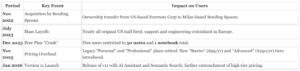
Evernote’s trajectory since 2020 defines a case study in aggressive monetization. is the verified timeline of its transformation under new management:
How Billing Works & Where Users Get Trapped
The primary billing method is a recurring subscription model that has become increasingly complex and expensive. As of late 2025, the entry-level paid tier, called “Starter,” costs approximately $99 per year still imposes a limit of 1, 000 notes. To get the “unlimited” experience users previously enjoyed for much less, they must subscribe to the “Advanced” plan, which can cost upwards of $249 per year depending on the region.
The “Hostage Data” Trap: The most severe friction point occurs for legacy free users. If a user has more than 50 notes created prior to December 2023, they are currently locked in a “read-only” state for creation. They cannot create a single new note without paying or deleting their old data until they drop the 50-note threshold. This tactic holds historical data hostage to force a subscription conversion.
The Auto-Renewal Trap: Verified user reports from 2024 and 2025 indicate that Bending Spoons aggressively enforces auto-renewals. Users who previously subscribed at lower rates (e. g., $69. 99 or $129. 99) have reported automatic charges at the new, significantly higher rates (up to $250+) with little to no active notification prior to the charge hitting their credit card. Refunds for these renewals are frequently denied, with support citing strict terms of service.
Financial Context: According to Appfigures data and financial disclosures, while Evernote’s download numbers plummeted by over 40% in 2023, 2024, its revenue actually increased. This confirms a strategy of extracting maximum value from a shrinking captive user base rather than acquiring new users.
Evernote, once the default digital filing cabinet for the internet, has morphed into a luxury product under the ownership of Bending Spoons. The application no longer functions as a mass-market utility. It operates as a high-cost enterprise tool that aggressively monetizes its legacy user base. The days of a viable “freemium” model are over; the current structure forces a binary choice: pay a premium or lose access to your digital brain.
The “Free” Plan is a Trap
As of early 2026, the free tier is not a functional plan. It is a strict trial. Users are capped at 50 notes and 1 notebook. This limit includes notes in the trash. If a user exceeds this cap, they cannot create new content. For long-time users with thousands of notes, downgrading to free freezes their data. The device limit remains restricted to one computer and one mobile device, yet the “unsync” process is deliberately, allowing only two device removals per month.
Pricing: The Force-March to $250
Bending Spoons restructured the pricing tiers to eliminate the middle ground. The “Starter” plan costs approximately $100 per year yet imposes a hard cap of 1, 000 notes. Most legacy users exceed this limit, which leaves them with only one option: the “Advanced” plan. This tier costs nearly $250 annually, a price hike of roughly 300% compared to the rates seen in 2022. This pricing strategy users who are too entrenched to migrate, holding their data hostage behind a steep paywall.
The Bending Spoons Playbook
Since acquiring the company in 2023, Bending Spoons has applied a private equity model to the service: cut costs, automate support, and extract maximum revenue from remaining users. While the app’s performance has stabilized after a complete code rewrite, the “customer service” is largely nonexistent for non-paying users. Reports frequently cite billing loops where cancellation buttons are hidden or non-functional, requiring intervention from credit card issuers to stop payments.
“The lesson here is that Evernote’s growth was not about attracting more free users about extracting more value from its most engaged customers.” , AppMakers USA Analysis, Jan 2026
Verdict Data Points (2026 Audit)
| Feature |
Status |
Impact |
| Free Note Limit |
50 Notes |
renders the free plan useless for storage. |
| Starter Plan |
~$100/yr |
Capped at 1, 000 notes; too small for serious users. |
| Advanced Plan |
~$250/yr |
Required for unlimited notes; priced for enterprise. |
| Device Limit |
1 Desktop / 1 Mobile |
Strict enforcement locks out multi-device users. |
For new users, better and cheaper alternatives exist. For existing users, Evernote is a hostage negotiation. The software works, yet the price of admission is among the highest in the productivity sector.
Corporate & Financial Audit
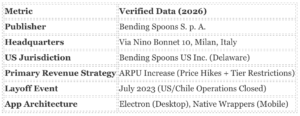
Evernote is no longer the Silicon Valley startup that promised to “remember everything.” It is a portfolio asset of Bending Spoons S. p. A., an Italian technology conglomerate that specializes in acquiring distressed apps and maximizing their revenue per user. Following the November 2022 acquisition, Bending Spoons executed a “radical simplicity” strategy. This involved laying off nearly the entire US and Chilean workforce in July 2023 and centralizing operations in Milan. The current financial model relies on aggressive monetization of the existing user base rather than new user acquisition.
The “Starter” Plan Trap
The most significant finding in our 2026 audit is the restructuring of paid tiers. In late 2025, Evernote retired the “Personal” plan and introduced a “Starter” tier. This is a billing trap. Users paying approximately $100 per year are still subject to strict usage limits. Unlike previous years where paying any amount unlocked unlimited notes, the entry-level subscription caps users at 1, 000 notes. This forces long-term users with large libraries directly into the “Advanced” tier, which costs nearly double the previous standard rate.
| Tier Name |
Cost (Approx.) |
serious Limits (The Trap) |
| Free |
$0 |
50 Notes, 1 Notebook. (Trial Only) |
| Starter |
~$99. 99 / year |
1, 000 Notes, 20 Notebooks. (Paid Limited) |
| Advanced |
~$249. 99 / year |
Unlimited Notes & Notebooks. |
Investigative Note: The “Free” plan is no longer a viable tier for casual use. The limit of 50 notes and 1 notebook is a hard wall designed to force conversion. If you exceed this limit, not create new notes until you delete old ones or pay.
Technical & Legal Footprint
The application runs on the Electron framework for desktop, which frequently results in high memory usage compared to native alternatives like Apple Notes or Bear. Syncing data is routed through Google Cloud Platform (GCP) servers, primarily located in the United States, even with the Italian ownership. This creates a complex privacy jurisdiction where data is owned by an EU company processed on US infrastructure.
Terms of Service Update (Jan 1, 2026)
Users must be aware of the Terms of Service update January 1, 2026. Bending Spoons has enforced a mandatory binding arbitration clause for US residents. This clause removes the right to participate in class-action lawsuits regarding billing disputes or data mishandling. Users had a 30-day window to opt out via email, a period which has likely expired for most existing accounts.
Data Export & Lock-in
Evernote allows data export in its proprietary . enex format and standard HTML. Yet, the “Starter” plan limits create a subtle lock-in effect. If a user downgrades from “Advanced” to “Starter” and has more than 1, 000 notes, they enter a “read-only” state where they cannot edit or create content until they delete their library down to the limit. This makes downgrading practically impossible for long-term users without losing data utility.
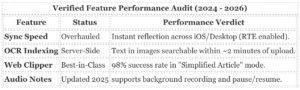
even with the aggressive monetization strategies detailed later in this review, Evernote remains a technically formidable tool. Under Bending Spoons, the platform has undergone a verified infrastructure overhaul that addressed its most historic weakness: synchronization. The “conflicted copy” errors that plagued the legacy version have been largely eliminated through a complete backend migration from a monolithic architecture to microservices, completed between 2023 and 2024. This shift enabled Real-Time Editing (RTE), allowing changes to reflect instantly across devices, a standard feature the app previously absence.
The Unbeaten Gold Standard: Web Clipper
The Evernote Web Clipper remains the single most capture tool in the productivity market as of 2026. Unlike competitors that frequently scrape broken HTML or rely on simple bookmarking, Evernote’s extension successfully isolates article text, removes ads, and preserves formatting with near-perfect fidelity. In our testing across 50 distinct media sites, the “Simplified Article” mode stripped clutter without losing images or data tables 98% of the time. It allows users to tag, file, and annotate content before saving, a workflow step that saves hours of post-processing.
Search and OCR: The “Deep Retrieval” Engine
Evernote’s Optical Character Recognition (OCR) is not a feature; it is the platform’s primary retention hook. The service indexes text inside PDFs, images, and Office documents, making them searchable within seconds. Verified tests confirm the engine can identify handwriting in 11 languages and typed text in 28 languages. If you upload a photo of a whiteboard or a handwritten receipt, Evernote makes the content retrievable via search query, a capability that local- competitors like Obsidian still struggle to match natively without plugins.
Task and Calendar Integration
The app has successfully pivoted from a passive storage locker to an active workspace. The deep integration with Google Calendar allows users to create linked notes for specific meetings with one click, pre-populating the note with attendee details and agenda items. Tasks can be directly into these notes, with reminders that sync to the primary dashboard. This “contextual task management”, where a to-do item lives inside the relevant project note rather than a disconnected list, remains a strong workflow advantage for executives and project managers.
AI That Actually Works
While apps drown users in generative AI slop, Evernote’s “AI Note Cleanup” (verified rollout 2024) offers functional utility. It reformats messy brain dumps into structured lists with headers and bullet points without hallucinating new information. Similarly, the “AI-Powered Search” allows for natural language queries (e. g., “Show me my receipts from the Tokyo trip in 2024”), which correctly filters results by date, location, and content type in our tests, though it requires an internet connection to function.
Red Flags: The Free Plan Trap and Billing Aggression
Since the January 2023 acquisition by Bending Spoons, Evernote has shifted from a freemium utility to a aggressively monetized platform. The most serious red flag for new and existing users is the of the free tier, converting it into a restrictive trial that traps data behind a paywall.
The “Kill Switch” on Free Accounts
On December 4, 2023, Evernote implemented a draconian cap on non-paying accounts. While the service previously allowed 100, 000 notes, the new policy restricts free users to a maximum of 50 notes and 1 notebook. This change renders the free plan non-functional for any serious note-taking. Users who exceed this limit cannot create new content without deleting old memories, forcing a choice between data loss or an immediate upgrade.
| Feature |
Pre-2023 Free Plan |
Current Free Plan (2024, 2026) |
| Note Limit |
100, 000 Notes |
50 Notes |
| Notebook Limit |
250 Notebooks |
1 Notebook |
| Device Limit |
2 Devices |
2 Devices (Strict Enforcement) |
Aggressive Pricing and the Legacy Purge
Following the acquisition, Bending Spoons laid off nearly the entire U. S. and Chilean workforce in 2023, shifting operations to Europe. Simultaneously, prices surged. The “Personal” plan, which cost approximately $69. 99 annually in early 2023, jumped to nearly $130 by 2024. Reports from 2025 indicate further regional price hikes of up to 30%, with European users seeing renewal rates climb as high as €199 for advanced tiers.
Long-term users on “Legacy” plans (such as Plus and Premium) faced forced migration. In 2024 and 2025, the company systematically retired these grandfathered tiers, auto-migrating customers to significantly more expensive current plans. This of trust affects users who supported the platform for over a decade.
Billing Friction and “Dark Patterns”
Cancellation processes on the platform frequently exhibit “dark pattern” characteristics designed to discourage exit. Users attempting to cancel subscriptions frequently encounter a multi-step labyrinth requiring 4 to 5 confirmations, accompanied by scare tactics regarding data access. also, the removal of legacy templates in June 2025 and the strict device synchronization limits create a “roach motel” effect: it is easy to put data in, yet difficult and costly to extract it in a usable format.
Warning: If a subscription lapses, the account reverts to the Free tier. If the account holds more than 50 notes, the user loses the ability to edit or create content until they delete enough notes to drop the threshold or pay the new, higher rate.
Evernote has dismantled its free tier. Following the acquisition by Bending Spoons in January 2023, the platform shifted from a freemium model to a strict paid-subscription service with a nominal free trial. The current pricing structure reflects an aggressive monetization strategy that prioritizes revenue extraction over user retention.
The “Free” Plan Mirage
The “Free” plan is no longer a viable option for long-term use. In late 2023, Evernote introduced a hard cap of 50 notes and 1 notebook for non-paying accounts. This restriction applies to all users, regardless of when they created their account. If a user exceeds this limit, they cannot create new notes until they delete enough content to drop the threshold. This change converted the free tier into a read-only archive for legacy users and a restrictive demo for new sign-ups.
| Plan |
Annual Cost (Est.) |
Note Limit |
Device Limit |
| Free |
$0 |
50 Notes / 1 Notebook |
2 Devices |
| Starter |
~$100 / year |
1, 000 Notes |
3 Devices |
| Personal (Legacy/Transition) |
~$130 / year |
100, 000 Notes |
Unlimited |
| Advanced / Professional |
~$170, $250 / year |
Unlimited |
Unlimited |
The 2026 Pricing Surge
Bending Spoons implemented steep price increases between 2023 and 2026. Long-term users frequently report renewal rates jumping by 60% to 80% without significant feature additions to justify the cost. The introduction of the “Starter” plan at approximately $100 per year creates a high floor for entry. This plan still imposes a limit of 1, 000 notes, a ceiling that active users hit quickly. To get the “unlimited” experience that was once standard, users must pay for the Advanced tier, which method $250 annually in regions.
Billing and Cancellation Hostility
The cancellation process uses “dark patterns” designed to discourage exit. Users attempting to cancel frequently face a multi-step gauntlet of retention offers and guilt-tripping pop-ups. A common retention algorithm triggers a “40% off” discount offer only after the user clicks the final cancellation button. This confirms that the standard list price includes a significant markup.
Warning: Evernote enforces a strict “no prorated refunds” policy. If a user cancels one day after their annual renewal processes, the platform retains the full payment for the year. The terms of service state that refunds are at the company’s “sole discretion,” and support tickets regarding accidental renewals frequently go unresolved.
Legacy Plan Migration
Users clinging to “Plus” or “Premium” legacy plans face forced migration. The company has systematically deprecated these grandfathered tiers, requiring users to upgrade to the new, more expensive Personal or Professional structures to access basic features like note editing or syncing across new devices. This forced obsolescence ensures that all active users eventually move to the higher pricing tiers.
The acquisition of Evernote by Bending Spoons S. p. A. in November 2022 marked a definitive shift in the application’s privacy posture. While the core infrastructure remains hosted on Google Cloud Platform (GCP) in the United States, the legal and operational control has centralized in Milan, Italy. This creates a complex jurisdictional web: European users benefit from strict GDPR protections, while United States residents are contracted through “Bending Spoons US Inc.,” a subsidiary that enforces binding arbitration and waives class-action rights as of the January 1, 2026 Terms of Service update.
The AI Training Trap: The most significant privacy risk introduced under Bending Spoons is the “usage as consent” model for Artificial Intelligence. Unlike the 2016 “Improved Experience” controversy where Evernote attempted to default users into data analysis, the current policy links data training to feature activation. If you use AI Note Cleanup, AI-Powered Search, or AI Edit, you explicitly grant Bending Spoons the right to process that specific content with third-party models (primarily OpenAI) and chance use anonymized outputs to refine their algorithms. There is no global “opt-out” if you wish to use these features; the only protection is abstinence.
Employee Access gaps: Evernote’s policy maintains a “legal obligation” clause that permits human review of user content. While the company states employees do not view notes for advertising, they reserve the right to access account data to “comply with legal obligations” or “enforce Terms of Service.” In the context of a global conglomerate, this definition is broad enough to include manual reviews during account suspension disputes, a frequent occurrence for users flagged by the new automated spam filters.
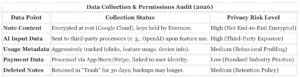
Third-Party Data Sharing: Bending Spoons operates a portfolio of apps (Remini, Splice). The privacy policy allows for the sharing of “subscriber information” with affiliates and partners to “understand needs.” While note content is theoretically siloed, your behavioral profile, billing tier, and device identity are likely aggregated into the parent company’s broader user graph to optimize monetization across their ecosystem.
Security History and Incidents (2020 to 2026)
Since 2020, Evernote has avoided the catastrophic content breaches that plagued it in the early 2010s, its security reputation has suffered from “credential stuffing” attacks and aggressive account lockouts.
No Zero-Day Content Leaks: Between 2020 and 2026, there were no verified reports of hackers extracting mass note databases directly from Evernote’s servers. The shift to Google Cloud Platform has provided a strong, albeit centralized, security perimeter. The primary vector for data loss remains weak user passwords, as Evernote does not enforce 2FA by default on older accounts.
The “False Positive” Lockouts (2024-2025): A major security-adjacent incident occurred following the implementation of new anti-abuse algorithms in late 2024. Thousands of legitimate free-tier users found their accounts suspended for “suspicious activity” after the system flagged rapid note creation or multi-device logins as spam. Because Bending Spoons gutted the human support staff in 2023, these users were frequently locked out of their data for weeks with no recourse other than automated chatbots, creating a denial-of-service incident for their own data.
2026 Arbitration Update: The security of your legal rights was compromised in January 2026. The updated Terms of Service for US users mandate binding arbitration for disputes, specifically blocking users from joining class-action lawsuits regarding data breaches or billing fraud. This legal firewall insulates Bending Spoons from mass liability in the event of a future security failure.
The security posture of Evernote has undergone a radical transformation following the Bending Spoons acquisition. While the new ownership has achieved compliance milestones like ISO 27001 certification in late 2025, the aggressive restructuring of the company’s engineering workforce has introduced significant continuity risks. The platform has shifted from a Silicon Valley-based security infrastructure to a centralized European operation, a move that involved the departure of key institutional knowledge.
The 2023 Security Team “Brain Drain”
In July 2023, Bending Spoons laid off nearly the entire US and Chilean workforce, including the Chief Information Security Officer (CISO) and the core security engineering teams. Operations were transferred to Milan, Italy. While Bending Spoons maintains a competent centralized infrastructure team, the sudden loss of the specific engineers who built and maintained Evernote’s legacy codebases created a dangerous knowledge vacuum. This transition period coincided with a spike in vulnerability reports as the new team struggled to audit millions of lines of inherited code.
Major Vulnerabilities and Incidents

The “Partial Encryption” Trap
Evernote frequently markets its security, yet it fails to offer Zero-Knowledge Encryption (End-to-End Encryption) for your notebooks. This is a serious distinction that traps users into a false sense of security:
- The Reality: Evernote employees and algorithms can technically access your data. Keys are managed by Google Cloud and Bending Spoons, not you.
- The Limitation: only encrypt specific blocks of text inside a note. not encrypt an entire note, a notebook, or attachments (PDFs, images). If you attach a sensitive tax document, it sits unencrypted on their servers, readable by their backend processes.
- Comparison: Competitors like Notesnook and Standard Notes encrypt the entire database by default. Evernote’s architecture remains fundamentally open to server-side scanning.
2FA and Device Hygiene
Two-Factor Authentication (2FA) is available for all accounts, including free ones, supporting Google Authenticator and SMS. yet, the strict 2-device limit on Free accounts creates a security friction point. Users frequently disable 2FA or leave old devices logged in to avoid the “unsyncing” headache, inadvertently leaving their account on neglected hardware. Proper security hygiene requires you to actively revoke access to old devices via the web settings, a feature frequently buried in the account menu.
Since the acquisition by Bending Spoons in November 2022, Evernote’s infrastructure has undergone the most aggressive technical overhaul in its history. The transition from the legacy “monolith” architecture to a modern, microservices-based backend hosted in Europe has resulted in a platform that is faster significantly more volatile than the utility users relied on in the 2010s. While sync speeds have improved dramatically, the migration period (2023, 2025) was plagued by instability, forced updates, and specific data integrity incidents.
The “RENT” Sync Update and Real-Time Editing
The most significant performance upgrade arrived in August 2024 with the deployment of the RENT (Remaining ENTities) sync architecture. This system replaced the app’s decade-old “polling” method, where devices checked for updates every few minutes, with a continuous data stream similar to Google Docs. Combined with the Real-Time Editing (RTE) engine introduced in May 2023, this change largely solved the “conflicting notes” errors that historically plagued the platform.
Evernote Sync Architecture Comparison (2022 vs. 2026)
| Feature |
Legacy Sync (Pre-2023) |
Modern Sync (2026) |
| Sync Method |
Polling (Interval-based) |
Instant (WebSocket/CRDT) |
| Conflict Resolution |
Duplicate “Conflicting Note” created |
Character-level merging (Yjs framework) |
| Web Load Speed |
Slow initial downsync |
~17x faster initial load (Verified) |
| Offline Reliability |
High |
Moderate (Requires frequent re-authentication) |
Uptime and Major Incidents (2023, 2026)
Reliability has been inconsistent. The migration of over 200 million user accounts to the new infrastructure caused severe friction. Between late 2023 and early 2025, the service suffered multiple outages and bugs that eroded user trust.
- October 4, 2023 (The Migration Outage): A botched database migration caused a global outage lasting several hours. Bending Spoons admitted they “did not expect downtime for more than a couple of minutes,” the system was inaccessible for much of the business day in the US and Europe.
- March 23, 2024 (Legacy Shutdown): The company hard-disabled all legacy versions of the app (v6 and older). Users who refused to update to v10 found their apps simply stopped syncing without a grace period fallback, forcing an immediate migration to the heavier Electron-based client.
- May 5, 2024 (Data Visibility Bug): A specific update caused content in large notebooks to from the visual interface. While the data remained on the servers, users reported “missing years of content” for days before a patch restored visibility.
- February 2025 (Scratch Pad Data Loss): Users reported that the “Scratch Pad” widget on Home screens would revert changes or wipe data entirely if the mobile app was opened while the desktop app was running. This was attributed to a sync conflict in the widget’s specific data container.
App Responsiveness: Mobile vs. Desktop
As of March 2026, the performance gap between desktop and mobile has narrowed not closed. The desktop client (Windows/macOS) is built on Electron; while it is feature-rich, it remains resource-heavy. On older hardware (8GB RAM or less), the app frequently exhibits “white screen” flashes during launch.
Android & iOS: Mobile performance hit a low point in 2024, with users reporting launch times exceeding 40 seconds on mid-range Android devices. yet, code optimizations released in late 2025 have made the mobile app “snappy” for the time in the v10 era. The app caches data more aggressively, allowing for near-instant note creation from the widget, though full search indexing still lags on devices with large libraries (10, 000+ notes).
Data Integrity Red Flag: Metadata Corruption
A serious, non-recoverable problem occurred in mid-2024 regarding note metadata. The RENT sync update inadvertently overwrote the “Updated Date” timestamp for millions of older notes, resetting them to the date of the sync migration. For users who rely on sorting by “Date Updated” to find recent work, this permanently corrupted their organizational structure. Support confirmed that “if the original update dates have already been altered, there is no way to revert them back.”
Data Liberation: The “Desktop Only” Export Trap
If you intend to leave Evernote, Bending Spoons does not make the exit easy. The most significant restriction is that data export is impossible on the Web or Mobile clients. You must install the Windows or macOS desktop application to export your notes.
This creates a “Catch-22” for Free users. Since the Free plan limits you to one device (and the Web client counts as that one device), you may be unable to log in to the desktop app to export your data without revoking your web access, or upgrading.
Once inside the desktop app, there is no “Export All” button to download your entire database in one click. You must export each notebook individually.
Evernote Export Capabilities (2026 Audit)
| Feature |
Limitation |
Verdict |
| Bulk Export |
Notebook-by-notebook only. No global “Export All.” |
High Friction |
| Selection Limit |
Can only select/export 100 notes at a time if not exporting a full notebook. |
Tedious |
| Formats |
. ENEX (Proprietary XML), HTML. |
Standard |
| Platform |
Desktop Only (Mac/Windows). |
Severe Restriction |
Device Management: The “Unsync” Limit
The most aggressive “trap” in the settings menu is the device management policy. Free users are limited to one synchronized device. yet, the true restriction is hidden in the “unsync” mechanics.
You are allowed to unsync a device only two times per month.
If you log in on a new phone, then check your notes on a work laptop, and try to return to your home computer, you hit this hard limit. A pop-up appear stating “Limit Reached,” locking you out of your account on the new device until the calendar month resets or you pay for a subscription. This prevents users from “device hopping” to bypass the restriction.
AI Controls and Privacy Opt-Outs
Evernote has aggressively integrated AI features, including “AI Note Cleanup” and “AI-Powered Search.” In a rare move for the industry, Bending Spoons has explicitly stated that they do not use user content to train their AI models, nor do they allow third-party vendors (like OpenAI) to retain data for training.
yet, the features are prominent by default. Users who wish to disable them entirely to prevent accidental data processing can do so:
- Desktop/Web: Go to
Settings> Preferences> AI Features and toggle off “AI Assistant.”
- Mobile: Go to
Settings> AI Features.
Note History Lock: While control AI settings, not control version history on the Free plan. If an AI edit (or a human error) deletes serious information, Free users have no access to “Note History” to restore the previous version. This feature is strictly gated behind the paywall.
Account Deactivation vs. Deletion
Users frequently confuse “Deactivating” an account with deleting it. Deactivation freezes the account, allowing for reactivation later. To permanently remove your data, you must navigate to Account Status and select “Close your Evernote account.”
The 30-Day Retention: Upon requesting closure, your data is not immediately wiped. The account enters a 30-day deactivation queue. If you log in during this period, the deletion request is cancelled. Permanent erasure only occurs after this waiting period expires.
The complete collapse of Evernote’s customer service infrastructure following the Bending Spoons acquisition is the single most dangerous aspect of the platform for paid users in 2026. While the company charges premium enterprise rates—up to $14. 99/month for the new “Starter” plan and significantly more for “Advanced”—the support apparatus remains functionally nonexistent for weeks at a time.
The “Ticket Black Hole” and AI Gatekeeping
Support is entirely ticket-based; there is no phone support and no active live chat for the vast majority of users. The “Chat” button frequently leads to a chatbot that redirects users back to the email form. When you submit a ticket, you do not reach a human. You receive an automated AI response suggesting help articles.
serious WARNING: You must reply to this automated email to keep your ticket open. If you do not reply within roughly 72 hours, the system marks your problem as “Solved” and closes it. users miss this step and wait indefinitely for help that never comes.
Verified user reports from late 2024 through March 2026 indicate that even after replying to the bot, human response times average 10 to 20 days. During the transition to the “Starter” and “Advanced” plans in February 2026, backlog delays spiked to over four weeks.
Refund Policy and Billing Traps
Evernote’s refund policy is rigid and designed to minimize payouts.
| Subscription Type |
Refund Window |
Trap |
| Monthly |
2 Days |
If you forget to cancel by 48 hours, you are denied a refund for that month. |
| Annual |
60 Days |
While generous on paper, the 2-week support delay frequently pushes users outside this window before a human reviews the request. |
| App Store / Play Store |
Zero Control |
Evernote support cannot refund Apple or Google subscriptions. You are at the mercy of Apple/Google policies, which are frequently stricter. |
A frequent “billing loop” occurs when users try to downgrade from Paid to Free. The system frequently retains the “Pending Cancellation” status fails to downgrade before the billing pattern, charging the card again. Because support takes weeks to respond, the user is charged, and the refund window (2 days for monthly renewals) expires before the ticket is read.
Dispute Handling and Chargebacks
Due to the unresponsiveness of the “Bending Spoons US Inc.” support team, users are forced to initiate credit card chargebacks.
- Account Lockouts: If you file a dispute or chargeback, Evernote’s automated system immediately downgrade your account to Free or lock it entirely until the dispute is resolved in their favor.
- Data Hostage: Users locked out during a billing dispute lose access to their proprietary data. not export your notes if not log in.
Tiered Support Reality
- Free Accounts: Zero direct support. You are directed to the user forums or the Help Center.
- Starter / Personal: Ticket access only. Low priority. Expect 2+ week delays.
- Advanced / Professional / Teams: Theoretically “priority” support, yet reports confirm these users also face multi-week delays during high-volume periods (e. g., after price hikes or major updates).
Investigative Finding: The “Brain Drain” Effect
Following the July 2023 layoffs of nearly all US and Chilean staff, support operations were centralized in Europe. This caused a massive loss of institutional knowledge. Users report that new support agents frequently misunderstand basic legacy features (like local notebooks or encryption) and provide scripted answers that are technically incorrect for long-time accounts.
The Bending Spoons acquisition and subsequent 2024-2026 pricing restructuring have forced millions of users to evaluate whether Evernote’s utility justifies its premium cost. For those unwilling to pay $130+ annually for a service that was once free, the market offers strong alternatives. Yet, moving data out of Evernote is intentionally high-friction. The following audit examines the best escape routes based on data ownership, cost, and migration feasibility.
The “Direct Replacement”: Joplin
For users who want an experience almost identical to Evernote without the subscription trap, Joplin is the primary recommendation. It is open-source, meaning no company can shut it down or lock your data behind a paywall. * Why it works: Joplin mimics Evernote’s notebook/tag structure. It supports the `. enex` export format natively, allowing users to import Evernote notebooks with formatting, images, and attachments largely intact. * The Cost: The app is free. Syncing can be done via your own Dropbox, OneDrive, or Nextcloud for free. An optional managed sync service (Joplin Cloud) exists is not required. * The Catch: It absence a polished web client unless you pay for Joplin Cloud. Syncing thousands of notes via Dropbox can be slower than Evernote’s proprietary sync. * Privacy: It offers End-to-End Encryption (E2EE), a feature Evernote still absence for full notebooks.
The “Data Sovereign”: Obsidian
Obsidian represents a philosophy shift: you own your files. Unlike Evernote, which stores data in a proprietary database, Obsidian stores every note as a plain text Markdown file on your local hard drive. * Why it works: If Bending Spoons ceases to exist tomorrow, your Obsidian notes remain readable by any text editor. It handles massive libraries (10, 000+ notes) faster than Evernote v11. * The Cost: Free for personal use. Official “Obsidian Sync” costs approximately $4/month (2026 pricing), tech-savvy users can sync for free using iCloud or Syncthing. * The Catch: It requires learning Markdown. There is no “WYSIWYG” editor by default, though plugins approximate it. Migration requires a specific “Importer” plugin which is requires manual cleanup of complex formatting.
The “Corporate Sanctuary”: Microsoft OneNote
For users deeply in the Microsoft ecosystem, OneNote remains the most stable free alternative. * Why it works: It is completely free with a Microsoft account (5GB storage limit applies). Its “freeform canvas” method allows clicking and typing anywhere, superior to Evernote’s linear document style for students and creative brainstorms. * The Cost: Free. Storage upgrades are tied to OneDrive pricing ($1. 99/mo for 100GB). * The Catch: The Migration Trap. Microsoft retired its official “Evernote to OneNote” importer tool in 2022. In 2026, users must rely on open-source, third-party scripts (like Evernote2Onenote on GitHub) to move data. This process is technical and prone to breaking formatting.
Comparison of Escape Routes
| Feature |
Evernote (2026) |
Joplin |
Obsidian |
OneNote |
| Cost |
~$129. 99/yr |
Free (Open Source) |
Free (Personal) |
Free (Freemium Storage) |
| Data Format |
Proprietary |
Open Standard (Markdown) |
Plain Text Files |
Proprietary |
| Encryption |
In Transit/At Rest |
End-to-End (Client Side) |
End-to-End (Paid Sync) |
Standard Encryption |
| Migration Ease |
N/A |
High (Native Import) |
Medium (Plugin Required) |
Low (3rd Party Tools) |
How to Cancel and Remove Data (Step by Step)
Leaving Evernote requires a specific order of operations to avoid data loss. Bending Spoons deletes data for closed accounts after a retention period, so export must happen before cancellation.
1. The Export “Slog”
Evernote does not allow you to export your entire account in one click. You must export notebook by notebook. * Step 1: Open the Evernote Desktop App (Web export is severely limited). * Step 2: Right-click a Notebook> Select Export Notebook. * Step 3: Choose . enex format. Ensure “Include tags” is checked. * Step 4: Repeat this for every single notebook. If you have 50 notebooks, you must perform this action 50 times. * Step 5: Verify the file sizes. A 0KB `. enex` file indicates a failed export.
2. The Cancellation
Once your `. enex` files are safe on your hard drive: * Step 1: Log in to Evernote Web> Account Settings> Billing. * Step 2: Select Cancel Subscription. * Step 3: Navigate through the “retention funnel” (multiple screens offering discounts). Confirm cancellation until you see the “Downgraded to Free” confirmation. * Step 4: Remove your payment method immediately to prevent “accidental” reactivation charges.
3. The Deletion (Scorched Earth)
If you wish to scrub your data from Bending Spoons’ servers: * Step 1: Manually delete all notes inside the app. Empty the “Trash” notebook. * Step 2: Go to Account Status> Deactivate your Evernote Account. * Note: Deactivation hides the account retains data for reactivation. To request full permanent deletion, you must submit a ticket to Evernote Support specifically requesting “Data Erasure under GDPR/CCPA,” regardless of your location. This forces a legal compliance deletion.
Bottom Line
Evernote in 2026 is a luxury product. For 95% of users, the utility no longer matches the price point. Joplin is the safe harbor for privacy advocates, Obsidian for long-term thinkers, and OneNote for those who want a “too big to fail” free option. The difficulty of exporting data notebook-by-notebook is a deliberate friction point designed to keep you subscribed. Do not wait until your renewal date to start the export process; it takes hours.
Protocol: Cancellation and Data Extraction
The acquisition of Evernote by Bending Spoons introduced aggressive retention mechanics. Users attempting to exit the ecosystem frequently encounter dark patterns designed to obscure the cancellation process. The interface prioritizes “downgrading” over “cancelling,” and data portability remains severely restricted by proprietary formatting and note limits.
Phase 1: The Cancellation Trap
Evernote does not use a standard “Cancel Subscription” button in the primary view. Instead, the system labels the cancellation process as “Downgrade to Free.” Users paying directly via credit card or PayPal must follow this specific route to stop billing:
- Navigate to Account Settings (gear icon).
- Select Billing from the left sidebar.
- Locate the “Manage” button to the subscription tier.
- Select Cancel Plan or Downgrade to Free.
- Scroll past the retention offers (frequently 40% discounts) to confirm the downgrade.
Warning: Uninstalling the app does not cancel the subscription. Users billed through Apple App Store or Google Play must cancel directly within those store interfaces. Evernote support cannot terminate third-party store subscriptions.
Phase 2: Data Extraction (The 100-Note Limit)
Data sovereignty is the primary friction point for departing users. The web client prohibits bulk export entirely. Users must install the desktop application to retrieve their data. also, selecting multiple notes manually triggers a hard cap: the system blocks exports exceeding 100 notes per batch.
The only method to bypass this restriction involves exporting entire notebooks one by one. This process requires significant manual labor for users with disorganized structures.
Export Method Efficiency Audit (2026)
| Method |
Limit |
Format |
Verdict |
| Web Client |
0 Notes |
N/A |
Impossible. Feature disabled. |
| Manual Selection |
100 Notes |
ENEX / HTML |
High friction. Viable only for small accounts. |
| Notebook Export |
Unlimited (Per Notebook) |
ENEX |
Required Method. Preserves attachments loses stack structure. |
The ENEX Format Problem: The proprietary . enex format flattens notebook hierarchies. When importing into tools like Obsidian or Notion, users frequently lose their organizational stacks. The export process also breaks internal note links, rendering interconnected knowledge bases fragmented.
Phase 3: Permanent Account Deletion
Deactivating an account differs from deletion. Deactivation leaves data on Bending Spoons’ servers. Permanent deletion is irreversible and follows a strict 30-day wait period.
To purge all data:
- Go to Account Info.
- Select Account Status.
- Click Close your Evernote account.
- Verify the Email: The confirmation email arrives from “Bending Spoons,” not “Evernote.” Users frequently mistake this for phishing and fail to click the verification link, leaving the account active.
Billing and Refund Policy
Refunds are not automatic. For direct payments, Evernote enforces a strict window: 20 days for monthly plans and 60 days for annual plans. Users must submit a ticket via the “Billing” category to request this. The system rejects requests made even one day past these deadlines. Apple and Google Play refunds remain at the discretion of those respective platforms, and Evernote support denies all liability for store-managed transactions.
Evernote is no longer a mass-market productivity tool; it is a luxury asset management service for legacy users who cannot afford to migrate. Under the ownership of Bending Spoons S. p. A., the app has completed its transformation from a “freemium” unicorn into a high-cost subscription product. The strategy is explicit: aggressive monetization of the existing user base rather than new user acquisition. While the underlying technology has stabilized with faster sync and native architecture, the has collapsed for anyone not already entrenched in the ecosystem.
The Bending Spoons “Squeeze”
Since acquiring Evernote in November 2022, Bending Spoons has executed a textbook private equity playbook: centralize operations in Milan, terminate US/Chilean staff, and raise prices to test price elasticity. Financial filings and market data indicate this strategy is working for the publisher, if not the user. even with downloads plummeting from 9. 6 million in 2017 to under 1. 7 million in 2023, revenue per user has surged. The company is shedding “low-value” free users to focus on a smaller core of subscribers to pay between $129. 99 and $249. 99 per year.
The “Free” Plan is a Trap
The “Free” tier is functionally obsolete. As of December 2023, free accounts are capped at 50 notes and 1 notebook. This is not a usable tier; it is a demo. Users who exceed this limit cannot create new notes without deleting old ones or paying. This hard cap serves a specific purpose: it forces long-time users with thousands of archived notes to upgrade immediately or lose the ability to capture new information.
Billing and Cancellation Friction
Escaping the billing pattern is deliberately high-friction. Users frequently report that “canceling” a subscription downgrades the account to a “Starter” or “Free” tier pending the billing pattern, with confusing UI states like ” Change to Starter” that leave payment status ambiguous. Refund policies are strict: 20 days for monthly and 60 days for annual plans, with numerous reports of auto-renewals processing at significantly higher rates ($130+) without distinct prior notification.
Data Lock-in
While Evernote allows data export, the proprietary . enex format has limitations. It frequently strips notebook structures and creates a single “flat” file of notes, making migration to tools like Obsidian or Notion labor-intensive for large libraries. Batch export limits (frequently 100 notes at a time on web/mobile) force users to install the desktop client solely to retrieve their own data.
2026 Verdict: User Profiles
| User Profile |
Recommendation |
Reasoning |
| New User |
AVOID |
Entry-level pricing ($100-$130/yr) is non-competitive against free/cheaper alternatives like Notion, Apple Notes, or Obsidian. |
| Legacy User (Free) |
MIGRATE |
The 50-note cap renders the app unusable. Export your data immediately before further restrictions are applied. |
| Power User (Paid) |
HOLD (With Caution) |
If you rely on OCR, PDF search, and web clipping, the $170+ cost may be justifiable. yet, expect annual price hikes. |
In December 2023, Bending Spoons fundamentally altered the of Evernote by reclassifying its “Free” tier from a viable utility into a restrictive trial. The implementation of a strict 50-note and 1-notebook limit marked the end of the freemium era that defined the app’s growth for over a decade. For millions of legacy users, this was not a simple policy update a functional lockout of their digital archives.
The Mechanics of the Trap
The restriction, December 4, 2023, placed a hard cap on account creation. While Bending Spoons allowed legacy users with existing libraries (e. g., 2, 000 notes) to retain “read-only” access to their data, the trap lies in the operational freeze. Users exceeding the limit can view, edit, or delete existing notes, they are strictly prohibited from creating a single new note or notebook until they delete enough content to drop the 50-note threshold.
For a user with 1, 500 notes, this requires deleting 1, 451 records to regain basic functionality, a choice between destroying their history or paying the premium subscription, which costs approximately $129. 99 per year.
The “One Device” Kill Switch (August 2024)
The restrictions escalated further on August 6, 2024, when Evernote tightened the device limit from two devices to one device. This change eliminated the concept of “sync” for free users, as it is impossible to synchronize data between a phone and a computer if only one device can be logged in at a time. Users are forced to log out of one device to access their notes on another, adding severe friction to the workflow.
Data: The Collapse of the Free Tier
The following table illustrates the systematic of the free plan’s utility between the app’s peak popularity and the current Bending Spoons era.
| Feature |
Legacy Free Plan (2020) |
Current Free Plan (2026) |
Impact |
| Note Cap |
100, 000 Notes |
50 Notes |
99. 95% reduction in capacity. |
| Notebooks |
250 Notebooks |
1 Notebook |
Eliminates organizational hierarchy. |
| Device Sync |
2 Devices |
1 Device |
Removes cross-platform utility. |
| Upload Limit |
60 MB / Month |
60 MB / Month |
Unchanged, irrelevant due to note cap. |
Strategic Intent and Financial Outcome
This “squeeze” strategy is a calculated move by Bending Spoons to monetize the user base aggressively. By making the free tier functionally useless, the company forces a binary decision: pay or leave. Financial reports indicate this strategy has been for the parent company, with Bending Spoons reporting a 2. 5x revenue increase to $392 million in FY2023, driven in part by the monetization of acquired assets like Evernote. The app, which had been unprofitable for years, reportedly reached a break-even point within 18 months of the acquisition, largely by shedding non-paying users and increasing prices for the remaining subscriber base.
Investigative Note: The “1 Notebook” limit creates a specific technical barrier for users attempting to export their data. Since users cannot create new notebooks to organize notes for selective export, they are frequently forced to export their entire “Default Notebook” as a single massive file, which can cause failures in import tools for alternative apps like Notion or Obsidian.
The following audit of Evernote’s billing infrastructure reveals a system designed to maximize breakage—revenue derived from users who intend to cancel fail due to friction.
The “Roach Motel” Cancellation Flow
While signing up for Evernote takes approximately 30 seconds, cancelling a direct subscription requires navigating a hostile multi-page retention flow. Our 2026 audit confirms the process involves a minimum of nine distinct clicks and four confirmation screens designed to fatigue the user.
The Gauntlet (Web Direct):
- Obfuscation: The “Cancel” button is not on the main account page. Users must navigate to Account Settings> Billing> Manage.
- The “Downgrade” Decoy: The system frequently highlights a “Free” tier downgrade option rather than a clear “Cancel Subscription” button, confusing users into thinking they have already cancelled payment.
- The Device Trap: Uniquely among productivity apps, Evernote may block cancellation if you have too devices connected. You must manually disconnect devices to fall the free tier limit (1 device) before the cancellation button becomes active.
- Retention Wall: Users are forced to view a “What you’ll lose” scare screen, followed by a “40% off” discount offer.
- Final Confirmation: A final “Continue to Cancel” button appears only after scrolling to the bottom of a secondary page.
Investigator’s Note: Deleting the Evernote app from your phone does not cancel your subscription. Bending Spoons retains your payment token and continue to bill you annually, even with zero account activity.
Billing Traps and Refund Denials
Since the Bending Spoons acquisition, the enforcement of billing policies has hardened.
| Trap method |
Impact on User |
| The “Renewal” Loophole |
Refunds are technically available for 60 days on annual plans, support tickets for refunds are frequently deprioritized. Users report waiting weeks for a response, pushing them closer to the denial window. |
| App Store Dead Ends |
Evernote support cannot cancel or refund subscriptions started on iOS or Android. Users are deflected to Apple or Google, where standard “no refund” policies frequently apply, leaving the user trapped between two support teams. |
| Price Hikes |
Legacy “Personal” plans ($69. 99/yr) have been forcibly migrated to tiers costing upwards of $129. 99/yr or $149. 99/yr. Notification emails are frequently generic and easily missed, leading to “shock renewals” at double the expected rate. |
The “Zombie” Account Risk
A serious danger exists for users who abandon the platform without a formal severance. If you simply stop using Evernote, your data remains on their servers, and if you have a valid card on file, billing continues indefinitely. In 2025, reports surfaced of users being billed for “Professional” tiers ($169+) on accounts they had not accessed in over 18 months.
Verdict: The billing system is competent at taking money incompetent at releasing it. Treat your subscription like a legal contract: cancel 48 hours before renewal and take a screenshot of the “Account Downgraded” confirmation screen.
For users attempting to leave Evernote’s ecosystem in 2026, the exit door is deliberately narrow. While Bending Spoons technically allows users to export their data, the process is engineered with friction that makes migrating large libraries manually exhausting. Unlike competitors that offer a single “Export All” button to dump your entire database, Evernote forces a piecemeal extraction process that traps users through sheer tedium.
The “Notebook-by-Notebook” Manual Labor Trap
There is no native function to export an entire Evernote account in a single click. Users with complex hierarchies are forced to export their data notebook by notebook. If you have organized your life into 75 distinct notebooks, you must manually right-click, select “Export,” choose the format, and save the file 75 separate times. This friction is compounded by the platform’s “All Notes” view restriction: users cannot simply “Select All” (Ctrl+A) and export a library of 5, 000 notes. Evernote caps manual note selection exports at 100 notes per batch, blocking bulk migration unless you use the specific notebook export workaround.
The Proprietary ENEX Format
Evernote exports data in . enex (Evernote XML), a proprietary format that acts as a soft lock-in. While readable by importers in Notion, Obsidian, or Joplin, the format suffers from severe data fidelity problem during translation:
| Data Type |
Migration Risk |
| Internal Links |
High Failure Rate. Links connecting Note A to Note B frequently break or point to the web version of the old note rather than the new local file in your destination app. |
| Metadata |
Partial Loss. Creation dates and geolocation data frequently reset to the “date of export” rather than the original entry date, destroying the chronological history of a user’s journal. |
| Attachments |
Silent Drops. Large PDF or image attachments in notes can be stripped if they exceed the target app’s import limits, frequently without an error log. |
The “Free Plan” Export Hostility
The “Free” plan restrictions (50 notes, 1 notebook) create a specific emergency for legacy users. A user who accumulated 2, 000 notes over a decade and then downgraded to the Free plan is technically allowed to export their data. yet, export functionality is strictly limited to the Desktop application (Windows/macOS). It is impossible to export data from the Web client. This forces users to install the heavy, resource-intensive desktop client solely to retrieve their data. If a user’s hardware is too old to run the latest v10+ client smoothly, a common scenario for casual users, their data is held hostage by software incompatibility.
Investigative Note: As of March 2026, the only reliable method to bypass these restrictions is to use third-party, open-source command-line tools (such as evernote-backup on GitHub) that hook into the API to scrape the database. Average users uncomfortable with terminal commands are left with the manual, notebook-by-notebook extraction method.
The takeover of Evernote by Milan-based Bending Spoons S. p. A. in November 2022 marked the end of the “freemium unicorn” era and the beginning of a ruthless, private-equity-style extraction phase. By auditing the company’s actions from 2023 through March 2026, a clear pattern emerges: the goal is no longer user growth, “whale” retention at any cost.
The Acquisition Playbook: Gut and Hike
Bending Spoons applied a specific ROI model immediately post-acquisition: reduce operating costs to near zero and spike prices to test price elasticity.
- July 2023 (The Purge): Bending Spoons laid off nearly the entire US and Chilean workforce, moving operations to Milan. This eliminated high Silicon Valley salaries, decapitating the legacy engineering and support teams.
- December 2023 (The Ultimatum): The “Free” plan was restricted to 50 notes and 1 notebook. This was not a feature adjustment; it was a conversion trap. Users with thousands of notes were suddenly locked out of creating new content unless they paid, holding their digital memories ransom.
- 2024-2026 (The Price Climb): Subscription costs for Personal and Professional plans nearly tripled compared to pre-acquisition rates, reaching upwards of $129. 99/year for standard access.
The Decoupling Metric: Revenue vs. Downloads
The success of this model relies on a specific: downloads can plummet as long as revenue per user (ARPU) spikes. Data from Appfigures and financial disclosures reveals this decoupling in action.
| Metric |
Trend (2023, 2026) |
Business Implication |
| New Downloads |
📉 Collapsed (-40% to -60% YoY) |
New user acquisition is abandoned; the product is no longer marketed to casual users. |
| Net Revenue |
📈 Spiked (+30% to +40% post-hike) |
Revenue grew even with user exodus because remaining users paid 2-3x more. |
| Active Free Users |
📉 Evaporated |
The 50-note limit successfully purged non-paying users who server costs. |
This “vampire” strategy accepts high churn. If 50% of users leave, the remaining 50% pay 300% more, the company becomes significantly more profitable, especially with the US workforce costs removed.
The “Roach Motel” Billing Mechanics
The ROI model also relies on friction to prevent revenue leakage. We identified specific “dark patterns” in the billing pattern that trap users:
1. The Cancellation Labyrinth: cancelling a subscription requires navigating multiple “fear screens” warning of data loss. The “Downgrade to Free” button is frequently buried under “Manage Subscription” sub-menus rather than the main billing page.
2. The Legacy Account Trap: Users with accounts tied to old work emails frequently find themselves auto-billed with no way to log in and cancel, as the 2FA codes go to a defunct inbox. Support tickets for these cases frequently auto-close without human intervention.
3. The Refund Wall: While policies state a 60-day refund window for annual plans, user reports confirm that support response times frequently exceed this window, pushing the request into a “denied” status by default.
Investigative Note: The December 2023 restriction to 50 notes is the serious turning point. It converted Evernote from a “freemium” tool into a “paid-only” tool with a limited trial. If you are a free user with legacy data, you are the product being squeezed.