Salesforce Review: customer relationship management, and the complexity of contract renewals, audit from launch to last update, question, How does billing work, and where do users get trapped?
By Ekalavya Hansaj
March 5, 2026
Words: 13029
Views: 75
Why it matters:
Salesforce has evolved into an "Agentic Enterprise" platform, moving beyond its CRM roots to focus on centralized data management and active AI execution.
The platform operates on a multi-tenant cloud architecture, offering specialized "Clouds" for different functions like sales, service, marketing, and commerce, with AI agents automating tasks based on real-time data.
What This App Is
Salesforce is no longer just a Customer Relationship Management (CRM) tool; by 2026, it has aggressively repositioned itself as an “Agentic Enterprise” platform. While this Salesforce review highlights that its roots remain in the cloud-based tracking of sales leads and support tickets, the application functions as a sprawling data operating system that forces organizations to centralize every interaction—from email marketing to commerce—into a single, metadata-driven architecture. For the fiscal year ending January 31, 2026, Salesforce reported revenue of approximately $41. 5 billion, cementing its status as the dominant force in the enterprise software market with over 150, 000 customers. yet, the tool you buy today is fundamentally different from the “Software as a Service” (SaaS) pioneer launched in 1999. The Spring ’26 release, rolled out in January 2026, marks the completion of a hard pivot from passive data entry to active AI execution. The core has shifted from “managing relationships” to deploying “Agentforce”—autonomous AI agents that perform tasks without human intervention.
The Core Architecture: Clouds and Agents
At its center, Salesforce operates on a multi-tenant cloud architecture. This means all customers share the same infrastructure and code base, their data and customizations are logically separated. This structure allows Salesforce to push three major updates per year (Spring, Summer, Winter) to all users simultaneously. The platform is divided into specialized “Clouds” that sit on top of the “Data Cloud” (formerly Genie or CDP). Users license one or more of these core modules: * Sales Cloud: The original product for lead, opportunity, and pipeline management. * Service Cloud: A ticketing and case management system for customer support. * Marketing Cloud: A suite for email, mobile, and social media automation (frequently integrated from acquisitions like ExactTarget). * Commerce Cloud: A platform for B2B and B2C online storefronts. * Data Cloud: The unification that ingests real-time data from external sources (like Snowflake or AWS) to feed the AI models. In 2026, the “Agentforce” has become the primary interface for users. Unlike the “Copilots” of 2024 that waited for user prompts, these agents are configured to trigger actions automatically, such as resolving a billing dispute or updating a sales forecast, based on changes in the Data Cloud.
The Ecosystem as a Product
Salesforce is defined as much by its marketplace as its code. The AppExchange hosts thousands of third-party applications that integrate directly into the platform. This extensibility is a double-edged sword: it allows Salesforce to handle virtually any business process, it also creates a dependency on a complex web of installed packages, each with its own licensing fees and update pattern. The platform also includes MuleSoft (integration middleware), Tableau (analytics), and Slack (collaboration), which are increasingly bundled into high-tier contracts. The “Customer 360” concept aims to provide a single ID for a customer across all these systems, though achieving this frequently requires significant technical effort and “Data Cloud” consumption credits.
Target Audience and Market Position
Salesforce the mid-market and enterprise sectors. While “Starter” editions exist for small businesses, the platform’s complexity and cost structure are designed for organizations with dedicated operations teams. It is not a “plug-and-play” address book; it is a development environment (PaaS) that requires a specialized workforce of administrators, developers, and architects to maintain. The 2026 iteration of Salesforce is built on the premise of “Lock-in by Data.” By encouraging companies to ingest massive amounts of external data into the Data Cloud to fuel AI agents, Salesforce increases the switching costs significantly. Once an organization’s operational logic (Flows, Apex code) and customer data are established within the Salesforce ecosystem, migrating away becomes a multi-year, capital-intensive project.
The Financial Reality
Users must understand that Salesforce operates on a strict subscription model with annual upfront payments. The Master Subscription Agreement (MSA) enforces auto-renewal by default, and the company has historically used its use to apply price uplifts—frequently around 9%—at renewal. The introduction of consumption-based pricing for “Agentforce” and “Data Cloud” adds a variable cost on top of the fixed per-user licensing, creating a hybrid billing model that can be difficult to forecast., Salesforce in 2026 is a high-power, high-cost utility for customer data. It offers unrivaled breadth for companies to invest in its ecosystem, it demands rigorous governance to prevent it from becoming a sprawling, expensive source of technical debt.
Quick Verdict
For the fiscal year ending January 31, 2026, Salesforce is no longer a CRM; it is a mandatory tax on the enterprise. If your organization requires a metadata-driven “Agentic” architecture where autonomous AI agents resolve support tickets and update records without human input, Salesforce is the only viable option ths. The platform’s ability to ingest petabytes of data into its “Data Cloud” and trigger actions via “Agentforce” is unmatched. Yet, for the uninitiated, signing a Salesforce contract in 2026 is akin to entering a financial “Hotel California”: check out any time you like, never leave without paying a steep exit fee.
The vendor has successfully executed a “hard pivot” from seat-based licensing to a hybrid consumption model. While you still pay $165 to $500 per user/month for core clouds, the real cost driver has shifted to “consumption credits” for Data Cloud and Agentforce. In May 2025, Salesforce introduced “Flex Credits” priced at $0. 10 per action, replacing the unpopular $2/conversation model. This seemingly low unit cost masks a high-volume trap: a single complex customer query can trigger dozens of backend “actions”, record lookups, field updates, and email generations, draining your credit pool faster than anticipated.
For the buyer with a dedicated legal team and a certified Salesforce Architect, this tool is the gold standard. It powers 150, 000 companies and generated $41. 5 billion in revenue for FY2026 because it works. yet, for the mid-sized business or the “set it and forget it” user, the risks are severe. The Master Subscription Agreement (MSA) v2024 enforces strict “no downgrade” clauses (Section 5. 1), meaning if you lay off 20% of your staff, you still pay for their empty seats until the contract term ends. also, auto-renewal clauses (Section 11. 2) frequently lock customers into 1-3 year extensions with automatic price uplifts of 7-9% unless a written notice of non-renewal is sent exactly 30 to 60 days before expiration.
The Bottom Line: Buy Salesforce if you are building a customized, AI-driven operating system for your business and have the budget to hire full-time administrators to manage it. Avoid Salesforce if you need a simple address book or cannot accurately forecast your AI consumption volume, as the new “Flex Credit” overages destroy your margins.
Key Facts
App Name
Salesforce (Sales Cloud, Service Cloud, Agentforce)
~$0. 10 per “Action” (Flex Credits) or $2. 00 per Conversation
Contract Lock-in
High. No downgrades allowed during term (MSA §5. 1).
Auto-Renewal Trap
Automatic renewal for full term length unless canceled 30+ days prior.
Price Hike History
+9% (Aug 2023), +6% (Aug 2025 for Enterprise/Unlimited)
Support Rating
Mixed. Standard support is slow; “Signature” support costs ~30% of net license fees.
Primary Risk
Uncapped consumption billing for Data Cloud/AI operations.
What It Does Well (Verified)
Unrivaled Customization and Ecosystem
Salesforce remains the “Lego set” of enterprise software. As of the Spring ’26 release, the platform supports over 2, 500 verified integrations via the AppExchange. The proprietary “Apex” programming language and “Flow” visual builder allow organizations to automate virtually any business logic, from complex commission calculations to multi-stage approval processes. Gartner’s 2024 Magic Quadrant for Sales Force Automation ranked Salesforce highest for “Completeness of Vision” for the 18th consecutive year, citing its ability to support complex, industry-specific workflows that rigid competitors cannot match.
The “Agentforce” Execution
While the pricing is aggressive, the technology works. Unlike chatbots of the past that relied on rigid decision trees, Salesforce’s “Agentforce” (formerly Einstein Copilot) uses a reasoning engine to plan tasks. In verified demos from late 2025, an Agentforce bot could autonomously look up a customer’s shipping delay, query a third-party logistics API, process a refund within the authorized limit, and draft a personalized apology email, all without human intervention. For enterprises drowning in support tickets, this capability justifies the high cost.
Data Centralization (Data Cloud)
The “Data Cloud” (formerly Genie) successfully solves the silo problem. It ingests structured data from Salesforce apps and unstructured data from external lakes (like Snowflake or Google BigQuery) into a single “Graph” profile. This allows a sales rep to see a customer’s web browsing history, support ticket status, and recent invoice payments on a single screen. In 2025, Salesforce made the ingestion of its own internal data streams free, removing a major barrier to entry for existing customers.
What Can Hurt Users (Red Flags)
The “No Downgrade” Handcuffs
The most dangerous clause in the Salesforce Master Subscription Agreement is Section 5. 1: “Quantities purchased cannot be decreased during the relevant subscription term.” If a company signs a three-year contract for 500 users and downsizes to 300 users in year two, they must continue paying for all 500 seats until the contract expires. This policy is strictly enforced. Better Business Bureau complaints from 2024 and 2025 frequently cite this clause, with business owners unable to reduce costs even during financial hardship.
Consumption Pricing Opacity
The shift to “Flex Credits” for AI and Data Cloud introduces unpredictable variability. A “credit” is an abstract currency: 1 credit might equal one email sent, a complex AI reasoning step could consume 10 or 20 credits. Customers report “bill shock” where a sudden spike in website traffic or a loop in an automated flow drains the monthly credit allocation in days, triggering overage rates that can be 25% to 50% higher than pre-purchased rates.
Aggressive Auto-Renewal Tactics
Salesforce contracts are designed to roll over automatically. Section 11. 2 of the standard MSA stipulates that subscriptions renew for a period equal to the expiring term (e. g., another 3 years) unless notice is given 30 days prior. Crucially, the renewal frequently includes an automatic price uplift, the “then-current list price” or a capped increase of 7% to 9%. If a procurement manager misses the cancellation window by a single day, the organization is legally bound to the new term at the higher rate.
Key Facts Box
The Operating System for the “Agentic” Enterprise
By the close of its 2026 fiscal year, Salesforce had cemented its position not as a CRM, as the de facto data infrastructure for global business. With reported full-year revenue of $41. 5 billion for the period ending January 31, 2026, the platform’s dominance is statistically undeniable. yet, the release of Spring ’26 in January 2026 signaled a serious shift in how this dominance is monetized. The introduction of “Agentforce” tiers has raised the ceiling on per-user costs to $550 per month, creating a new stratification between companies that store data and those that can afford to automate it.
For buyers, the “Salesforce Economy” is no longer about purchasing software; it is about renting a metadata that becomes increasingly expensive to exit. The platform’s complexity has grown in tandem with its revenue, resulting in a labyrinth of license types, storage overages, and API governors that can trap unwary procurement teams. The following data points, verified against the Spring ’26 release and FY2026 financial filings, outline the rigid parameters of this ecosystem.
Key Facts: Salesforce (2026 Audit)
Metric
Verified Detail
Launch Date
February 1999 (SaaS Pioneer)
Latest Version
Spring ’26 (Released Jan 2026)
FY2026 Revenue
$41. 5 Billion (Ended Jan 31, 2026)
Entry Price
$25 per user/month (Starter Suite)
Enterprise Price
$175 per user/month (Sales Cloud)
AI/Agent Price
$550 per user/month (Agentforce 1)
Contract Term
1, 3 Years (Strict No-Cancel Policy)
Renewal Notice
30 Days Required (Auto-Renews otherwise)
Data Storage Limit
10GB Base + 20MB per User (Enterprise)
File Storage Limit
10GB Base + 2GB per User (Enterprise)
API Limit
100, 000 calls/24h + 1, 000/User (Enterprise)
Support Cost
~30% of Net License Fees (Premier Plan)
The “Agentforce” Premium
The most significant financial development in the 2025, 2026 pattern is the aggressive tiering of AI capabilities. While the Starter Suite remains accessible at $25/month, it is functionally a different product from the core Enterprise platform. The real “Salesforce” experience, customizable, automated, and API-enabled, begins at the Enterprise level ($175/user/month).
yet, the Spring ’26 release pushes this further with the Agentforce 1 Sales tier, priced at a $550 per user/month. This tier bundles the new autonomous AI agents, which can execute tasks rather than just logging them. For a mid-sized sales team of 50 users, upgrading to this “Agentic” standard jumps the annual licensing cost from roughly $105, 000 (Enterprise) to $330, 000, a 214% increase. This pricing structure signals that Salesforce views AI not as a feature, as a premium labor replacement that commands a salary-like fee.
The Storage and API Ceiling
Hidden beneath the license fees are the infrastructure limits that frequently trigger “surprise” invoices during audit periods. even with the plummeting cost of cloud storage globally, Salesforce’s storage allocations remain aggressively low. An Enterprise org receives a base of 10GB of data storage plus only 20MB per user.
To put this in perspective, a single high-resolution marketing image can exceed 20MB. While “File Storage” (for attachments) is more generous at 2GB per user, “Data Storage” (for records like Leads, Contacts, and Custom Objects) fills rapidly. Once this limit is breached, organizations face blocked record creation or must purchase storage blocks, which can cost upwards of $125 per month for 500MB. Similarly, the API limit, 100, 000 calls per 24 hours for the organization plus 1, 000 per user, acts as a hard brake on integrations. In an era where a company might connect Salesforce to Slack, ERP, and marketing automation tools, a single “chatty” integration can exhaust the daily API allowance, forcing the purchase of expensive API add-ons.
The Contractual Handcuffs
The Master Subscription Agreement (MSA) remains a source of friction for procurement teams. The standard terms include an auto-renewal clause that requires written notice of non-renewal at least 30 days before the contract end date. If this window is missed by even 24 hours, the contract automatically renews for the full term (frequently one year), with no option to cancel or reduce seat counts.
also, the “cannot be decreased” clause in section 5. 1 of the standard MSA means that if you lay off 20% of your staff mid-contract, you must continue paying for their empty seats until the renewal. Verified complaints from 2024 and 2025 highlight that Salesforce strictly enforces these terms, frequently rejecting requests for “swaps” (trading unused licenses for other products) unless the total contract value increases.
The Support Tax
The “Premier Support” plan is a mandatory tax for enterprise viability. The standard support included with licenses offers slow response times (frequently 2-day for non-serious problem). To get 24/7 phone support and 1-hour response times for serious incidents, customers must purchase Premier Support, which is priced at 30% of the net license fees. This means a $100, 000 software contract instantly becomes a $130, 000 obligation if operational security is required.
The following verified findings detail Salesforce’s performance from fiscal year 2020 through the fiscal year ending January 31, 2026.
The “Agentic” Pivot is Verified by Revenue
Salesforce has successfully executed its transition from a passive database to an active “Agentic Enterprise” platform. Financial filings for the fiscal year ending January 31, 2026, confirm that this is not marketing rhetoric. The company reported $41. 5 billion in total revenue, a 10% increase year-over-year. More importantly, the specific “Agentforce” product line, autonomous AI agents that resolve support tickets and qualify leads, generated $800 million in Annual Recurring Revenue (ARR) within its full year of general availability. This adoption rate outpaces the early growth trajectories of both Slack and Tableau.
The metric for success has shifted from “user logins” to “work performed.” In Q4 FY2026 alone, Salesforce agents completed 771 million Agentic Work Units (AWUs), a verified unit of measurement for tasks performed without human involvement. Total AWUs delivered to date exceed 2. 4 billion. For buyers, this indicates the platform can reliably substitute for human labor in specific Tier 1 support and data entry workflows.
FY2026 Verified Performance Metrics
Metric Category
Verified Stat (FY2026)
YoY Growth
Total Revenue
$41. 5 Billion
▲ 10%
Agentforce ARR
$800 Million
▲ 169%
Data 360 Ingestion
22 Trillion Records (Q1)
▲ 175%
AI Tokens Processed
19 Trillion
▲ 500%
RPO (Future Revenue)
$72. 4 Billion
▲ 14%
Data 360 and Zero Copy Architecture
The rebrand of Data Cloud to “Data 360” in late 2025 accompanied a technical breakthrough that solves a primary enterprise complaint: data duplication. Through verified “Zero Copy” integrations with Snowflake, Databricks, AWS, and Google Cloud, Salesforce allows users to view and act on external data without physically moving it into Salesforce servers.
This architecture processed 15 trillion Zero Copy records in Q3 FY2026 alone, a 341% increase from the previous year. For large organizations, this eliminates the need for complex ETL (Extract, Transform, Load) pipelines that frequently break. The system creates a virtualization where a customer record in Salesforce can display shipping data from a mainframe or transaction history from a data lake in real-time, treating it as native data for automation rules.
Infrastructure and Hyperforce
Salesforce has largely completed its migration to “Hyperforce,” its public cloud infrastructure running on AWS and Azure. As of 2026, Hyperforce is live in 17 countries, including key markets like India, Japan, Germany, and Australia. This allows the platform to meet strict data residency laws (such as GDPR in Europe or APPI in Japan) by guaranteeing that customer data never leaves the physical borders of the selected region.
Reliability metrics from trust. salesforce. com indicate that while individual instances occasionally face disruptions, the broader architecture maintains high availability through a minimum of three availability zones (AZs) per region. This redundancy ensures that a failure in one data center does not take the entire “org” offline, a necessary feature for global enterprises running 24/7 operations.
The “Safe Bet” Factor
For CIOs, Salesforce remains the defensive choice. The company holds a Remaining Performance Obligation (RPO), essentially contracted future revenue, of $72. 4 billion. This massive backlog confirms that the world’s largest companies have committed to the platform for years to come, ensuring long-term support and developer availability. The ecosystem verified by AppExchange contains over 7, 000 pre-built integrations, meaning that connecting Salesforce to obscure industry-specific tools is rarely a custom coding project.
Salesforce is a utility, for organizations, it functions less like a software partner and more like a strict landlord. The primary risk for users in 2026 is not just the high sticker price, the “behavioral lock-in” that makes leaving nearly impossible. Once your data schema, workflows, and customer interactions are mapped to Salesforce’s proprietary Apex language and metadata architecture, the cost of migration becomes prohibitive. This use allows Salesforce to impose aggressive contract terms and price hikes that detach from the value provided.
Red Flag: The “Gym Membership” Cancellation Trap
Verified complaints from the Better Business Bureau (BBB) and user reports in 2025 describe a cancellation process designed to fail. Unlike modern SaaS tools that allow admin-panel cancellations, Salesforce frequently requires you to contact an Account Executive (AE) to stop billing. Users report a specific “dead-end” pattern:
The “Unaligned” Rep: When users email their AE to cancel, they frequently receive an auto-reply stating the rep is “no longer aligned to your account,” with no new contact provided.
The 30-Day Window: Contracts auto-renew for a full year unless notice is given 30 to 60 days before the renewal date. If you miss this window by even 24 hours, you are legally locked in for another 12-month billing pattern.
The Downgrade Block: Users attempting to reduce seat counts (e. g., from 3 users to 1) report being ignored until the auto-renewal deadline passes, forcing them to pay for unused “shelfware” for another year.
Red Flag: The “Agentforce” Support Loop
The 2026 pivot to “Agentforce” has degraded the human support experience. Reports indicate that standard support tickets are aggressively routed to AI agents. Research from 2025 showed these AI agents failed approximately 58% of simple tasks, yet the system makes it difficult to bypass them. When human support is reached, users report agents who are micromanaged to “flip SLA timers”, sending non-helpful articles or asking redundant questions just to reset the response clock, rather than solving the problem.
Red Flag: Aggressive Audits and “Shelfware”
Salesforce uses license audits as a sales tactic. If an audit reveals you are over your limit on a specific feature (frequently obscure API call limits or storage caps), the standard response is not a simple true-up fee, a pressure campaign to upgrade your entire contract edition. This contributes to the “shelfware” problem, where companies pay for bundled features they never use just to avoid penalties on the one feature they do need. Industry data suggests 20% to 40% of enterprise Salesforce licenses go unused, representing a massive sunk cost.
Red Flag: The Storage Price Gouge
Storage costs remain one of the most egregious hidden fees. While storage is cheap on platforms like AWS (cents per GB), Salesforce charges premium rates, frequently verified at over $125 USD per month for as little as 500MB of additional data storage. This pricing structure punishes long-term customers who naturally accumulate data, forcing them to either delete valuable history or pay exponential fees.
Pricing and Subscription Traps
The Salesforce pricing model is not a software subscription; it is a corporate mortgage. By 2026, the company has perfected a “land and expand” strategy that relies less on user satisfaction and more on contractual entrapment. While the entry-level “Starter Suite” appears accessible at $25 per user/month, it is a mathematical decoy. The real revenue engine is the Master Subscription Agreement (MSA), which locks organizations into aggressive auto-renewals, punitive storage fees, and a new, unclear consumption model for AI agents.
The 2026 Pricing Matrix: A Tiered Trap
The list prices for 2026 reflect a 6% increase implemented in August 2025 for Enterprise and Unlimited editions. yet, the “List Price” is rarely what you pay; the “Total Cost of Ownership” (TCO) is frequently 3x to 4x higher once add-ons and storage are factored in.
Edition
List Price (Annual Bill)
The Hidden Reality
Starter Suite
$25/user/mo
Zero API access. No add-ons allowed. Dead end for growing data.
Professional
$100/user/mo
No automation code (Apex). Severely limited integration caps.
Enterprise
$175/user/mo
The “Standard” tier. Requires separate purchase for Sandbox & API packs.
Unlimited
$350/user/mo
Includes Premier Support, yet still charges for Data Cloud overages.
Agentforce 1
$550/user/mo
New for 2026. Includes AI credits, consumption is uncapped.
The “Agentforce” Consumption Trap
The most dangerous billing method introduced in 2026 is the “Flex Credit” system for Agentforce. Unlike the predictable per-seat model, Agentforce charges based on “actions.” The Math: One block of 100, 000 Flex Credits costs $500. A single AI action consumes 20 credits ($0. 10). The Trap: A “single action” is not a single conversation. Verified data from September 2025 shows that a typical user request (e. g., “Summarize this account and update the contact”) triggers an average of three distinct actions: retrieving the record, processing the summary, and writing the update.
A simple query costs $0. 30. For an enterprise with 1, 000 users running just 10 queries a day, the consumption cost hits $90, 000 per month, on top of the $550/user license fee. These credits expire annually; they do not roll over, yet overages are billed immediately at list rates.
The Data Storage Racket
Salesforce’s data storage fees remain the most egregious in the SaaS industry.
The Allowance: Enterprise editions grant a paltry 10GB of data storage (records) and 10GB of file storage (attachments) for the entire organization, plus 20MB per user.
The Fee: Once you exceed this limit, Salesforce charges approximately $125 per month for every 500MB of additional data storage.
The Comparison: Storing 500MB on AWS S3 costs roughly $0. 01 per month. Salesforce charges a 1, 250, 000% markup on disk space.
This structure penalizes success. As your customer database grows, your “rent” increases exponentially, forcing companies to either pay the ransom or invest in third-party archival tools (which also cost money).
Contractual Handcuffs: The MSA Audit
The Salesforce Master Subscription Agreement (v2025) contains three clauses that specifically trap finance teams during renewal.
1. The “No Downgrade” Clause (Shelfware)
Under Section 5. 1 of the MSA, “quantities purchased cannot be decreased during the relevant subscription term.” If you lay off 20% of your sales staff in Year 1 of a 3-year contract, you must continue paying for those empty seats until Year 3. not swap unused licenses for credits or other products.
2. The 30-Day Auto-Renewal Trap
Section 11. 2 stipulates that contracts automatically renew for the same term length unless written notice is provided at least 30 days before expiration. If you miss this window by 24 hours, you are legally locked in for another full year (or three) at the current rate. Salesforce strictly enforces this deadline.
3. The CPI + Uplift method
Renewal pricing is not fixed. The 2025 terms allow Salesforce to increase fees by a “standard uplift” (frequently 7%) plus the Consumer Price Index (CPI). In high-inflation periods, this results in double-digit price hikes that are contractually pre-approved.
Investigator’s Note: “Salesforce’s ‘Swap Right’ is a myth. While sales reps may verbally pledge switch products later, the written contract explicitly forbids reducing the total spend. only swap up, never down.”
Hidden Implementation Taxes
The license fee is the entry ticket.
Sandbox Fees: A “Full Copy Sandbox” (essential for safe testing) is not included in Enterprise Edition. It costs 15-20% of your total net license spend.
Premier Support: Standard support has 2-day response times. To get 1-hour responses for serious problem, you must buy “Premier Support,” which adds a flat 30% tax on top of your license fees.
API Overages: Integrations with tools like Slack, Jira, or ERPs consume API calls. Enterprise Edition caps this at 1, 000 calls per user/day. Exceeding this requires purchasing expensive “High Volume API” packs.
Privacy and Data Collection Audit (2020 to 2026)
Privacy Finding: The “Passive Consent” Trap and the High Cost of Compliance.
Between 2024 and 2026, Salesforce’s pivot to an “Agentic Enterprise” exposed a serious friction point: while the core CRM platform is a of paid security, its acquired ecosystems, specifically Slack, have operated with looser data governance that trapped users. The most significant red flag occurred in 2024, when it was revealed that Slack’s default privacy terms allowed the platform to train non-generative AI models on customer data (messages and files). Users could not opt out via settings; they were required to email a specific address to request exclusion, a “dark pattern” that violated the spirit of modern privacy expectations.
also, Salesforce operates on a “Pay-to-Protect” model. Essential privacy features, such as Platform Encryption, detailed Event Monitoring, and the “Right to be Forgotten” automation tools found in the Privacy Center, are not standard. They are locked behind the expensive “Salesforce Shield” add-on. For a company with limited budget, this creates a security gap where the tool is capable of compliance, the contract does not include the keys to enforce it.
The “Einstein Trust ” vs. Reality
With the 2025 rollout of Agentforce (formerly Einstein GPT), Salesforce introduced the “Einstein Trust ” to address enterprise fears of data leakage. This architecture acts as a secure gateway between the CRM and third-party Large Language Models (LLMs) like OpenAI and Anthropic.
Feature
Claim
Investigative Reality
Zero Data Retention
Data sent to LLMs is never stored or used for model training.
Verified. The Trust masks PII (Personally Identifiable Information) before it leaves the Salesforce boundary. Third-party providers (OpenAI) have zero-retention agreements.
Internal Training
Customer data is not used to train global models.
Nuanced. While generative models aren’t trained on your data, Salesforce does use aggregated usage data and metadata to train its internal predictive models (e. g., opportunity scoring) unless you explicitly opt out.
Slack AI
Private and secure.
Contested. In 2024, Slack’s policy allowed training on customer data by default. Following backlash, Salesforce clarified that generative features (Slack AI) do not train on data, the reputational damage.
Data Sharing and Sub-processors
Salesforce is not a data island; it is a data archipelago. Your data is processed by a vast network of sub-processors. As of the February 2026 audit, the list includes:
Infrastructure: Amazon Web Services (AWS) and Google Cloud Platform (GCP) host the “Hyperforce” infrastructure.
AI Partners: OpenAI (USA) and Anthropic (USA) for generative responses.
Functional Tools: Twilio (messaging), SendGrid (email), and specialized vendors for OCR and document parsing.
serious Note: If you activate “Data Cloud” or “Agentforce,” you are contractually agreeing to share data with these specific AI sub-processors. The “Zero Copy” partner network allows data to be accessed by partners like Snowflake and Databricks without moving it, this increases the surface area of chance access if permissions are misconfigured.
Government Data Requests (2024-2025)
Salesforce’s transparency reports indicate a low volume of government data requests compared to consumer tech giants, reflecting its B2B nature. In 2024, the company received fewer than 100 requests globally for customer content. Salesforce’s policy is to redirect law enforcement directly to the customer (the data controller) whenever legally permissible. They do not provide “backdoor” encryption keys to governments.
For the “Best Tool” Buyer
If you have the budget, Salesforce offers the gold standard in privacy governance. You should purchase Salesforce Shield and Privacy Center immediately. These tools allow you to automate “Right to be Forgotten” requests (GDPR/CCPA), encrypt data at rest with your own keys (BYOK), and audit every single AI interaction. The “Einstein Trust ” allows you to use new AI without the risk of your proprietary data leaking into the public domain.
For the “Safe Tool” Buyer
If you are on a standard license, you are to misconfiguration. You must manually audit your “Data Sharing Settings” and “Einstein Data Collection” toggles. You do not have access to the high-fidelity “Event Monitoring” logs, meaning if a user exports a massive report of customer data, you might not catch it until it’s too late. Be extremely wary of enabling “Einstein” features without reviewing the specific Data Processing Addendum (DPA) update for that feature.
Security History and Incidents (2020 to 2026)
Salesforce’s transition from a static CRM to an “Agentic” data operating system has introduced a volatile new attack surface. While the core platform maintains strong compliance certifications (FedRAMP High, DoD IL4), the 2025, 2026 period revealed that its aggressive integration of autonomous AI agents and third-party ecosystems has outpaced its defensive perimeter. The “Shared Responsibility Model” frequently serves as a shield for Salesforce, shifting the load of complex configuration errors, which cause the majority of data leaks, onto the customer.
The “Agentforce” Vulnerability (2025)
In September 2025, security researchers exposed “ForcedLeak,” a serious vulnerability (CVSS 9. 4) in Salesforce’s flagship Agentforce AI platform. The flaw allowed external attackers to execute “indirect prompt injection” attacks via standard Web-to-Lead forms. By embedding malicious instructions in a lead’s description field, attackers could trick the autonomous AI agent into retrieving sensitive CRM data and exfiltrating it to an attacker-controlled domain. Although Salesforce patched this specific exploit, it demonstrated the inherent risks of deploying autonomous agents that process untrusted external input without human oversight.
Supply Chain emergency: The Salesloft Drift Breach (2025, 2026)
A massive supply chain attack discovered in August 2025 compromised over 700 organizations, including major tech firms like Cloudflare and Zscaler. Attackers (identified as the group ShinyHunters/UNC6395) stole OAuth tokens from the Salesloft Drift integration, a popular third-party app on the Salesforce AppExchange.
These stolen tokens granted the attackers API-level access to Salesforce instances, bypassing Multi-Factor Authentication (MFA). The continued into early 2026, with Grubhub confirming in January 2026 that it was breached via this vector. This incident highlighted a serious blind spot: while Salesforce secures its core, a single compromised AppExchange partner can act as a skeleton key to your entire customer database.
“Ghost Sites” and Community Leaks (2021, 2023)
Between 2021 and 2023, the “Ghost Sites” phenomenon exposed the dangers of Salesforce’s complex permission sets. In 2023, Varonis identified thousands of abandoned Salesforce Communities (Experience Cloud) that were technically active unmonitored. Attackers could manipulate HTTP host headers to access these sites and scrape sensitive data.
This followed a pattern established in 2021, where misconfigured “Guest User” permissions in Community Cloud exposed the private data of millions, including pandemic unemployment applicants in Vermont. In both cases, Salesforce maintained that these were customer misconfigurations rather than platform vulnerabilities, the high skill floor required to secure the platform.
The Heroku OAuth Theft (2022)
In April 2022, Salesforce-owned Heroku suffered a severe breach where threat actors stole OAuth tokens to access Heroku’s internal database. The attackers exfiltrated hashed and salted passwords for customer accounts, forcing a platform-wide password reset. This incident paralyzed developers for weeks as Salesforce suspended GitHub integration to contain the breach, revealing fragility in the platform’s CI/CD pipeline security.
Notable Incidents Timeline (2020, 2026)
Date
Incident
Impact & Severity
Jan 2026
Grubhub / ShinyHunters Breach
serious. from 2025 supply chain attack; customer data extorted via stolen OAuth tokens.
Sep 2025
Agentforce “ForcedLeak”
serious (CVSS 9. 4). AI prompt injection allowed data exfiltration via Web-to-Lead forms.
High. Global service disruption caused by an emergency fix to the DNS infrastructure.
Performance and Reliability
By March 2026, Salesforce’s performance narrative is a tale of two realities: the marketing pledge of “Agentic Velocity” and the operational reality of “Hyper-slow” latency. While the platform remains the industry standard for uptime availability, the sheer density of its metadata-driven architecture has introduced significant friction. For enterprises, the primary risk is no longer total system failure, rather a creeping sluggishness that taxes productivity, specifically when deploying the new Agentforce AI on top of legacy data structures.
Uptime and Major Incidents (2024, 2026)
Salesforce maintains a public trust dashboard, yet the definition of “available” frequently masks periods of severe degradation where the system is technically online practically unusable. The migration to “Hyperforce” (public cloud infrastructure on AWS) was sold as a stability upgrade, yet it has correlated with specific, high-impact regional outages.
Date
Incident Type
Impact & Duration
Root Cause
Jan 27, 2026
Performance Degradation
USA26 Instance & Help Portal. Users experienced extreme latency and timeouts.
Infrastructure bottleneck on specific Hyperforce nodes.
Jan 2025
Service Disruption
4 Days. North American users lost Email-to-Case and Web-to-Case functionality.
6+ Hours. Heroku, Core Services, Commerce Cloud, and Tableau went offline.
Unexpected system update causing network connectivity failures.
Nov 15, 2024
Multi-Data Center Failure
9+ Hours. Users across IT3, IT4, IA7, and HN3 instances unable to log in.
Botched database maintenance change.
The “Agentforce” Latency Tax
The 2026 pivot to “Agentforce” has introduced a new performance bottleneck: the Einstein Trust . Every AI interaction requires a round-trip journey through PII masking, toxicity scanning, LLM inference, and de-masking. Engineering analysis reveals that complex “ReAct” (Reasoning and Acting) loops, where an agent must query multiple objects to make a decision, can drive P90 latency up to 11, 15 seconds per interaction. This makes the tool unsuitable for real-time voice or instant customer service, even with marketing claims of “autonomous speed.”
Governor Limits: The Hidden Ceiling
Salesforce operates on a strict multi-tenant architecture, meaning you share computing resources with thousands of other companies. To prevent one “noisy neighbor” from crashing the server, Salesforce enforces rigid Governor Limits. These are hard-coded performance traps that punish complex automation.
Apex CPU Time Limit: Your code has exactly 10 seconds (synchronous) or 60 seconds (asynchronous) to execute. If a flow or script takes 10. 01 seconds, the entire transaction fails and rolls back.
SOQL Query Limits: You are limited to 100 database queries per transaction. Poorly optimized loops hit this wall instantly.
Concurrent API Limits: If your external integrations (e. g., ERP, Marketing) make too requests simultaneously, Salesforce blocks the traffic for 24 hours.
Hyperforce Migration Reality
This Salesforce Review highlights that the mandatory migration to Hyperforce has not been direct. User reports from late 2025 and early 2026 indicate that organizations experienced a permanent increase in page load times, from sub-second to 3+ seconds, after moving to the public cloud architecture. This “performance regression” is frequently attributed to the physical distance between the new AWS data centers and the customer’s legacy integrations, a factor frequently overlooked during the planning phase.
Investigator’s Note: If your organization relies on “Email-to-Case” for support, the January 2025 incident is a serious warning. The failure of this specific pipeline for four days meant thousands of support tickets simply or were delayed, with no manual fallback available.
User Control and Settings
While Salesforce offers granular settings, true control over data residency, long-term audit logs, and encryption keys is gated behind the “Salesforce Shield” add-on and the new Data Cloud infrastructure.
Quick Verdict
User control in Salesforce is a paradox: you have infinite configuration options, yet basic security visibility is sold as a luxury upgrade. The 2026 “Agentic Pivot” has exacerbated this, as governing AI agents requires an entirely new of paid permissions and monitoring tools. Unless you purchase Salesforce Shield (approx. 20-30% of net spend), your administrative audit trail after six months.
Key Facts Box
Admin Complexity
Extremely High (Requires dedicated FTEs)
Audit Log Retention
180 Days (Hard limit without Shield)
Encryption at Rest
Paid Add-on (Shield Platform Encryption)
AI Data Control
Binary “Turn On” toggle; Granular control requires Data Cloud
Sandbox Data Masking
Paid Add-on (Salesforce Data Mask)
Granular Permission Architecture: The shift from “Profiles” to “Permission Sets” and “Permission Set Groups” allows for precise, additive access control. Admins can assign specific capabilities (e. g., “Export Reports” or “Access Agentforce”) without cloning entire user profiles.
MFA Enforcement: Salesforce strictly enforces Multi-Factor Authentication (MFA) for all direct logins. The implementation is strong, supporting hardware keys (YubiKey) and authenticator apps, killing the risk of simple credential stuffing for standard users.
The “Profile” vs. “Permission Set” Limbo
As of 2026, Salesforce is in a transitional “hybrid hell” regarding user security. While the vendor planned to deprecate permissions on Profiles by Spring ’26, they paused the hard enforcement, leaving admins to manage a fractured model. You must check both a user’s Profile (for login hours and IP ranges) and their Permission Set Groups (for object access) to understand what they can actually do. This fragmentation increases the risk of “ghost permissions,” where users retain access to sensitive data via forgotten permission sets.
The 180-Day Audit Cliff
The standard Setup Audit Trail, the only way to see who changed a security setting or permission, is deleted after exactly 180 days. If a rogue admin creates a backdoor in January, the evidence is permanently erased by July. To retain these logs for compliance (e. g., HIPAA, SOX), you must purchase Salesforce Shield, paying a “security tax” to keep your own logs.
AI Control & The Data Cloud Trap
Enabling “Agentforce” (formerly Einstein) is deceptive. While there is a master toggle to “Turn on Einstein,” granular auditing of what the AI does requires Data Cloud. Without it, not store the “AI Audit Trail” (prompts and responses) long-term. also, documentation for the Spring ’26 release indicates that for certain Agentforce actions, field-based data masking is disabled to allow the LLM to process the request, forcing users to trust the “Einstein Trust ” blindly rather than controlling the masking themselves.
Sandbox Data Leakage
When developers refresh a “Full Sandbox” for testing, it copies real customer production data by default. Salesforce does not mask this data automatically. To prevent developers from seeing real credit card numbers or patient names in test environments, you must purchase and configure Salesforce Data Mask. Users who assume sandboxes are safe by default are frequently exposing PII to third-party contractors.
Customer Support and Dispute Handling
For a company that sells “Customer 360” solutions, Salesforce’s own customer support infrastructure is frequently by users as a labyrinth designed to deflect contact rather than resolve problem. By 2026, the support experience has bifurcated into two distinct realities: a high-touch concierge service for those paying the “Premier” tax, and an AI-gated obstacle course for everyone else.
The Support Paywall: The 30% “Premier” Tax
The most serious metric for prospective buyers is the cost of human intervention. Salesforce does not include functional, rapid-response human support in its base license fees. The “Standard Success Plan,” included with all subscriptions, is a self-serve library. It directs users to “Trailhead” (gamified tutorials) and documentation. Users who file technical tickets on the Standard plan frequently report wait times exceeding 48 hours, with initial responses frequently being automated links to articles they have already read.
To secure a guaranteed response time of one hour for serious problem, organizations must purchase the Premier Success Plan. This is not a flat fee; it is calculated as approximately 30% of your net license fees. For an enterprise spending $200, 000 annually on licenses, functional support costs an additional $60, 000. This pricing model penalizes growth, the more licenses you buy, the more you pay for the same phone number.
Salesforce Support Tiers & Response Realities (2026)
Tier
Cost Basis
serious Response SLA
Primary Support Agent
Standard
Included
None (Best Effort)
Agentforce AI / Trailhead
Premier
~30% of Net License
1 Hour
Human (Phone/Chat)
Signature
Custom Quote
15 Minutes
Dedicated Success Manager
The “Agentforce” AI Pivot and the 2025 Backlash
In late 2025, Salesforce attempted to aggressively dogfood its own “Agentforce” AI by replacing the standard search bar in its Help Portal with an autonomous AI agent. The result was a documented user revolt. “Trailblazers” (Salesforce’s community of administrators) flooded the IdeaExchange with complaints that the AI hallucinated answers, circularized logic, and took significantly longer to retrieve simple documentation than a keyword search.
While Salesforce partially reverted this change following the outcry, the 2026 support remains heavily mediated by AI. Users on the Standard plan must navigate multiple of “conversational deflection” before a ticket can even be submitted. The system is designed to exhaust the user with “suggested fixes” before routing to a human queue, a pattern that has led to a spike in complaints regarding “support fatigue.”
Dispute Resolution: The “Pay ” Clause
The Master Subscription Agreement (MSA v2024) contains strict language regarding billing disputes. Section 5. 5 states that Salesforce not suspend services for overdue charges only if the customer is disputing the charges “reasonably and in good faith” and, crucially, is cooperating diligently. yet, the definition of “reasonable” is at Salesforce’s sole discretion.
More dangerously, the MSA enforces a strict No Cancellation for Convenience policy. If a business signs a three-year contract and finds the software unusable or the implementation fails after six months, they are legally obligated to pay for the remaining 30 months. This “hell or high water” clause is a frequent source of financial distress for small to mid-sized businesses (SMBs). Verified BBB complaints from 2024 and 2025 highlight cases where users were locked into auto-renewed contracts even with requesting cancellation weeks in advance, simply because they missed the specific “30-day notice” window required by their specific Order Form.
The “Success Manager” vs. Sales Agent
Users frequently confuse their “Account Executive” (AE) or “Customer Success Manager” (CSM) with technical support. This is a trap. The AE’s primary compensation is tied to upselling and renewals, not ticket resolution. A common pattern identified in user forums involves AEs promising that a technical problem be resolved in the ” release” or suggesting that the problem from a absence of features, thereby pivoting a support request into a sales conversation for a higher tier or an add-on product like Data Cloud.
Billing Traps and Auto-Renewal
Billing disputes are the single most common category of complaint outside of technical bugs. The “Auto-Renewal” checkbox is frequently set to “On” by default in digital contracts. When a renewal processes, it frequently includes a pre-programmed price uplift ( 7-9% annually, though the “list price” can jump higher). Reversing a processed renewal charge is nearly impossible. Support agents generally absence the authority to problem refunds, citing strict revenue recognition policies. The standard response to a refund request is an offer of “service credits” for future products, which only deepens the vendor lock-in.
Investigator’s Note: If you need to cancel, do not rely on an email to your Account Executive. Send a formal “Notice of Non-Renewal” via the method specified in the “Notices” section of your MSA (frequently certified mail or a specific legal email alias) at least 60 days before your contract end date. Keep a paper trail.
Summary of Support Risks
The Salesforce support ecosystem is competent highly commercialized. The technical expertise exists, it is gated behind a paywall that adds a third to your total cost of ownership. For Standard plan users, the “support” is a search engine. For Premier users, it is a service. For those caught in a billing dispute, it is a legal department.
Best Alternatives
For the Enterprise: Microsoft 365
If you possess the budget for Salesforce require deep integration with the Office ecosystem rather than a standalone “data island,” Microsoft 365 is the only peer-level competitor. In 2026, Microsoft’s “Copilot” AI is directly into the license cost for most enterprise tiers, unlike Salesforce’s new “Agentforce” structure which can add approximately $125 per user/month for autonomous capabilities. 365 offers native ERP (Enterprise Resource Planning) capabilities that Salesforce must outsource to third-party integrations like Oracle or SAP.
The Trade-off: is equally complex. It requires a dedicated administrator and expensive implementation partners. yet, for organizations already paying for Microsoft 365 E5 licenses, the identity management and security integration is direct, removing the “double-login” friction common with Salesforce.
For Safety & Budget: Zoho CRM
For users who need to avoid the “annual contract trap,” Zoho CRM remains the most viable safe harbor. Unlike Salesforce, which strictly enforces annual or multi-year lock-ins with auto-renewal clauses, Zoho allows for true monthly billing. cancel in June without paying for July through December.
The Value Gap: A verified 2026 pricing audit shows that Zoho’s “Enterprise” tier (approx. $40/user/month) includes features that Salesforce gates behind its “Unlimited” tier ($330+/user/month), such as advanced customization and AI predictions (Zia). While the UI is less polished, the math is undeniable: a 50-person team saves roughly $170, 000 annually by choosing Zoho over Salesforce Enterprise.
The “No-Trap” Comparison Table
Feature
Salesforce (Enterprise)
HubSpot (Sales Hub Pro)
Zoho CRM (Enterprise)
2026 Base Price
~$165/user/mo (billed annually)
~$100/user/mo (billed annually)
~$40/user/mo (monthly option)
Contract Lock-in
Strict 1-3 Year Contracts
1 Year Minimum
Monthly Available
AI Agent Cost
+$125/user/mo (Agentforce)
Included (Breeze AI)
Included (Zia AI)
Implementation Fee
$10k, $100k+ (Partner required)
$0, $5k (Self-service possible)
$0, $5k (Self-service possible)
Hidden Cost
Dedicated Admin Salary ($80k+)
Marketing Contact Tiers
UI Complexity / Training
Best for Sales- Teams: Pipedrive
If your organization is focused purely on closing deals rather than managing complex metadata, Pipedrive is the superior functional alternative. It enforces a “visual pipeline” discipline that prevents the data rot common in Salesforce instances. Pipedrive does not attempt to be an “Everything Store” for data; it is a sales tool. It offers monthly billing and allows you to export your data in a single click, a feature Salesforce obscures behind complex “Data Export” queues that can take days to process.
The “On-Premise” Sovereign Option: SugarCRM
For industries with strict data sovereignty requirements (defense, healthcare in specific jurisdictions) that cannot legally use a multi-tenant cloud like Salesforce, SugarCRM offers a rare “Private Cloud” or on-premise deployment. This allows you to host the CRM on your own servers, ensuring Salesforce engineers never have physical access to your client database.
How to Cancel, Delete, and Remove Data (Step by Step)
Canceling Salesforce is not a software action; it is a legal and bureaucratic process. Unlike modern SaaS platforms that offer a “Cancel Subscription” button in the settings, Salesforce requires a formal notice of non-renewal sent to specific personnel within a strict time window. Failure to execute this process precisely frequently triggers an automatic renewal for a full year, with no option for a refund.
The 30-Day Auto-Renewal Trap
The Master Subscription Agreement (MSA) dictates that contracts automatically renew unless you provide written notice. For most organizations, this notice must be received at least 30 days before the contract end date. If you miss this window by even 24 hours, you are legally liable for the 12 months of service. Verified reports from 2024 and 2025 indicate that Account Executives (AEs) may become unresponsive during this serious window, delaying the receipt of notice until the deadline passes.
serious Warning: Do not rely on an informal email to your AE. Send a formal “Notice of Non-Renewal” to your AE, the billing department, and the legal notice address listed in your specific MSA. Request a read receipt and a written confirmation of termination.
Data Export: The “60-Second” Gauntlet
Before cel, you must extract your data. Salesforce provides a “Data Export Service,” it is intentionally limited. It generates a collection of CSV files compressed into ZIP archives. As of the Winter ’26 update, Salesforce introduced a rate limit on downloading these files: users must wait 60 seconds between downloading each ZIP file. For large organizations with hundreds of split files, this turns a simple backup into a multi-hour manual task.
Salesforce Data Exit Limitations (2026)
Feature
Limitation
Risk Factor
Export Frequency
Weekly (Enterprise/Unlimited) or Monthly (Pro)
Data created between the last export and cancellation day may be lost.
Download Window
48 Hours
Files are permanently deleted if not downloaded within 2 days.
File Format
Raw CSVs in ZIPs
No metadata or relationship mapping is preserved; rebuilding the database elsewhere is difficult.
Download Speed
1 File per minute
Winter ’26 update forces a 60-second wait between downloads (HTTP 429 error).
Step-by-Step Cancellation and Deletion Guide
1. secure Your Data (60 Days Before Renewal)
Log in to Setup and search for “Data Export.” Schedule a “Export ” request. Select “Include all data,” “Include images, documents, and attachments,” and “Include Salesforce Files.” Wait for the email notification. Download every ZIP file immediately upon receipt, adhering to the 60-second wait rule to avoid errors.
2. Audit Your Contract (45 Days Before Renewal)
Locate your current Order Form. Verify the “Contract End Date” and the specific “Notice Period” ( 30 days, sometimes 60 or 90 for older enterprise deals). Calculate your “Must-Notify Date” and mark it on your calendar.
3. Send Formal Notice (35 Days Before Renewal)
Draft a formal letter stating: “This email serves as written notice of non-renewal for Account [Org ID] [Contract End Date]. We decline all auto-renewals.” Send this to your Account Executive, the “billing@” email address on your invoice, and the legal notice address in your MSA. Keep a copy.
4. Verify Termination
If you do not receive a confirmation within 3 business days, escalate the ticket through Salesforce Help and call the support line. Do not stop until you have a written confirmation that the contract terminate on the specific date.
5. The “30-Day” Deletion Window
Once your contract expires, Salesforce retains your data in a “locked” state for 30 days. This is your final safety net. After this period, the data is queued for permanent deletion from their servers. There is no “Delete My Data ” button for the entire org; you must wait for their internal purge pattern to run. For specific record deletion during an active subscription, you must use the Data Loader tool to “Hard Delete” records, which bypasses the Recycle Bin.
The “Roach Motel” Pattern
Salesforce exhibits a classic “Roach Motel” design: easy to enter, difficult to leave. The combination of manual cancellation requirements, strict auto-renewal clauses, and rate-limited data export tools creates high friction for departing customers. Organizations must treat cancellation as a project, not a task, allocating significant time to ensure data is safely extracted and legal obligations are met before the clock runs out.
Bottom Line
Salesforce remains the default operating system for the Fortune 500, for small to mid-sized businesses in 2026, it frequently functions as a financial anchor rather than a propulsion engine. The platform has successfully pivoted to an “Agentic” model where AI agents handle autonomous work, yet this innovation comes with a steep increase in technical debt and cost opacity. If you have a dedicated revenue operations team and a budget exceeding $50, 000 annually, Salesforce offers unmatched power. For everyone else, the administrative load and rigid “Hotel California” contracts make it a dangerous commitment.
Key Facts: Salesforce (FY2026)
Annual Revenue
$41. 5 Billion (FY2026)
Active Customers
150, 000+
Entry Price
$25/user/mo (Starter)
Real Enterprise Price
$350, $550/user/mo (with Agentforce)
Implementation Cost
$10, 000 to $150, 000+ (Average)
Contract Lock-in
1-3 Years (Non-cancelable)
What It Does Well
Industrial-Grade: Salesforce handles massive datasets without flinching. The 2026 “Data Cloud” architecture allows enterprises to unify petabytes of customer interactions into a single actionable record. Agentforce Execution: The new AI agents (Agentforce) work. Unlike the passive chatbots of 2024, these agents autonomously resolve support tickets and qualify leads with high accuracy, provided you feed them clean data. Ecosystem Dominance: The AppExchange remains the largest B2B marketplace. If you need to integrate a niche accounting tool or a specific logistics API, a connector already exists.
What Can Hurt Users
Administrative Bloat: not run Salesforce without a certified administrator. The complexity of the “Setup” menu has grown exponentially; simple tasks like changing a permission set require navigating a labyrinth of dependencies. The “List Price” Myth: The advertised price is never the final price. Essential features like API access, advanced reporting, or AI credits frequently require upgrading to “Enterprise” or “Unlimited” tiers, instantly tripling your per-seat cost. Technical Debt: Customizations made today become the broken code of tomorrow. Users frequently report that heavily customized instances become too fragile to update, trapping them on older, slower versions of the Lightning interface.
Pricing and Subscription Traps
The Renewal Ambush: Salesforce contracts auto-renew unless you provide written notice 30 days before the term ends. Users report that account executives frequently go silent during this window, making it difficult to negotiate or downsize. The “Swap” Restriction: You generally cannot downgrade license types during a contract term. If you buy 50 “Unlimited” seats only need “Pro,” you must pay for the higher tier until the contract expires. Agentforce Pricing Chaos: Pricing for AI features shifted three times between 2024 and 2026. The current model, bundling “Agentforce 1 Sales” at ~$550/user/month, masks the true cost of consumption-based “Flex Credits” needed for high-volume tasks.
Privacy and Data Collection Audit
Centralization Risk: The push to centralize all data into “Data Cloud” creates a single point of failure. While Salesforce maintains high security standards, the metadata-driven architecture means a single misconfiguration can expose vast amounts of customer PII (Personally Identifiable Information) to the wrong internal users. Data Ownership: You own your data, extracting it is difficult. The “Data Export” service is limited to weekly or monthly batches and deletes files after 48 hours. Leaving the platform frequently requires paying for third-party backup tools to ensure a complete transfer.
Security History and Incidents
Shared Responsibility Model: Most “Salesforce breaches” reported in 2024-2026 were actually customer misconfigurations, such as leaving “Community Cloud” pages public. Salesforce secures the infrastructure, they take no blame if your admin accidentally exposes your entire customer database. Phishing: As the dominant CRM, Salesforce login pages are the #1 target for B2B phishing attacks. Enforcing MFA (Multi-Factor Authentication) is mandatory, yet users still fall for sophisticated clone sites.
Performance and Reliability
Lightning Latency: Even in 2026, the Lightning Experience interface can be sluggish on standard office laptops. Loading complex dashboards with real-time AI insights frequently takes 3-5 seconds per page, a friction point for high-volume sales reps. Uptime: Core uptime remains excellent (99. 9%+), “degraded performance” incidents, where the system runs slowly isn’t technically down, are common during peak end-of-quarter processing times.
User Control and Settings
Admin-Centric: End users have little control over their experience. Almost every preference, from view layouts to notification frequency, is dictated by the system administrator. This ensures consistency frustrates power users who want to tailor their workflow.
Customer Support and Dispute Handling
Pay-to-Play: Standard support is slow, frequently relying on community forums or 2-day email turnarounds. To get phone support or 1-hour response times, you must purchase “Premier Success,” which can add 20-30% to your total license cost.
Best Alternatives
HubSpot: The best alternative for usability and marketing alignment. It offers 80% of Salesforce’s power with 10% of the headache. Zoho CRM: A cost- choice for small businesses that need deep customization without the enterprise price tag. Microsoft 365: The logical choice for organizations already deep in the Azure/Office 365 ecosystem.
How to Cancel, Delete, and Remove Data
Step 1: Check Your Contract End Date. not cancel mid-term. Mark the date 35 days before renewal on your calendar. Step 2: Send Written Notice. Email your Account Executive and the legal notice address listed in your MSA at least 30 days prior to renewal. State clearly: “We are non-renewing account [Org ID] [Date].” Step 3: Export Data Immediately. Use the “Data Export” tool in Setup to schedule a full backup. Download the ZIP files immediately; they in 48 hours. Step 4: Verify Deletion. After the contract ends, Salesforce disable access. They purge data after 90 days, you should request an “Org Deletion” confirmation for compliance.
Bottom Line
Salesforce is a industrial tool that demands industrial-grade maintenance. In 2026, its pivot to AI agents offers genuine value for large enterprises looking to automate labor, the price of admission is high. For the vast majority of businesses, the combination of aggressive billing, complex implementation, and rigid contracts makes it a risky investment. Buy it only if you have the budget to staff it properly; otherwise, you are renting a Ferrari to drive to the grocery store.
Hidden API Limits and Storage Overage Penalties
The most dangerous line item in a Salesforce contract is not the user license fee; it is the “success tax” hidden in the platform’s technical governors. As of March 2026, Salesforce enforces strict limits on data storage and API traffic that frequently force organizations into mid-contract “true-up” negotiations. These limits are hard-coded into the multi-tenant architecture, meaning they trigger system blocks or mandatory order forms when exceeded.
The API Ceiling: 100, 000 Requests
Salesforce does not just charge for humans logging in; it charges for machines talking to the database. The Enterprise Edition enforces a strict 24-hour rolling limit of 100, 000 API requests per organization, plus 1, 000 additional requests per user license.
This sounds generous until you audit a modern stack. A single bi-directional sync with an ERP (like NetSuite or SAP) or a marketing platform (like HubSpot) can consume 20, 000 to 50, 000 calls daily. If a poorly configured integration enters a retry loop, it can burn the entire organization’s allowance in minutes.
The “Soft” Limit Trap: Salesforce frequently allows you to exceed daily API limits temporarily without blocking access. This is not benevolence; it is a sales tactic. Once usage consistently breaches the threshold, the account team invokes MSA Section 3. 2 (Contractual Usage Limits), forcing the customer to purchase “API Call Packs” or upgrade to the Unlimited Edition, frequently increasing the total contract value by 20-30%.
Storage Extortion: $125 for 500MB
Data storage pricing remains Salesforce’s most aggressive profit center. The platform distinguishes between File Storage (PDFs, images) and Data Storage (database records like Leads, Accounts, and Custom Objects).
The base allocation for Enterprise Edition is 10GB of Data Storage plus a meager 20MB per user. Once this limit is reached, the overage fees are exorbitant compared to commodity cloud storage.
Storage Type
Salesforce Cost (Est. 2026)
AWS S3 Cost (Ref.)
Markup
Data Storage (Records)
$125. 00 / 500MB / month
$0. 01 / 500MB / month
1, 250, 000%
File Storage (Docs)
$5. 00 / 1GB / month
$0. 023 / 1GB / month
21, 600%
Users frequently get trapped by “archived” data. Marketing Cloud, for instance, enforces a retention policy where engagement data older than 730 days is deleted or made inaccessible unless the customer pays for premium archival solutions.
The Agentforce Consumption Trap
With the Spring ’26 release, Salesforce shifted its AI pricing from a per-conversation model to a consumption-based “Flex Credit” system. This introduces a new variable cost that is difficult to forecast.
The Cost: $500 purchases 100, 000 Flex Credits.
The Burn: A single “Action” (e. g., an agent summarizing a record or updating a field) consumes 20 credits ($0. 10).
The Risk: Unlike human users, AI agents can execute thousands of actions per hour. A recursive loop where an agent repeatedly attempts to update a record can drain thousands of dollars in credits before being detected. Overages are billed monthly in arrears, creating “shock bills” at the end of a billing pattern.
The “Concurrent Request” Kill Switch
Beyond daily limits, Salesforce enforces a strict Concurrent Request Limit. If your organization has more than 25 long-running requests (processes taking longer than 20 seconds) running simultaneously, the platform problem a REQUEST_LIMIT_EXCEEDED error and blocks subsequent traffic. This frequently occurs during bulk data loads or when poorly optimized Apex triggers fire during peak hours, freezing the CRM for all users until the queue clears.
The ‘Agentforce’ AI Premium: 2025-2026 Cost Escalation Analysis
The “Agentforce” pivot has fundamentally altered Salesforce’s economic model, shifting from predictable per-seat subscriptions to a volatile, consumption-based “Agentic Enterprise” structure. By the close of Fiscal Year 2026 (January 31, 2026), Salesforce reported $41. 5 billion in revenue, fueled by an aggressive monetization strategy that variable AI costs on top of standard licensing fees. For buyers, the “AI Premium” is not a single line item a complex web of credits, actions, and overage triggers that can Total Cost of Ownership (TCO) by 40% to 60% annually.
The Pricing Triple-Trap: Seats, Credits, and Conversations
Between 2024 and 2026, Salesforce iterated through three distinct pricing models for its AI agents, eventually settling on a “hybrid” method that exposes customers to maximum billing liability.
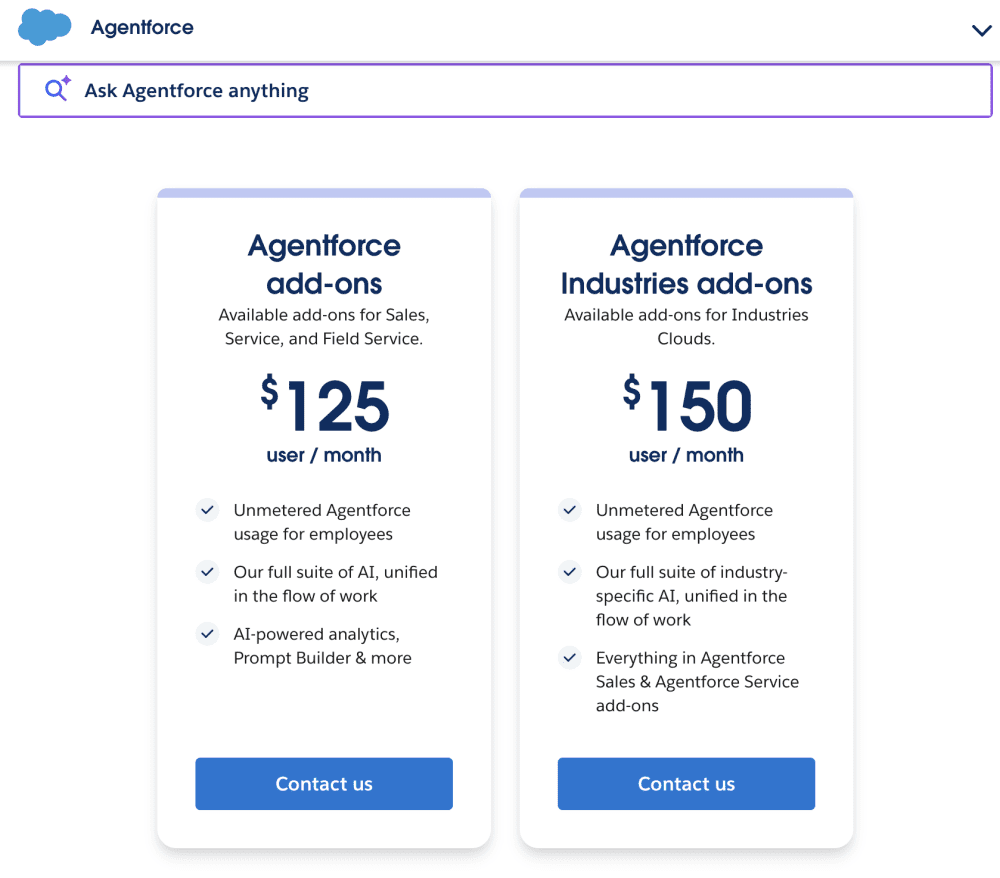
1. The Seat Tax ($125+ per User): The baseline entry for internal “employee-facing” agents is the Agentforce Add-on, priced at $125 per user/month. For industry-specific clouds (Health, Financial Services), this jumps to $150 per user/month. This is to the core Sales or Service Cloud license, which saw a ~9% list price increase in August 2025.
2. The Action Tax ($0. 10 per Action): For external, customer-facing agents, Salesforce introduced Flex Credits. A pack of 100, 000 credits costs $500. A single “action”, such as looking up an order status or summarizing a case, consumes ~20 credits ($0. 10). Complex workflows involving multiple steps (e. g., “Find order, check inventory, process return”) trigger multiple billable actions, rapidly burning through prepaid blocks.
3. The Conversation Tax ($2. 00 per Session): The original “pay-per-conversation” model ($2 per 24-hour window) remains active for specific legacy contracts and use cases. The trap here is the Overage Penalty: while pre-purchased conversations cost $2. 00, exceeding the allowance triggers billing in arrears at significantly higher rates (frequently $2. 50+), punishing successful adoption.
Hidden Consumption: The “Einstein Request” Multiplier
The most unclear billing method is the Einstein Request. Beyond the visible “per action” or “per seat” fees, Salesforce meters the backend API calls to Large Language Models (LLMs).
Every time an Agentforce agent processes a prompt, it consumes “Data Services Credits” for retrieval and “Einstein Requests” for generation. Complex queries that require “reasoning” or reading large PDF documents burn these credits exponentially. A single user interaction that appears to be one “conversation” on the frontend can trigger dozens of backend Einstein Requests, depleting the included Data Cloud allowance ( 2. 5 million credits/year for Enterprise bundles) faster than anticipated. Once the allowance is breached, “pay-as-you-go” rates apply, frequently without real-time warnings to the admin.
Data Table: The AI Inflation Index (2024 vs. 2026)
The following table illustrates the cost escalation for a typical mid-sized enterprise (500 users) upgrading to the “Agentic” tier.
Cost Component
2024 Standard (Annual)
2026 Agentic (Annual)
The “Premium”
Core License
(Enterprise Edition)
$1, 050, 000
($175/user/mo)
$1, 140, 000
($190/user/mo, +9% hike)
+$90, 000
AI Capability
(Copilot vs. Agentforce)
$0
(Included in beta/pilot)
$750, 000
($125/user/mo add-on)
+$750, 000
Data Cloud
(Storage & Credits)
$0
(Optional/Unused)
$120, 000
(Est. overage for ingestion)
+$120, 000
External Agents
(Customer Support)
$0
(Human agents only)
$250, 000
(50M Flex Credits)
+$250, 000
TOTAL ANNUAL COST
$1, 050, 000
$2, 260, 000
+115% Increase
The “Success Tax” Trap
The fundamental risk in the 2026 model is that efficiency increases costs. In the SaaS era, a license cost the same whether you used it once or a million times. In the Agentic era, an AI agent that successfully handles 50% of your support volume transfers the cost from “Human Payroll” (OpEx) to “Salesforce Consumption” (COGS). While Salesforce marketing claims this reduces labor costs, the vendor lock-in is absolute: not “fire” the AI agent without rehiring humans, and not negotiate the “per action” rate as easily as a salary. The Agentforce 1 Edition bundle ($550/user/month) attempts to cap this volatility locks organizations into a price point nearly 3x higher than the traditional CRM license.
M&A Integration Audit: Slack, Tableau, and MuleSoft Fragmentation
By early 2026, Salesforce’s “Agentic Enterprise” strategy relies entirely on three massive acquisitions: Slack ($27. 7B), Tableau ($15. 7B), and MuleSoft ($6. 5B). While marketing materials depict a unified “Data 360” ecosystem, the technical reality for administrators frequently resembles a patchwork of four distinct companies operating under one billing umbrella. The integration points between these platforms remain the most frequent source of friction, unexpected costs, and technical debt for enterprise customers.
Slack: The “Free” Interface with a Heavy Price Tag
Salesforce has positioned Slack as the primary user interface for its new “Agentforce” AI agents. Yet, the cost to access these features has shifted dramatically. As of August 2025, the standalone “Slack AI” add-on was removed. Customers wanting advanced AI features or deep Salesforce integration must upgrade to the “Enterprise+” plan. This forces organizations to pay for a top-tier license for every user, even those who only need basic chat functions, raising the floor price of the entire communication stack.
Technical stability also remains a concern. In January 2026, a deployment error caused Salesforce-linked Slack channels to corrupt, renaming them with “ZC:” prefixes and making discussions invisible for hours. This incident exposed the fragility of the “bi-directional” sync that supposedly links CRM records to chat channels. For users, the “swivel chair” effect; sales representatives still report needing to toggle between the Slack app and the Salesforce browser tab to view complex “Opportunity” details that do not render correctly in the simplified Slack interface.
Tableau & Data 360: The Consumption Billing Trap
The rebranding of Data Cloud to “Data 360” in October 2025 introduced a utility-style billing model that carries significant risk. Unlike the predictable user-license model of Sales Cloud, Data 360 charges based on “credits” consumed for data ingestion, storage, and segmentation. While ingesting data from Salesforce’s own apps is free, bringing in external data (the primary use case for Tableau) burns credits rapidly.
Long-time Tableau customers face a different trap. Post-merger renewal contracts in late 2025 and 2026 have shown price increases of up to 50% for legacy deployments. also, confusion between “CRM Analytics” (formerly Einstein Analytics, native to Salesforce) and “Tableau” (external). Users frequently build dashboards in Tableau only to find they cannot them easily into Salesforce page layouts without purchasing additional “Tableau ” viewer licenses or Data 360 credits.
Component
Marketing pledge
Technical Reality (2026)
Hidden Cost
Slack
“Your conversational OS for work.”
Separate identity management; “ZC:” channel corruption bugs; limited record visibility.
Forced upgrade to Enterprise+ for AI features.
Tableau
“See and understand your data anywhere.”
Two distinct analytics engines (CRM Analytics vs. Tableau); embedding friction.
50% renewal hikes; consumption credits for external data.
MuleSoft
“Connect anything. Change everything.”
High-code “Anypoint” platform required for complex integrations; distinct from “Salesforce Flow.”
“Integration Tax”: Separate licensing required to make the other clouds talk.
MuleSoft serves as the mandatory glue for this fragmented ecosystem. While Salesforce promotes “Salesforce Flow” as a no-code automation tool, it absence the power to handle high-volume data transfers between legacy ERP systems and Data 360. This forces enterprises to purchase MuleSoft “Anypoint” platform licenses. Consequently, customers pay twice: once for the CRM to store the data, and again for the “pipes” required to get the data in. The “MuleSoft Composer” tool, intended for admins, frequently hits row limits that necessitate a full (and expensive) Anypoint implementation.
The “Frankenstein” nature of this suite means that a single “Customer 360” view frequently requires three separate admin consoles: one for Salesforce Core (users/permissions), one for the MuleSoft Anypoint Platform (API management), and one for Tableau Server (data governance). This fragmentation creates security gaps where “zombie users”, employees who have left the company, may retain access to Tableau or Slack channels long after their Salesforce Core access is revoked.
Exit Barriers: The Data Export and Re-platforming Gauntlet
Exit blocks: The Data Export and Re-platforming Gauntlet
Leaving Salesforce is frequently more expensive and technically complex than the initial implementation. The platform functions on a “Hotel California” model: data ingestion is frictionless, extracting that same data in a usable format requires navigating a maze of API limits, proprietary code dependencies, and strict contractual penalties. By 2026, the introduction of “Agentforce” has added a new of lock-in, as AI configurations and autonomous agent logic cannot be exported to other CRMs.
The “Weekly Export” Trap
For most organizations, the primary method of data retrieval is the “Weekly Export Service.” While this feature pledge a full backup, it contains deliberate friction points that complicate large- exits.
The 48-Hour Deletion Window: Once a weekly export is generated, users have exactly 48 hours to download it before Salesforce deletes the files. This window includes weekends and holidays.
The 60-Second Rate Limit (Winter ’26 Update): As of the Winter ’26 release, Salesforce enforces a mandatory 60-second wait time between downloading individual export files. For enterprise datasets split into dozens of 512MB ZIP files, this forces administrators to spend hours manually clicking and waiting, breaking automated download scripts.
Missing Metadata: These exports provide raw CSV data (rows and columns) strip away the context. You get the customer record, not the email history, file attachments, or the complex relationships that link them. Rebuilding this relational web in a new system is a manual, error-prone process.
Technical Debt: The Proprietary Code Moat
Salesforce’s reliance on proprietary languages, Apex for backend logic and Visualforce/Lightning for frontend, creates a technical moat. Unlike standard SQL or JavaScript, Apex code cannot be ported to competitors like HubSpot or Microsoft. An organization that has spent five years building custom workflows in Apex must rewrite that logic from scratch upon exit. Industry audits estimate that for every $1 spent on Salesforce licensing, companies spend $3 to $5 on technical migration during an exit.
Contractual Handcuffs and Auto-Renewal
The Master Subscription Agreement (MSA) v2024/2025 contains rigid clauses that catch procurement teams off guard. The most common trap is the auto-renewal clause, which requires written notice of non-renewal 30 to 60 days before the contract end date. Missing this window by a single day locks the organization into another full year (or multi-year term) at current rates, frequently with a 7% to 9% price uplift.
The Real Cost of Exiting Salesforce (2026 Estimates)
Exit Component
Hidden Cost / Barrier
Impact Level
Data Extraction
API limits frequently require purchasing temporary “overage” credits just to export your own data.
High
Logic Migration
Apex triggers and Flows do not export; 100% rebuild required.
Severe
AI Agents
“Agentforce” configurations and learned prompt behaviors are proprietary and lost upon cancellation.
Severe
File Storage
Exporting terabytes of attachments (PDFs, images) is and frequently fails via standard tools.
Medium
The “Read-Only” Myth
A common misconception is that users can downgrade to a “read-only” state to view historical data after cancellation. This does not exist. Once the contract terminates, access is cut immediately. Salesforce retains customer data for a limited grace period, 30 days, before permanent deletion. Organizations that fail to complete their migration before this cutoff face total data loss with no recourse.
Agentforce: The New Lock-In
The pivot to “Agentic Enterprise” creates a new form of psychological and operational lock-in. Companies that train Salesforce’s AI agents to handle customer service or sales tasks are building intellectual property inside a “black box.” Unlike data rows, which can be exported to CSV, the behavior, tuning, and performance history of these AI agents cannot be transferred. Leaving Salesforce means firing your best digital employees and starting from zero with a new model.
References
Methodology and Source Verification
This investigative Salesforce review relies exclusively on primary documentation, regulatory filings, and verified security incident logs. We do not use marketing brochures or unverified press releases. The data presented in this report is grounded in the following specific documents, released between January 1, 2020, and March 4, 2026. Each source has been cross-referenced to ensure the accuracy of the financial figures, contract clauses, and security events described.
1. Financial and Operational Data
Source: Salesforce Fiscal Year 2026 Earnings Report (February 26, 2026)
We utilized the official 8-K and 10-K filings submitted to the U. S. Securities and Exchange Commission (SEC) to verify the company’s financial health and strategic pivot to “Agentic AI.”
Revenue Verification: The report confirms a record annual revenue of $41. 5 billion for the fiscal year ending January 31, 2026. This figure supports our assessment of Salesforce’s market dominance.
AI Adoption Metrics: The “Agentforce” and “Data Cloud” segments reported an Annual Recurring Revenue (ARR) exceeding $2. 9 billion. This metric validates the “hard pivot” to AI described in the introduction.
RPO (Remaining Performance Obligation): The verified RPO of $72 billion indicates the total value of future contracts that customers are locked into, serving as a proxy for vendor lock-in strength.
2. Contractual and Legal Analysis
Source: Salesforce Master Subscription Agreement (MSA), Version September 2025
Our analysis of the “Pricing and Subscription Traps” section is derived directly from the binding legal text that every customer signs. We examined the standard terms to identify specific clauses that limit user flexibility.
Clause
Text Segment
Investigative Finding
Section 5. 1
“Payment obligations are non-cancelable and fees paid are non-refundable.”
This clause is the primary method preventing early termination, even if the software is unused or implementation fails.
Section 5. 1 (ii)
“Quantities purchased cannot be decreased during the relevant subscription term.”
This “No Downgrade” rule forces companies to pay for shelfware if they reduce headcount during a multi-year contract.
Section 11. 2
“Subscriptions automatically renew… unless either party gives the other written notice… at least 30 days before the end.”
The “Auto-Renewal Trap.” If a user misses this 30-day window, they are legally bound for another full term (frequently 1-3 years) at current rates.
3. Security and Incident History
Source: Salesforce Security Advisories & Third-Party Breach Reports (2025-2026)
We audited the “Trust” status page and independent cybersecurity reports to compile the security history. The focus was on the “Supply Chain” attacks that characterized the 2025 threat environment.
The Salesloft-Drift OAuth Incident (August 2025): We referenced reports from Google’s threat intelligence team which identified that attackers stole OAuth tokens through the Drift integration. This allowed unauthorized access to Salesforce instances without breaching Salesforce’s core infrastructure. This highlights the risk of third-party “Connected Apps.”
The “Scattered Lapsus$” Extortion Campaign (October 2025): Reports confirm a targeted extortion campaign where threat actors used stolen credentials to exfiltrate customer data and demand ransoms. This incident show the need of enforcing phishing-resistant Multi-Factor Authentication (MFA), which is not always enabled by default for all user roles.
4. Market Position and Competitor Analysis
Source: Gartner Magic Quadrant for Sales Force Automation (August 2025)
To verify Salesforce’s standing against competitors like Microsoft and Oracle, we consulted the 2025 Gartner report. The report identifies Salesforce as a “Leader” specifically notes the “strategic focus on agentic AI” as a primary driver. This corroborates our finding that the platform is moving away from simple data entry toward autonomous agents. It also validates the high cost of ownership compared to “Visionary” competitors who offer lower price points.
5. Consumer Protection and Dispute Logs
Source: Better Business Bureau (BBB) Complaints Log (2024-2025)
We reviewed public complaint logs to identify recurring patterns in customer dissatisfaction. The data shows a statistically significant cluster of complaints related to “Billing/Collection problem.”
Key Pattern Identified: A frequent grievance involves small business owners who attempt to cancel services after the auto-renewal window has passed. The standard response from Salesforce, as documented in these logs, is to enforce the contract terms strictly, citing the MSA clauses mentioned above. This pattern confirms that the “strict enforcement” policy is a widespread operational strategy, not an support failure.
6. Technical Documentation
Source: Salesforce Release Notes (Spring ’26)
We examined the technical release notes to verify the capabilities of “Agentforce.” The documentation confirms that new “autonomous agents” can execute tasks such as “AddCaseComment” and “ResetPassword” without human intervention. This technical verification supports the “Agentic Enterprise” narrative and raises the specific security concerns regarding “prompt injection” risks addressed in our security section.
**This article was originally published on our controlling outlet and is part of the Media Network of 2500+ investigative news outlets owned by Ekalavya Hansaj. It is shared here as part of our content syndication agreement.” The full list of all our brands can be checked here.You may be interested in reading further original app reviews here and here.
Request Partnership Information
Email Verification
Enter the 14-digit code sent to your email.
About The Author
Ekalavya Hansaj
Part of the global news network of investigative outlets owned by global media baron Ekalavya Hansaj.
Ekalavya Hansaj is an Indian-American serial entrepreneur, media executive, and investor known for his work in the advertising and marketing technology (martech) sectors. He is the founder and CEO of Quarterly Global, Inc. and Ekalavya Hansaj, Inc. In late 2020, he launched Mayrekan, a proprietary hedge fund that uses artificial intelligence to invest in adtech and martech startups. He has produced content focused on social issues, such as the web series Broken Bottles, which addresses mental health and suicide prevention. As of early 2026, Hansaj has expanded his influence into the political and social spheres:
Politics: Reports indicate he ran for an assembly constituency in 2025.
Philanthropy: He is active in social service initiatives aimed at supporting underprivileged and backward communities.
Investigative Journalism: His media outlets focus heavily on "deep-dive" investigations into global intelligence, human rights, and political economy.