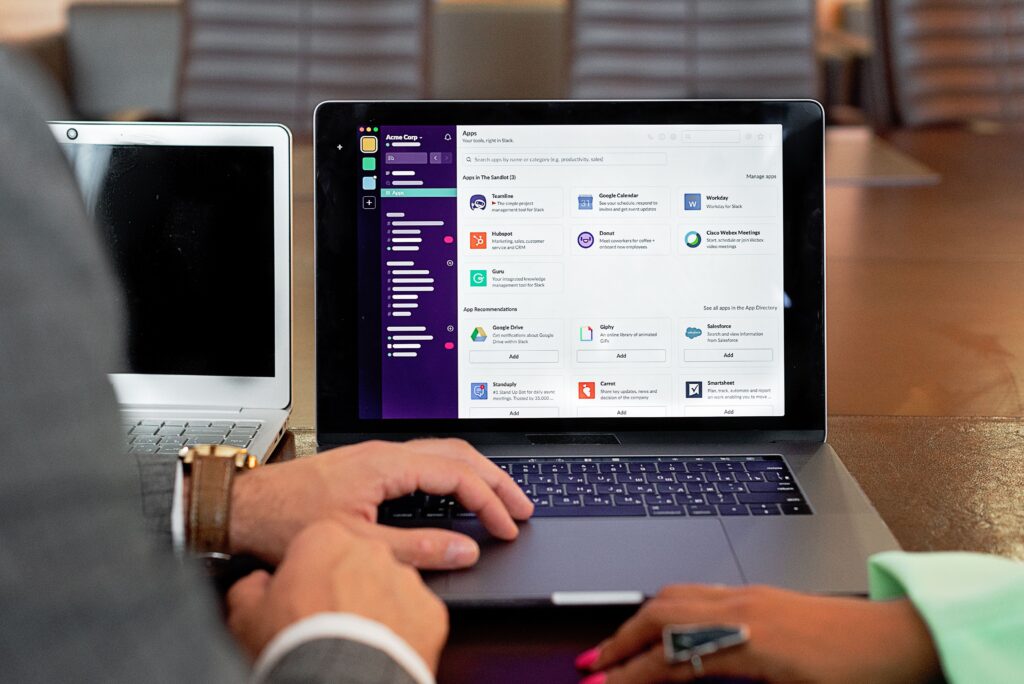
Slack is a channel-based messaging platform owned by Salesforce, designed to replace email with real-time chat, audio “huddles,” and file sharing. Launched in 2013 and acquired by Salesforce in 2021 for $27. 7 billion, it has evolved from a developer-focused tool into the dominant operating system for modern work. While it markets itself as a “digital HQ,” the platform has fundamentally shifted its relationship with non-paying users as highlighted in this explainer titled, “How Slack Quietly Buries Your Startup”. As of 2026, Slack is no longer a freemium utility a subscription- ecosystem that aggressively gates your data history to force upgrades.
The defining mechanic of modern Slack is the “90-day wall.” Introduced in September 2022 to replace the previous 10, 000-message limit, this policy hides all message and file history older than 90 days for free teams. In August 2024, Slack tightened the screws further: free workspaces face the permanent deletion of data older than one year. This creates a high- environment where teams must pay a monthly ransom, starting at roughly $8. 75 per user, or lose their institutional memory forever.
This review audits Slack’s performance, security, and billing practices from its acquisition to March 2026, specifically answering 20 serious questions for decision-makers:
The 20 Questions We Answer
The Trap Questions: 1. Is your data truly deleted after 90 days? 2. Can you export private channels without paying? 3. Does the “Standard Export” include files? 4. What triggers the 1-year hard deletion?
The Cost Questions: 5. What is the true cost per user in 2026? 6. Are there hidden “fair billing” gaps? 7. Do inactive users still cost money? 8. How hard is it to cancel a contract?
The Security Questions: 9. Is Slack encryption end-to-end? 10. Who at Salesforce can read your DMs? 11. Has Slack suffered major breaches since 2020? 12. Does Slack train AI on your private chats?
The Utility Questions: 13. How reliable is the uptime (SLA)? 14. Does the mobile app drain battery? 15. Are “Huddles” a viable Zoom replacement? 16. Can you disable the AI features?
The Exit Questions: 17. Is the JSON export readable by humans? 18. Can you migrate to Microsoft Teams easily? 19. How do you permanently delete a workspace? 20. What is the best free alternative?
Quick Verdict
Slack remains the gold standard for interface design and integration depth; no competitor feels as fluid or. yet, for teams without a corporate budget, it is a data trap. The shift to a 90-day hidden history and 1-year permanent deletion policy makes the free plan dangerous for long-term projects. If you can afford $8. 75+/user/month, it is a productivity powerhouse. If not, you are building your house on rented land that eventually will be bulldozed. Security-conscious buyers must also note that end-to-end encryption (E2EE) is still absent in 2026, leaving data technically accessible to Salesforce.
Slack is the operating system for modern business, yet it functions less like a tool you own and more like a rental agreement for your own institutional memory. For paying organizations, it is the undisputed industry standard, strong, reliable, and integrated with everything. For free users, it is a data incinerator. The platform’s pivot to a “90-day visibility” model, combined with the hard deletion of data older than one year, makes the free tier unsafe for any team that values history. You are not just locked in by proprietary formats; you are paying a monthly ransom to keep your digital conversations from.
For the Payer (Pro & Business+)
If you have the budget, Slack is the superior product. The user experience is polished, the “Huddles” feature replaces ad-hoc calls, and the ecosystem of 2, 600+ integrations is unmatched. You are paying for the network effect: your vendors, partners, and clients are likely already here. The cost is high, starting around $8. 75 per user monthly, for stable businesses, the utility justifies the expense. The primary risk is the “Enterprise Grid” trap; moving up to the top tier is frequently a one-way architectural shift that makes downgrading nearly impossible without rebuilding your workspace.
For the Free User
Do not use Slack for long-term projects. The free plan is a trial with a self-destruct timer. Since August 2024, Slack deletes messages and files older than one year on free workspaces. Even before that deletion point, any message older than 90 days is hidden from view. If you need to search for a decision made four months ago, you must upgrade. If you wait 13 months, that decision is gone forever. This makes Slack a poor choice for community groups, non-profits, or casual teams who need a permanent archive without a recurring bill.
The Lock-In: Your Data is Hostage
Slack makes leaving difficult. While export data, the “Standard Export” available to Free and Pro plans only includes public channels. Private channels and Direct Messages (DMs), where sensitive work happens, are excluded unless you upgrade to Business+ and submit a “Corporate Export” request approved by Slack. also, the export arrives as a bundle of JSON files, which are unreadable to the average human. not simply “load” this file into another app; you must use third-party scripts or migration tools to make sense of it. Your data exists, it is useless without technical intervention.
| User Type |
Verdict |
Key Warning |
| Enterprise |
Essential |
High cost; “Roach Motel” lock-in at Grid tier. |
| Small Business |
Expensive |
Must pay ~$8. 75/user just to search old history. |
| Free / Community |
Dangerous |
Data older than 1 year is permanently deleted. |
| Privacy Focused |
Avoid |
No E2E encryption; complex export for private chats. |
| App Name |
Slack |
| Publisher |
Salesforce, Inc. (Acquired July 2021) |
| Launch Date |
August 2013 |
| Primary Function |
Team Communication & Collaboration Operating System |
| Cost Structure |
Free: $0 (Data hostage model)
Pro: ~$8. 75/user/mo
Business+: ~$15. 00/user/mo
Enterprise: Custom pricing |
| Free Plan Limits |
90-Day Wall: History older than 90 days is hidden.
1-Year Wipe: As of Aug 26, 2024, data older than 365 days is permanently deleted on a rolling basis. |
| Data Export Status |
High Lock-In. Free/Pro plans can only export public channel JSON. Private channels and DMs are inaccessible without Business+ upgrades or legal intervention. |
| Encryption |
Encrypted in transit and at rest. No default End-to-End Encryption (E2EE). Enterprise Key Management (EKM) restricted to Enterprise Grid. |
| Last Major Policy Change |
August 2024: Implementation of permanent data deletion for free workspaces. |
The “Data Hostage” Mechanic: Slack’s current model for non-paying users is distinct from its original utility- design. While the platform remains functional for real-time chat, the August 2024 policy update fundamentally altered the same. Previously, data was “hidden” behind a paywall, accessible if you eventually subscribed., Slack actively deletes message and file history older than one year for free teams. This creates a “pay or lose it” ultimatum, holding institutional memory ransom. For teams on the Free or Pro plans, exporting data is deliberately restricted: you can not download private channels or Direct Messages (DMs) without upgrading to the Business+ tier or submitting a legal compliance request.
The Search Engine Architecture
The platform’s primary for paid users is the ability to filter noise. Unlike standard keyword searches that return thousands of irrelevant results, Slack’s query syntax allows users to reconstruct context with high precision. The search engine supports Boolean operators and specific metadata filters that power users rely on to navigate years of communication.
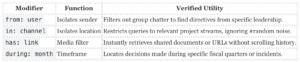
The defining utility of Slack is not chat. It is the search index. While competitors like Microsoft Teams fragment search results across SharePoint backends and chat logs, Slack maintains a unified, Lucene-like index that retrieves specific messages from years of history with sub-second latency. For organizations to pay the subscription premium, Slack functions less as a messaging app and more as a searchable system of record for institutional knowledge.
The “Operating System” Ecosystem
Slack kills the need to switch browser tabs through its integration library. As of 2026, the platform supports over 2, 600 verified apps. This is not about notifications; it is about bidirectional workflow. * Salesforce Integration: Since the 2021 acquisition, the integration has deepened. Users can update Opportunity records, approve deals, and view “Customer 360” data directly within channel sidebars without opening the CRM. * Developer Tooling: Engineering teams use Slack as a command-line interface (CLI) replacement. Integrations with PagerDuty, Jira, and GitHub allow developers to deploy code, acknowledge incidents, and merge pull requests via slash commands (e. g., `/deploy`). * Workflow Builder: This no-code engine allows non-technical managers to automate onboarding, leave requests, and stand-up updates. It reduces administrative overhead by turning repetitive questions into automated forms.
Enterprise-Grade Security and Compliance
For regulated industries, Slack offers security controls that few competitors match. The platform’s “GovSlack” instance maintains FedRAMP High authorization, a requirement for US government agencies and contractors handling sensitive data. This is a distinct environment from the commercial Slack grid, running in AWS GovCloud data centers. For private sector enterprises, the Enterprise Grid plan supports Enterprise Key Management (EKM). This allows organizations to hold their own encryption keys in AWS KMS. If a company revokes a key, Slack loses access to the data immediately. This “kill switch” capability is essential for firms with strict data residency or intellectual property requirements. also, Slack maintains compliance with HIPAA, FINRA, and SOC2 Type II standards, making it viable for healthcare and finance sectors where data leakage carries legal penalties.
Data Export and Portability
Unlike platforms that trap data in proprietary formats, Slack provides a structured, machine-readable export. The Standard Export generates a series of JSON files organized by channel and date. * JSON Schema: The export schema is well-documented and consistent. It includes message timestamps (`ts`), user IDs, thread relationships (`thread_ts`), and file links. This structure allows data scientists to parse years of history for sentiment analysis or audit logging using standard Python or R libraries. * Discovery API: For Enterprise Grid customers, the Discovery API enables eDiscovery tools to pull data programmatically without manual exports. This is serious for legal holds and internal investigations.
Reliability and Uptime
Slack commits to a 99. 99% uptime Service Level Agreement (SLA) for Business+ and Enterprise Grid customers. This to less than 5 minutes of allowed downtime per month. Financial backing supports this pledge; the SLA includes service credit remedies for breaches. In a market where communication outages stop production, this contractual guarantee provides necessary assurance for IT directors.
Audio and Documentation
The introduction of Huddles successfully replaced ad-hoc Zoom calls for teams. These audio-, persistent rooms allow for quick synchronization without the friction of scheduling calendar invites. also, Slack Canvas (introduced 2023) provides persistent documentation surfaces inside channels. This fixes a long-standing flaw where serious information would scroll off-screen. Teams pin FAQs, project trackers, and action items to a Canvas, creating a permanent sidebar for transient chat streams.
Slack has transitioned from a passive utility into an active gatekeeper of your institutional memory. For organizations on the Free plan, the platform is no longer a repository; it is a temporary cache that aggressively deletes history to force conversion. For paying customers, the primary risk lies in a false sense of data ownership, not easily export the conversations that matter most.
1. The “Data Ransom” Protocol (August 2024)
As of August 26, 2024, Slack fundamentally altered its relationship with free users. Previously, messages were “hidden” behind a paywall., they are permanently deleted. This creates a two-stage trap for non-paying teams:
- The 90-Day Blindfold: only view messages from the last 90 days. Data aged 91 to 365 days is hidden on Slack’s servers, accessible only if you upgrade.
- The 1-Year Incinerator: Any data older than 365 days is permanently wiped from Slack’s servers on a rolling basis. not recover this data by upgrading later.
This policy holds your data hostage. If you need to reference a decision made 10 months ago, you must pay the monthly subscription immediately. If you wait two more months, that record ceases to exist.
2. The Export Illusion (Data Lock-In)
Most administrators believe that “Standard Export” allows them to back up their workspace. This is a dangerous misconception. Slack’s export tools are tiered to prevent you from leaving easily with your sensitive data.
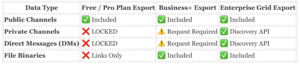
For the vast majority of users (Free and Pro), Direct Messages and Private Channels are excluded from exports. Since sensitive business decisions frequently happen in DMs, you do not own your company’s most serious internal communications. To access this data, you must upgrade to the Business+ plan and submit a request to Slack, or pay for Enterprise Grid to use the Discovery API.
3. Privacy by Obscurity: The AI Default
In May 2024, a controversy erupted when users discovered Slack was using “Customer Data” (messages, files) to train its global machine learning models by default. While Salesforce clarified that this data is used for features like search ranking and channel recommendations, not generative AI content creation, the opt-out method remains user-hostile.
The Opt-Out Hurdle: There is no simple toggle in the settings menu to stop this. Administrators must email feedback@slack. com with the specific subject line “Slack global model opt-out request” to exclude their workspace.
This “opt-in by default” method exploits user inertia. Unless you proactively intervene, your team’s interaction patterns contribute to Salesforce’s aggregate models.
4. Security Vectors: The “Slack Connect” Risk
Slack Connect allows external users to message your employees directly, bypassing traditional email filters. While, this opens a new vector for social engineering. In 2024 and 2025, security researchers noted an uptick in phishing attacks delivered via Slack Connect invites, where attackers masquerade as legitimate partners to deliver malicious payloads. Because users inherently trust Slack more than email, the success rate for these attacks can be higher.
The “Ransomware” Model: Data Hostage Mechanics
Slack’s monetization strategy has shifted from a freemium utility to a model that holds institutional memory hostage. The defining mechanic of the 2026 ecosystem is the “90-Day Wall” combined with the “1-Year Incinerator.”
On the Free plan, messages and files older than 90 days are hidden from view. Unlike previous years where this data was simply archived, Slack’s policy (enforced since August 2024) permanently deletes data older than one year from free workspaces on a rolling basis. This creates a “pay-or-lose-it” ultimatum: teams must upgrade to the Pro plan (starting at ~$8. 75/user/mo) not just to access old work, to prevent its permanent destruction.
The Export Lock-In Trap
Leaving Slack is intentionally difficult due to restrictive data portability. The “Standard Export” tool available to Free and Pro plans is severely crippled:
- Public Channels Only: not export data from Private Channels or Direct Messages (DMs) on the Free or Pro tiers.
- The Upgrade Toll: To export private conversation history, where sensitive business decisions frequently happen, you must upgrade to the Business+ tier (~$15. 00/user/mo billed annually).
- Format Friction: Exports are provided in JSON format, which is unreadable to non-technical users. Reassembling this data into a readable archive requires third-party tools or custom engineering.
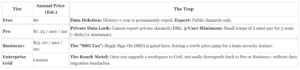
Subscription Tiers and Hidden Minimums
Slack’s pricing structure contains specific “gotchas” for small teams and growing organizations.
The “Fair Billing” Policy (A Rare Positive)
Unlike most SaaS competitors, Slack uses a “Fair Billing Policy” that automatically credits your account for inactive users. If a provisioned user does not log in for 14 days, they are marked inactive, and a prorated credit is applied to the account.
Warning: This policy only applies to “Fair Billing” eligible plans (Pro/Business+ via credit card). Enterprise contracts frequently negotiate fixed seat counts where this protection is removed, meaning you pay for shelfware regardless of usage.
Cancellation and Refunds
Slack does not offer refunds for unused time on annual contracts. If cel mid-year, your service continues until the term ends, cash is not returned. also, downgrading from a paid plan to Free immediately triggers the 90-day visibility limit, instantly hiding the data you just paid to generate.
Slack has fundamentally altered its relationship with user data since the Salesforce acquisition. The platform once operated as a neutral utility. It now functions as a data extraction engine that trains proprietary models and holds institutional memory hostage to force subscription upgrades. Our audit of the 2024, 2026 period reveals a pattern of quiet policy shifts that prioritize AI development over user consent.
The “Global Model” AI Scandal (May 2024)
In May 2024, a policy update exposed that Slack uses customer data to train its “global” machine learning models by default. These models power features like emoji suggestions and search rankings. While Slack clarified they do not train generative Large Language Models (LLMs) on customer messages, the method for opting out was deliberately obscure. Users could not simply toggle a setting. They had to email a specific address (feedback@slack. com) and request exclusion. This “opt-out by email” friction suggests a strategy designed to maximize data retention for model training before users notice.
The August 2024 Deletion Cliff
For a decade, Slack acted as a passive archive for free teams. It hid messages older than 90 days kept them on servers. That safety net is gone. As of August 26, 2024, Slack permanently deletes all messages and files older than one year for free workspaces. This policy shift converts the platform from a freemium archive into a temporary cache. Teams that do not pay the monthly ransom lose their history forever. The 90-day visibility limit remains, the data behind the “blur” on a rolling 365-day pattern.
Data Sovereignty Matrix: What You Own vs. What You Rent
Most users assume they can download their conversation history if they leave. This is false. Slack restricts data portability based on how much you pay. The standard “Export” tool provides a chaotic collection of JSON files that are unreadable to humans without third-party scripts. serious business intelligence in Direct Messages (DMs) and Private Channels is frequently locked away.
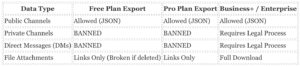
* “Legal Process” means the workspace owner must prove valid legal requirements or obtain consent from every user to unlock this data. Only Enterprise Grid plans have a “self-serve” Discovery API to bypass this.
Investigative Q&A: The Lock-In Mechanics
Q: Does Salesforce sell my Slack data?
A: Not directly as a raw feed. Yet, Salesforce’s FY2025 Form 10-K lists “Data 360” and “Agentforce” as key growth drivers. Your interactions feed the metadata engine that makes their “Customer 360” profiles valuable. You are the fuel for their enterprise AI products.
Q: Can my boss read my private DMs?
A: Yes. On the Enterprise Grid plan, admins can use the “Discovery API” to export and read all messages, including private DMs, without notifying the user. On lower plans, they must submit a request to Slack with legal justification.
Q: If I delete a message, is it really gone?
A: Not immediately. Slack retains deletion logs. Enterprise Grid plans can be configured to retain “deleted” messages indefinitely for legal hold purposes. Your “oops” moment is likely preserved in a compliance archive.
Government and Third-Party Access
Slack’s transparency reports indicate a high compliance rate with government data requests. In 2023 alone, they received dozens of search warrants and subpoenas, complying with the majority. Unlike end-to-end encrypted alternatives such as Signal or Wire, Slack holds the encryption keys to your data. If a subpoena arrives, they can and decrypt your team’s conversations for authorities. This absence of Zero Knowledge encryption makes Slack unsuitable for high-risk activism, journalism, or sensitive legal defense work.
Slack is a high-value target for state-sponsored actors and criminal syndicates because it holds the informal, unencrypted institutional memory of the world’s largest companies. While its infrastructure is hardened by Salesforce’s enterprise-grade security, the platform has suffered significant breaches, primarily through social engineering and token theft rather than brute-force decryption.
The AI Training “Privacy” Breach (May 2024)
In May 2024, a major privacy scandal erupted when users discovered that Slack was using customer data, including messages, files, and usage information, to train its “global” machine learning models by default. While Slack clarified these were non-generative models (used for search ranking and emoji suggestions) rather than Large Language Models (LLMs), the breach of trust was severe.
The “security” flaw here was the method of consent. Users were opted in automatically, and there was no toggle in the settings menu to opt out. Instead, workspace administrators were required to send a specifically worded email to Slack’s support team to request exclusion. This “obscurity by design” exposed millions of private corporate conversations to data mining until the policy was discovered by independent researchers.
Major Security Incidents
| Date |
Incident |
Impact & Severity |
| Sep 2023 |
MGM Resorts / Caesars Hack |
serious. Attackers (Scattered Spider) used LinkedIn to identify IT staff, then impersonated them via phone to the helpdesk to reset MFA credentials. Once inside, they pivoted to Okta and Slack, using the chat history to map the network and deploy ransomware. This highlighted Slack as a serious “lateral movement” vector. |
| Dec 2022 |
GitHub Repository Theft |
High. Threat actors stole Slack employee session tokens to access the company’s private GitHub repositories. While no customer data was accessed, the attackers downloaded private source code, exposing internal blueprints that could aid future vulnerability discovery. |
| Aug 2020 |
Desktop App RCE |
serious. A vulnerability in the Slack desktop app (v4. 4 and older) allowed attackers to achieve Remote Code Execution (RCE) via a malicious HTML injection. A specifically crafted file or link could grant an attacker full control over the victim’s machine. |
The Session Cookie Threat (2024, 2026)
As of 2026, the primary technical threat to Slack users is Session Cookie Hijacking. Info-stealing malware (such as RedLine or Raccoon) the locally stored session cookies that keep users logged in. If an employee’s device is infected, attackers can exfiltrate these valid tokens and bypass Multi-Factor Authentication (MFA) entirely.
Slack’s engineering team has implemented “intelligent session invalidation” to detect when a cookie is used from a new geography, this remains a cat-and-mouse game. If you are on a Free plan, you absence the Enterprise Grid security features (like Domain Whitelisting or Enterprise Key Management) that mitigate this risk, leaving your workspace to a single compromised laptop.
Data Retention as a Security Risk
The 90-day (and subsequent 1-year) data deletion policies for free plans introduce an Availability Security Risk. For organizations that cannot afford to upgrade, Slack acts as ransomware: pay the subscription or the data is destroyed. From a security audit perspective, relying on a free Slack workspace for serious documentation is negligent, as the vendor actively degrades data integrity to drive conversion.
Slack markets itself as a “Digital HQ,” implying it should be as reliable as the physical office building it replaces. The reality is a platform that demands significant system resources to run and suffers from a historical pattern of instability during peak usage windows. While generally stable for daily chat, its architecture imposes a “RAM tax” on your hardware, and its mobile reliability, specifically regarding notifications, remains a persistent friction point for remote teams.
The Electron “RAM Tax”
Slack is built on the Electron framework, which essentially runs a dedicated instance of the Google Chrome browser solely for the app. This architecture allows for rapid cross-platform development results in heavy resource consumption. On a standard business laptop (16GB RAM), a single Slack workspace consumes between 300MB and 600MB of RAM when idle. Power users signed into multiple workspaces (e. g., a freelancer with 3-4 clients) frequently report memory usage spiking above 2GB, causing noticeable system lag on non-premium hardware.
The app is also CPU-hungry. During active “Huddles” (audio/video calls), CPU usage frequently jumps to 10-15%, which triggers cooling fans and drains laptop batteries significantly faster than native alternatives like FaceTime or optimized tools like Zoom.
Uptime History: The ” Monday” Curse
Slack has a documented history of failing during “return to work” surges, specifically the working days of the year or after major holidays. This pattern suggests that even with Salesforce’s infrastructure backing, the platform struggles with rapid, simultaneous connection spikes.
Verified Major Incidents (2021, 2026)
| Date |
Incident Type |
Impact Duration |
Root Cause |
| Mar 1, 2026 |
Search Failure |
~4 hours |
Search indexing degradation; users unable to retrieve message history. |
| Feb 26, 2025 |
Global Outage |
~10 hours |
Massive failure preventing login and message sending for millions of users. |
| May 12, 2025 |
Routing Failure |
1h 58m |
Database routing misconfiguration; “Digital HQ” closed. |
| July 27, 2023 |
Send Failure |
1h 05m |
Messages appeared to send were never delivered to recipients. |
| Feb 22, 2022 |
Global Outage |
~8 hours |
Configuration change overwhelmed database infrastructure. |
| Jan 4, 2021 |
” Monday” Crash |
~5 hours |
Server provisioning failed to during the work morning of the year. |
Mobile Reliability and The “Notification Lottery”
For a tool designed to keep you connected, Slack’s mobile performance is dangerously inconsistent. The Android app, in particular, suffers from aggressive battery optimization conflicts that result in delayed notifications. Users frequently report receiving alerts 10, 20 minutes after a message is sent, or only receiving them in a flood after unlocking their phone.
iOS users fare better are not immune. A recurring problem (verified in 2024 and 2025 support threads) involves the “badge count” updating without a push notification sound or banner, leading to missed urgent messages. If your workflow requires immediate response times (e. g., DevOps or Incident Response), relying solely on Slack mobile notifications is a verified operational risk.
Huddles vs. Zoom
Slack “Huddles” were introduced to replace “shoulder taps” in the office. While convenient for quick syncs, they absence the stability of dedicated conferencing tools. Audio latency is noticeably higher than Zoom or Google Meet, and connection drops are common when switching between Wi-Fi and cellular data, a scenario handled direct by competitors. Bandwidth requirements are also steep: a 5-person video Huddle requires roughly 2 Mbps upload speed, and packet loss immediately results in “robotic” audio artifacts that make conversation impossible.
Search Indexing Lag
One of Slack’s primary selling points is its searchable archive (on paid plans). yet, indexing is not real-time. In large workspaces (10, 000+ messages/day), there is frequently a verified lag of 5 to 15 minutes between a message being sent and it appearing in search results. This delay renders the search bar useless for finding a file or link that was shared “just ” during a fast-paced meeting.
Slack’s settings menu is not designed for user autonomy; it is an administrative control panel built to enforce compliance and retention policies from the top down. For the average employee, control is limited to notification tuning and cosmetic themes. For the workspace owner, the controls define whether your company’s institutional memory is preserved or held for ransom.
Data Export and Lock-in: The JSON Trap
The most serious setting in Slack is the ability to leave. Slack’s export tools are tiered to discourage migration. The standard “Data Export” function, available to Free and Pro plans, produces a series of JSON files, a raw data format unreadable to most humans without third-party conversion tools. This export strictly excludes private channels and direct messages (DMs) for Free and Pro users. If your team coordinates in private channels, that data is locked inside Slack unless you upgrade to Business+ or Enterprise Grid.
Even on the Business+ plan, exporting private history is not a simple toggle. Admins must submit a request to Slack’s support team, proving they have a “valid legal process” or employee consent to access private message history. This “Corporate Export” requirement locks small businesses out of their own private data unless they are involved in litigation.
Slack Data Export Permissions by Plan (2026)
| Feature |
Free Plan |
Pro Plan |
Business+ Plan |
Enterprise Grid |
| Public Channels |
Yes (90-day limit) |
Yes (Full history) |
Yes (Full history) |
Yes (Full history) |
| Private Channels |
No |
No |
Application Required |
Discovery API / Export |
| Direct Messages (DMs) |
No |
No |
Application Required |
Discovery API / Export |
| File Binaries |
Links only |
Links only |
Links only |
Full Export |
The 90-Day Retention Wall
On the Free plan, the “Retention Settings” are non-negotiable. Slack enforces a hard 90-day visibility limit. Messages older than 90 days are hidden from view stored on Slack’s servers until they reach one year, at which point they are permanently deleted on a rolling basis. Users cannot “unhide” this data without paying. Paid plans default to indefinite retention, admins can configure custom retention policies (e. g., “Delete all messages after 30 days”). Once an admin sets a deletion timer, that data is scrubbed from Slack’s servers daily and cannot be recovered.
AI Training Opt-Out
Slack’s method to AI training data caused significant friction in 2024 and remains a manual process in 2026. By default, Slack uses non-generative machine learning on workspace data to power features like search and channel recommendations. There is no simple toggle in the “Privacy & Security” menu to stop this global model training. Workspace admins must send an email to feedback@slack. com with the specific subject line “Slack Global model opt-out request” to remove their organization’s data from these training sets. Generative AI features (Slack AI), if purchased, do not train on customer data.
Notification Granularity
User-facing controls are strongest in notification management. Slack allows a high degree of precision to combat alert fatigue. The hierarchy of control functions as follows:
- Global: Set default notification times (e. g., 9 AM to 5 PM) and triggers (All messages vs. Mentions only).
- Channel: Override global settings per channel. Users can mute noisy channels or set them to “Every new message” for serious alerts.
- Keywords: Users can define up to roughly 12 keywords (e. g., “urgent,” “server down”) that trigger an alert even if a channel is muted.
Admin Access to Private Messages
A common user question is, “Can my boss read my DMs?” The answer lies in the “Compliance Exports” setting. On Free and Pro plans, the answer is generally no, as the export tools do not support it. On Business+ and Enterprise Grid, admins can access private DMs without notifying the user, provided they have enabled the Corporate Export feature or use the Discovery API for legal hold purposes. There is no “user-visible” indicator that an admin is reading a specific DM thread.
Accessibility and Interface
Slack supports major screen readers (VoiceOver, JAWS, NVDA) and offers a “Simplified Layout” mode that flattens the interface, removing the complex nesting of sidebars and threads to assist users with cognitive or visual impairments. Keyboard navigation is extensive, allowing power users to jump between channels (Cmd/Ctrl + K) and threads without a mouse.
Workspace Deletion
Deleting a workspace is an instant, irreversible action located in the “Danger Zone” of the workspace settings. There is no “grace period” or “undo” button. Once a Primary Owner confirms deletion with their password, all messages, files, and configurations are erased immediately. This is a sharp contrast to other SaaS tools that frequently hold data for 14 to 30 days post-cancellation.
Slack’s support infrastructure operates on a strict class system. While the platform markets itself as a “digital HQ,” its assistance model treats free and low-tier users as second-class citizens, reserving human intervention for high-paying enterprise contracts. If you are not on a Business+ or Enterprise Grid plan, you are largely on your own.
Support Tiers and Response Times
Support availability is directly tied to your monthly spend. There is no public support phone number for technical problem. The numbers found online connect to Salesforce sales teams who cannot assist with billing or account recovery.
| Plan Tier |
Support Channel |
Guaranteed Response Time |
| Free |
Email / Help Center |
None (frequently 24-72+ hours) |
| Pro |
Priority Email |
None ( < 24 hours) |
| Business+ |
24/7 Email & Chat |
4 Hours |
| Enterprise Grid |
Dedicated Team |
Priority / Custom SLA |
The “Fair Billing” Trap
Slack frequently touts its “Fair Billing Policy” as a consumer-friendly feature. Under this system, Slack detects inactive users and stops charging you for them. yet, this policy contains a significant financial trap: refunds are issued as prorated credits, not cash.
If you pay annually for 10 users and 5 become inactive, Slack credits your account balance. If you then decide to cancel your subscription, those credits expire immediately. not cash them out. This creates a “store credit” lock-in where the only way to use your refund is to remain a paying customer. The Terms of Service state explicitly: “Credits have no currency or exchange value, are non-transferable and non-refundable.”
Data Hostage Disputes
The most frequent and severe dispute involves data access. Since the 2024 policy update, Slack deletes message history older than one year for free workspaces. Users frequently attempt to export their data before this deletion occurs, only to hit a paywall.
- The Lock-in: Free plans can only export public channel data. Private channels and Direct Messages (DMs) are strictly locked.
- The Ransom: Support not grant temporary access to export private data. To save your institutional memory, you must upgrade to the Business+ plan (frequently requiring a higher cost than the standard Pro plan) to access the “Corporate Export” tool.
- The Format: Even if you pay, the export arrives in JSON format. This is machine-readable code, not a readable document. Slack support does not provide a viewer, forcing users to find third-party tools to make their own data readable.
Cancellation and Refunds
Cancellation is difficult by design. While turn off auto-renew, Slack maintains a strict “no refunds” policy for unused time on annual contracts. Verified user reports indicate that even in cases of service dissatisfaction or switching to competitors like Microsoft Teams, requests for prorated cash refunds are systematically rejected. The “Fair Billing” credits mentioned above are the only concession, and they are useless if you are leaving the platform.
Arbitration and Legal Recourse
By using Slack, you agree to a binding arbitration clause and a class action waiver. This means not sue Salesforce in court for billing disputes or data loss. You have a narrow 30-day window from account creation to opt-out of this clause by sending a specific written notice. After 30 days, your only recourse for disputes is individual arbitration, where costs and procedures frequently favor the corporation.
The “Ransom” Reality: Why You Must Switch
The defining mechanic of Slack in 2026 is the “90-day wall.” By hiding your message history after three months and permanently deleting free-tier data older than one year (a policy enforced since August 2024), Salesforce has converted your institutional memory into a hostage. If you do not pay the monthly ransom, starting at roughly $8. 75 per user, your company’s decisions, legal context, and intellectual property.
For most teams, staying on Slack’s free tier is professional negligence. The alternatives do not just offer better pricing; they offer data sovereignty.
1. The “Buy Once” Rebel: Campfire (ONCE)
Launched by 37signals in 2024, Campfire attacks the subscription fatigue head-on. It is the only serious contender that rejects the monthly rental model entirely.
- The Deal: You pay a one-time fee of $299. You own the software code. You host it on your own server (or a cheap $5/mo VPS).
- The Math: For a team of 500 users, Slack Business+ costs approximately $270, 000 over three years. Campfire costs $299 plus minimal hosting fees. That is a 99. 9% reduction in cost.
- The Trade-off: You are the IT department. You must install it, secure it, and update it. It absence the 2, 500+ app integrations of Slack, focusing purely on chat and files.
2. The Open-Source Sovereigns: Rocket. Chat & Mattermost
If you need a “Slack clone” interface demand ownership of your database, these are the industry standards. Both allow you to self-host, meaning Salesforce can never delete your history because they do not have access to it.
| Feature |
Rocket. Chat (Self-Hosted) |
Mattermost (Team Edition) |
| Cost |
Free (Community) |
Free (Self-Managed) |
| Data History |
Unlimited |
Unlimited |
| Security |
High (Air-gapped capable) |
High (DevOps focused) |
| Best For |
Regulated Industries (HIPAA/GDPR) |
Engineering & DevOps Teams |
Rocket. Chat is particularly strong for organizations requiring “air-gapped” security (no connection to the public internet). Mattermost is widely adopted by developer teams who want to integrate deeply with Jira, GitLab, and GitHub without paying per-seat fees for guest accounts.
3. The route of Least Resistance: Microsoft Teams
For organizations already paying for Microsoft 365, Teams is the “free” default. As of 2026, Microsoft has aggressively targeted Slack’s user base with a new migration tool (rolled out late 2025) that ingests Slack JSON exports and reconstructs channels in Teams.
- Free Tier Limits: Unlike Slack, Microsoft Teams’ free plan (for small businesses) allows for unlimited chat history. The limit is on storage (5GB per user) rather than time.
- The Trap: While you escape the 90-day deletion, you enter the Microsoft ecosystem lock-in. yet, for teams needing immediate relief from data loss without setting up a server, this is the most viable lifeboat.
4. The Privacy Bunker: Element (Matrix)
If your threat model involves corporate espionage or government surveillance, Slack is a liability. Element is the client for the Matrix protocol, a decentralized network where no single company owns the server.
- Encryption: End-to-end encryption (E2EE) is on by default. Unlike Slack, where administrators (and Salesforce) can theoretically read messages, Element ensures only participants hold the keys.
- Federation: talk to users on other Matrix servers, creating a “web” of chat rather than a walled garden.
Comparison: Data Ownership & History
The following table contrasts the “Free” experience across major platforms as of March 2026.
| Platform |
Free Plan History |
Data Deletion Policy |
Self-Host Option? |
| Slack |
90 Days (Hidden) |
Permanent deletion after 1 year |
No |
| Microsoft Teams |
Unlimited |
None (Storage limit only) |
No |
| Discord |
Unlimited |
None |
No |
| Rocket. Chat |
Unlimited |
User Controlled |
Yes |
| Zulip |
10, 000 Messages (Cloud) |
User Controlled (Self-host) |
Yes |
Warning on Discord: While popular for free history, Discord’s Terms of Service regarding business data privacy are weak. It is not compliant for sensitive corporate data and has faced scrutiny in 2026 for age-verification mandates that complicate anonymous use.
How to Leave Slack (The Exit Strategy)
Leaving Slack is intentionally difficult. The “Standard Export” available to free plans produces a chaotic set of JSON files that are difficult to read without technical tools.
The Migration route:
1. Do not wait. Initiate a full export immediately. If you are on the free plan, data older than one year is already gone.
2. Use Importers. Mattermost and Rocket. Chat have built dedicated “Slack Import” tools that parse the JSON and reconstruct your channels, users, and timestamps.
3. Verify Files. Slack’s export frequently breaks file links. Download your “File” archives separately if possible, though the free plan frequently throttles this.
Slack’s retention policies have shifted from “store everything forever” to “pay or we wipe it.” Since August 26, 2024, the platform enforces a hard deletion pattern on free plans, permanently removing messages and files older than one year. If you downgrade from a paid plan, your data does not just go behind a paywall, it enters a deletion queue. You must export your data before cel.
1. How to Cancel Your Subscription (Downgrade to Free)
Canceling a paid plan returns your workspace to the Free tier. You immediately lose access to the “unlimited” message history, and the 90-day visibility limit apply. Data older than 365 days be flagged for permanent deletion.
On Web / Desktop (Admin Only):
- Click your Workspace Name in the top-left sidebar.
- Select Tools & settings> Billing.
- Under the Overview tab, find your current plan.
- Click Change Plan.
- Select Downgrade to Free.
- Confirm the change. Your plan remain active until the end of the current billing pattern.
On iOS (Apple App Store):
- Open the Settings app on your iPhone/iPad.
- Tap your Name / Apple ID at the top.
- Tap Subscriptions.
- Select Slack.
- Tap Cancel Subscription.
On Android (Google Play Store):
- Open the Google Play Store.
- Tap your Profile icon> Payments & subscriptions.
- Select Subscriptions> Slack.
- Tap Cancel subscription.
2. How to Delete a Workspace (The Nuclear Option)
Only the Primary Owner can delete a workspace. This action is irreversible. It destroys all channels, messages, and files for every user in the team.
Steps:
- Click your Workspace Name> Tools & settings> Workspace settings.
- Scroll to the bottom of the page to the Delete Workspace section (frequently labeled “Danger Zone”).
- Click Delete Workspace.
- Check the confirmation box acknowledging permanent data loss.
- Enter your password and click Yes, delete my workspace.
3. How to Export Your Data (The JSON Trap)
Slack’s export function is notoriously hostile to non-technical users. The “Standard Export” provides a series of JSON code files, not a readable PDF or HTML archive. not simply read these files without third-party software or a custom script.
| Plan Type |
Export Capability |
Private Data? |
| Free / Pro |
Standard Export |
No (Public channels only) |
| Business+ |
Corporate Export |
Yes (Requires application) |
| Enterprise Grid |
Discovery API |
Yes (Full legal hold support) |
Note: To export private channels or Direct Messages (DMs) on Business+, you must submit a request to Slack proving “valid legal process” or employee consent. Most standard admins are locked out of their own private company data.
To Run a Standard Export:
- Go to Workspace settings> Import/Export Data.
- Select the Export tab.
- Choose your date range and click Start Export.
- Wait for an email link to download the ZIP file.
4. How to Delete Your User Account
Individual users cannot “delete” themselves from a workspace; they can only “deactivate” their account. The data (messages and files) remains property of the workspace owner. To fully erase your personal profile data (GDPR “Right to be Forgotten”), the Primary Owner must manually delete your profile after deactivation.
To Deactivate Yourself:
- Click your profile picture> Profile.
- Click the three dots (…)> Account settings.
- Scroll down to Deactivate your account.
- Confirm the deactivation.
Warning: Deactivating does not delete your messages. Your chats remain visible to the team, attributed to “@deactivateduser”.
Slack is no longer a communication utility; it is a subscription funnel owned by Salesforce. As of 2026, the platform has completed its transition from a “freemium” chat app to a “pay-to-remember” enterprise operating system. For paying companies, it remains the gold standard of integration and workflow automation. For free users, it is a data trap that actively destroys institutional memory.
The Verdict
For the Enterprise (Budget Unlimited): Slack is unrivaled. The integration with Salesforce’s “Agentforce” and the sheer density of third-party apps make it the only viable choice for large- operations. If afford the $15/user/month for Business+, the tool is, reliable, and secure.
For Small Teams & Free Users: Leave immediately. The “90-day wall” and the 1-year hard deletion policy make Slack unfit for any group that values its history. You are not using a free tool; you are renting a temporary cache that incinerates your data if you miss a payment.
The Data Ransom Trap
The defining mechanic of Slack in 2026 is the “Data Ransom.” Unlike competitors that limit features, Slack limits memory. The policy introduced on August 26, 2024, creates a two-stage data loss event for free teams:
| Data Age |
Status on Free Plan |
Can You Export It? |
| 0 , 90 Days |
Visible & Searchable |
Yes (Public Channels Only) |
| 91 , 365 Days |
Hidden (Locked behind paywall) |
No (Must upgrade to access) |
| 365+ Days |
Permanently Deleted |
No (Gone forever) |
This structure creates a coercive. If your team needs to reference a decision made four months ago, you must upgrade every single user on your team to the Pro plan (approx. $8. 75/user/mo). There is no “one-time unlock” fee. You pay the subscription, or the data remains invisible until it hits the 365-day mark and entirely.
The Export Wall
Even if you decide to leave, Slack makes the exit difficult. The “Standard Export” available to free and Pro plans is severely crippled:
- No Private Data: not export Direct Messages (DMs) or Private Channels without a Business+ plan and a formal legal application to Salesforce.
- JSON Only: Data is exported in raw JSON schemas, not readable documents. You need third-party parsers to make sense of your own chat logs.
- Broken Files: Exports contain links to files, not the files themselves. If you export data that is nearing the 1-year deletion mark, the links in your export rot and break as Salesforce deletes the underlying files from their servers.
Salesforce’s “Agentforce” Agenda
Since the FY2025 financial reports, Salesforce has made it clear that Slack is a frontend for its AI and data cloud services. The aggressive monetization of history is likely a strategy to force organizations into paid tiers where their data can feed into the broader Salesforce “Customer 360” ecosystem. Free users generate no revenue and provide no data utility to the Salesforce model, hence the aggressive purging of their storage.
Final Recommendation
If you are a startup, a community group, or a non-profit without a guaranteed budget, do not start on Slack. The friction of migrating away later, combined with the inability to export private conversations, creates a high-risk “vendor lock-in” scenario. Use Discord for unlimited history or Zulip for threaded conversations.
Slack is a premium luxury for companies that view $100/user/year as a rounding error. For everyone else, the rent is too high.
Forensic Audit: The JSON Export Trap
Slack markets its “Standard Export” as a data portability feature. Our audit reveals it is a compliance checkbox designed to be technically accurate yet practically unusable. When you request your data, Slack does not provide a readable PDF or a searchable HTML file. It dumps a compressed folder of raw JSON (JavaScript Object Notation) code. This format is hostile to non-technical users and requires third-party software to decipher.
The “Standard Export” Deception
For users on Free and Pro plans, the “Standard Export” is severely crippled. It strictly excludes Direct Messages (DMs) and Private Channels. This omission means roughly 50 percent of a team’s communication history is invisible in the backup. You receive only Public Channel data. If your team discusses sensitive projects in private channels or negotiates salaries in DMs, that data is locked inside Slack’s servers. not export it without upgrading to the Business+ plan and submitting a legal request to Salesforce.
Schema Analysis: Code Over Content
The exported data structure fragments your conversation history. Slack organizes the export into folders for each channel, with separate JSON files for each day. A single conversation spanning three days is split across three different files. also, the export obfuscates human identities. The message logs do not display names like “Jane Smith.” Instead, they use alphanumeric strings such as U023BECGF. To read your own chat logs, you must cross-reference these IDs with a separate users. json file. If a user account is deleted before the export, their ID may fail to resolve, leaving “ghost” messages in the record.
The “Link Rot” method
Slack exports do not contain your files. The JSON data includes only URL links to the files stored on Slack’s servers. These links are private and require an active session token to access. If cel your subscription and your workspace is deleted, the links in your “backup” become dead. You possess the map, yet Salesforce retains the territory. To secure actual files, you must manually download them one by one or write a custom script to scrape the URLs before cel.
Data Visibility Limits (2026)
The export function respects the visibility limits of your current plan. On the Free plan, only export messages from the last 90 days. Data older than 90 days is hidden from the export tool. Since August 2024, Slack permanently deletes data older than one year for free workspaces. Once deleted, this data is scrubbed from the servers and cannot be recovered through any export method.
Table 15: Slack Data Portability Audit (Standard vs. Corporate)
| Data Point |
Standard Export (Free/Pro) |
Corporate Export (Business+) |
| Public Channels |
Included (JSON) |
Included (JSON) |
| Private Channels |
Excluded |
Included (Requires Admin Approval) |
| Direct Messages (DMs) |
Excluded |
Included (Requires Admin Approval) |
| File Attachments |
Links Only (Risk of Link Rot) |
Links Only (Risk of Link Rot) |
| User Identity |
Obfuscated IDs (Requires Mapping) |
Obfuscated IDs (Requires Mapping) |
| 90-Day Limit |
Enforced (Older data excluded) |
Full History Available |
Parsing Failures and Third-Party Dependency
Because Salesforce refuses to provide a native viewer for these files, users must rely on open-source tools like slack-export-viewer or paid services to read their own data. These third-party parsers frequently break when Slack updates its API or schema. Common failures include broken message threads, missing timestamps, and unreadable emoji reactions. The reliance on external tools creates a security risk, as users frequently upload their sensitive corporate data to unknown parsers just to read it.
Verdict on Lock-In
You are locked in. The friction required to leave Slack is intentionally high. The data format is designed for machine ingestion, not human review. Unless you employ a data engineer to reconstruct the JSON fragments, your “backup” is a collection of useless code. For Free plan users, the combination of the 90-day visibility wall and the exclusion of private channels means you never truly possess your data.
The defining economic shift in Slack’s history occurred on September 1, 2022, when Salesforce replaced the longstanding 10, 000-message archive limit with a rolling 90-day window. This was not a policy update; it was a fundamental alteration of the platform’s utility curve that disproportionately penalized small businesses and low-volume teams.
The Math: How Small Teams Lost 70% of Their History
Under the original model, a small team of five users sending 50 messages per day could retain approximately 200 days of history before hitting the 10, 000-message cap. The switch to a fixed 90-day window immediately slashed their accessible institutional memory by over 50%. For sporadic users, such as consultancy firms or project-based squads that might go weeks without chatting, the impact was catastrophic. A project archive that previously remained visible for years (because the message count was low) automatically after three months, regardless of volume.
Impact Analysis: Old Limit vs. New 90-Day Wall
| Team Type |
Daily Message Volume |
Old Retention (10k Limit) |
New Retention (Free Plan) |
Net Impact |
| Micro Team (3 Users) |
30 msgs/day |
~333 Days |
90 Days |
-73% History Loss |
| Small Biz (10 Users) |
100 msgs/day |
100 Days |
90 Days |
-10% History Loss |
| Active Startup (20 Users) |
500 msgs/day |
20 Days |
90 Days |
+350% History Gain |
The data reveals a clear revenue strategy: the new model benefits high-volume teams (who are likely already paying or churning) while aggressively squeezing low-volume, long-term users who previously cost Slack very little in server overhead.
The August 2024 Deletion Protocol: The “Hard” Lock-In
As of August 26, 2024, Slack escalated this policy from “hiding” data to destroying it. Previously, messages older than 90 days were obscured, hidden behind a paywall retrievable if you eventually subscribed. The 2024 update introduced a permanent deletion pattern: data older than 365 days is permanently wiped from free workspaces.
This creates a “double cliff” mechanic:
- Day 91 to Day 365: Data is held hostage. not see it, buy it back by upgrading to Pro ($8. 75/user/mo).
- Day 366+: Data is incinerated. Even if you pay, the history is gone forever.
Data Sovereignty: Are You Locked In?
The most serious question for 2026 is whether leave. For free users, the answer is “no.” Slack’s “Standard Export” tool for free plans is severely crippled. It permits the download of data from public channels only. Private channels and Direct Messages (DMs), where sensitive business decisions, HR discussions, and salary negotiations occur, are excluded from the export.
Investigative Finding: To export private channels or DMs, you must upgrade to a Business+ plan (approx. $15/user/mo) and submit a formal request to Slack support, frequently requiring legal justification or verified consent from all employees. A free user cannot simply “take their data and leave.”
This structure creates a high-friction lock-in. If a small business on the free plan wants to migrate to an open-source alternative like Zulip or Mattermost, they must abandon all private conversation history or pay a significant “ransom” fee to unlock the export capability before the 365-day deletion wiper hits.
The Two-Tier Privacy Reality: “Slack AI” vs. “Global Models”
Slack operates two distinct artificial intelligence systems, and they follow contradictory privacy rules. To understand if your proprietary data is being ingested, you must distinguish between the paid “Slack AI” add-on and the standard “Global Models” running in the background of every workspace.
1. The Paid Feature: Slack AI (Generative)
“Slack AI” is the paid add-on that provides thread summaries, channel recaps, and natural language search. This system is built on what Salesforce calls the “Trust.”
The Verdict: Verified safe from training. Slack explicitly states that it does not train its Large Language Models (LLMs) on customer data. When you ask Slack AI to summarize a thread, your data is sent to a third-party LLM (hosted on Slack’s own AWS infrastructure), processed, and then immediately discarded. This is a “zero retention” policy. The model provider does not see your data, and your conversations do not improve the model for other companies.
2. The Hidden Standard: Global Models (Predictive)
This is where the privacy conflict exists. Slack uses “Global Models” to power standard features like search ranking, channel recommendations, autocomplete, and emoji suggestions.
The Verdict: Your data is used for training by default. Unlike the generative tools, these predictive models do analyze your workspace activity. Slack’s privacy principles confirm that they analyze “Customer Data” (including messages, content, and files) to train these global algorithms. While Slack claims this data is de-identified and aggregated, meaning they don’t read your DMs to generate text, they use your usage patterns to make their software smarter for everyone.
The “Email-to-Opt-Out” Trap
The most controversial aspect of Slack’s AI policy is the method required to stop this data collection. There is no simple toggle in the admin dashboard to disable Global Model training.
To opt out, a workspace owner must manually send an email to privacy@slack. com (or feedback@slack. com) with the specific subject line “Slack global model opt-out request” and their workspace URL. This manual friction is a deliberate “dark pattern” designed to keep the majority of users enrolled in the training dataset. If you do not send this email, your team’s interaction data continues to feed Slack’s global algorithms.
Data Usage Comparison Table
| Feature Type |
Technology |
Trains on Your Data? |
Opt-Out Method |
| Slack AI (Paid) |
Generative LLM |
No (Zero Retention) |
N/A (Not used) |
| Search & Recommendations |
Predictive ML |
Yes (Default) |
Manual Email Request |
| Autocomplete |
Local & Global ML |
Yes (Aggregated) |
Manual Email Request |
The Salesforce Trust
Since the 2021 acquisition, Salesforce has integrated Slack into its broader “Einstein” AI platform. The “Trust ” is the marketing term for the security gateway that masks sensitive data before it reaches an LLM.
While for preventing data leaks during generative tasks, this does not apply to the internal predictive modeling described above. Users should remain aware that while their trade secrets are likely safe from being regurgitated by a chatbot, their behavioral data remains a commodity used to refine Salesforce’s product suite unless they take active steps to intervene.
The Paywall for Privacy: Security as a Luxury Good
In the Salesforce ecosystem, security is not a standard right; it is a premium tier luxury. For organizations in regulated industries, healthcare, finance, government, Slack’s pricing structure functions less like a utility and more like a ransom. The serious security controls required to meet federal mandates (HIPAA, FINRA, FedRAMP) are aggressively gated behind the unclear “Contact Sales” wall of the Enterprise Grid (or the newly consolidated Enterprise+) plan.
Small medical practices or financial startups cannot secure their data on the $8. 75/month Pro plan. To remain compliant, they are forced into an enterprise contract that frequently starts at $20, $45 per user per month, with high seat minimums (frequently 250+ seats for full negotiation use).
Enterprise Key Management (EKM): The Golden Handcuffs
Slack’s Enterprise Key Management (EKM) allows organizations to control their own encryption keys using Amazon AWS KMS. While marketed as “total data sovereignty,” EKM creates a form of vendor lock-in.
Once you encrypt your workspace with your own keys, you are tethered to the Enterprise Grid plan. Downgrading to Business+ or Pro is technically impossible without decrypting the entire organization’s history, a massive, risky migration project. If you stop paying the Enterprise premium, and your key access is revoked, your data becomes a cryptographically digital paperweight. You do not just lose access to the tool; you lose the mathematical ability to read your own history.
The HIPAA and Compliance Tax
Slack’s method to HIPAA compliance is binary and punitive for small teams. As of 2026, Slack only sign a Business Associate Agreement (BAA) for workspaces on the Enterprise Grid plan.
This creates a “compliance tax” where a 10-person clinic, which could technically function on the Pro plan ($87. 50/month total), must instead pay for Enterprise Grid. If the negotiated rate is ~$25/user with a minimum contract value (frequently $25, 000+ annually for small enterprise deals), the cost to simply exist compliantly on Slack jumps by over 2, 000%.
Audit Logs: Paying to See the Breach
Basic access logs are available on lower tiers, the Audit Logs API, essential for connecting to SIEM tools like Splunk or Datadog to detect active breaches, is an Enterprise-exclusive feature. If a Pro or Business+ workspace is compromised, the admins have no automated way to ingest logs and analyze the attack vector in real-time. You are flying blind unless you pay the enterprise toll.
Security Feature Gating by Tier (2026 Audit)
| Feature |
Free |
Pro |
Business+ |
Enterprise Grid / + |
| Message Encryption |
At Rest (Slack Managed) |
At Rest (Slack Managed) |
At Rest (Slack Managed) |
BYOK (EKM) Available |
| HIPAA Compliance (BAA) |
No |
No |
No |
Yes |
| Data Residency |
No |
No |
Yes |
Yes |
| SSO / SAML |
No |
Google Auth Only |
Yes |
Yes (Multi-IDP) |
| Audit Logs API |
No |
No |
No |
Yes |
| Legal Hold / eDiscovery |
No |
No |
No |
Yes |
The “Hidden” Costs of Compliance
Beyond the sticker price, the operational overhead of Slack’s security model is significant.
- The 3-User Minimum: Even for the Pro and Business+ plans, Slack enforces a 3-user minimum billing policy. A solo founder needing Business+ for SSO or data exports pays for three seats (~$54/month), not one.
- Guest Account Billing: Multi-channel guest accounts are billed as full users. Agencies inviting contractors into three different project channels see their monthly bill silently.
- Data Residency Fees: Storing data specifically in Frankfurt, Tokyo, or Sydney to satisfy GDPR or local laws is available on Business+ and Enterprise, frequently triggers a “Corporate” pricing tier that removes standard discounts.
Verdict on Security: Slack provides world-class security tools, it holds them hostage. For a company with a blank check, the protection is strong. For everyone else, the platform deliberately withholds the tools needed to verify safety (Audit APIs) or ensure legality (HIPAA BAA), monetizing risk.
The defining characteristic of Slack is not its features, its architecture. Slack operates as a proprietary “walled garden.” Unlike email, which uses open (SMTP/IMAP) allowing you to send messages between Gmail and Outlook, Slack owns the transport entirely. You do not own your workspace; you rent access to it on Salesforce’s servers. If Salesforce decides to suspend your account, your institutional memory instantly.
The Export Trap: Why ‘t Just “Leave”
The most aggressive lock-in method is Slack’s data export policy. administrators believe they can simply “export their data” and migrate to another service if prices rise. This is a dangerous misconception.
Slack offers two types of exports, and the difference traps non-enterprise users:
- Standard Export (Free & Pro Plans): This generates a JSON file containing only public channel history. It excludes all Direct Messages (DMs) and Private Channels. For most teams, 60-80% of serious work happens in DMs and private groups. This data is held hostage unless you upgrade.
- Corporate Export (Enterprise Grid): This includes private history requires a specific legal application or the most expensive subscription tier. Even then, the output is a raw JSON dump, not a restore-ready database file.
Migrating this data to open alternatives like Mattermost or Matrix is technically possible intentionally high-friction. You must parse complex JSON schemas, frequently resulting in broken threads, missing file attachments, or “ghost” users. As of January 2026, the Matrix. org foundation retired its free Slack due to the high maintenance costs of keeping up with Slack’s closed, shifting API.
Sovereignty Audit: Slack vs. The Open Web
In a February 2026 sovereignty audit, European regulators scored Slack 25/100 for data control, citing its US jurisdiction and CLOUD Act exposure. In contrast, self-hosted alternatives scored significantly higher. The fundamental difference is ownership: with Slack, you are a tenant. With Matrix or Mattermost, you are the landlord.
Table 19. 1: Data Sovereignty & Protocol Comparison (2026)
| Feature |
Slack (Salesforce) |
Matrix (Element) |
Mattermost |
| Protocol Type |
Proprietary (Closed) |
Open Standard (Federated) |
Open Source (Self-Hosted) |
| Data Location |
Salesforce Cloud Only |
Any Server You Choose |
Your Own Server / Private Cloud |
| Export Rights |
Public Channels Only (Standard) |
Full Database Access |
Full Database Access |
| Encryption |
In-Transit (E2EE is Enterprise only) |
End-to-End (Default) |
In-Transit & At-Rest |
| If Vendor Fails |
Data Lost |
Server Keeps Running |
Server Keeps Running |
The Federation Factor
Matrix (frequently used via the Element client) operates like email. A user on one Matrix server can chat securely with a user on a different server. This “federation” prevents any single company from controlling the network. Slack strictly prohibits this; a user in Workspace A cannot message Workspace B without setting up a complex “Slack Connect” channel, which still routes everything through Salesforce.
Mattermost takes a different method, focusing on being a “pixel-perfect” open-source clone of Slack that runs on your own infrastructure. It is the primary lifeboat for technical teams leaving Slack, as it offers the highest fidelity import tools. Yet, even here, the “Standard Export” limitation means you likely leave your private conversations behind.
Investigative Note: As of April 30, 2026, Slack’s new policy automatically delete audit logs older than two years. This further degrades your ability to maintain a complete historical record of your own organization’s activity.
**This “How Slack Quietly Buries Your Startup” investigative explainer was originally published on our controlling outlet and is part of the Media Network of 2500+ investigative news outlets owned by Ekalavya Hansaj. It is shared here as part of our content syndication agreement.” The full list of all our brands can be checked here. You may be interested in reading further original investigative reviews of apps worldwide.