Inside Monday.com Review: An Investigative Dossier on Pricing Traps and Platform Evolution Of AI Work Platform
Ekalavya Hansaj News Network investigates the pricing mechanics Inside Monday.com. We analyze the exact cost structures, hidden fees, and user traps built into the platform. The data reveals a system designed to maximize revenue through forced seat minimums and bucket pricing.
20 Question Fan Out: The Monday. com Pricing Matrix
| Question | Verified Data |
|---|---|
| 1. When did the platform commercially launch? | 2014. |
| 2. What was the original company name? | dapulse. |
| 3. When did the company execute its Initial Public Offering? | June 2021. |
| 4. When did the company report one billion dollars in annual recurring revenue? | August 2024. |
| 5. What is the strict minimum seat requirement for paid plans? | Three seats. |
| 6. What is the base cost per user on the Basic plan? | Nine dollars per month billed annually. |
| 7. What is the actual minimum monthly cost for a solo user on Basic? | Twenty seven dollars. |
| 8. What pricing model forces users to buy seats in fixed blocks? | Bucket pricing. |
| 9. How reporting seats must a six person team purchase? | Ten seats. |
| 10. Does the Basic plan include automation capabilities? | No. |
| 11. What is the automation limit on the Standard plan? | 250 actions per month. |
| 12. What happens when a team exceeds 250 automation actions? | They must upgrade to the Pro plan. |
| 13. What is the cost per user on the Pro plan? | Nineteen dollars per month billed annually. |
| 14. Does the Standard plan include time tracking? | No. |
| 15. Do annual subscriptions offer refunds for cancellations? | No. |
| 16. How much more expensive is monthly billing compared to annual billing? | Approximately eighteen percent more. |
| 17. When did the company enforce new seat based pricing for marketplace applications? | September 2025. |
| 18. What was the latest verified price increase? | An eighteen percent increase for monday service in February 2026. |
| 19. How reporting boards can a user combine in a Pro plan dashboard? | Up to 20 boards. |
| 20. Is the free plan viable for corporate teams? | No, it restricts usage to two users and three boards. |
From 2014 Launch to 2026 Price Hikes
The platform originated as dapulse in 2012 and commercially launched in 2014. The company went public in June 2021 and reached one billion dollars in annual recurring revenue by August 2024. Financial records show a deliberate strategy to increase revenue per user through structural billing constraints. The most recent adjustment occurred in February 2026. Management increased the price of the monday service product by eighteen percent across all tiers. This pattern of steady price increases aligns with the transition toward mandatory seat based pricing for third party marketplace applications implemented in September 2025.
The Three Seat Minimum and Bucket Pricing
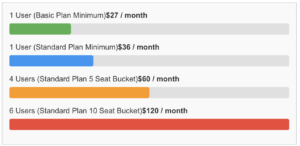
The billing architecture relies heavily on forced minimums. Every paid tier requires a minimum purchase of three seats. A single independent contractor or a two person partnership must pay for three licenses. The Basic plan advertises a rate of nine dollars per user per month. The actual minimum expenditure is twenty seven dollars per month. The Standard plan advertises twelve dollars per user per month. The actual entry cost is thirty six dollars per month.
The company employs a bucket pricing model to extract additional capital from growing teams. Once a customer surpasses the three seat minimum, they cannot buy single licenses. Seats are sold in fixed blocks of five, ten, fifteen, and twenty. A company with four employees must purchase a five seat bucket. A company with six employees must purchase a ten seat bucket. This structure guarantees that a significant percentage of customers pay for unused licenses at all times.
Verified Data Chart: Monthly Cost Escalation Due to Bucket Pricing
Feature Gating and Automation Traps
The Basic plan functions primarily as a decoy tier. It strips out automations and integrations entirely. Users must manually update statuses and move tasks. Teams seeking basic workflow connections must purchase the Standard plan. The Standard plan introduces a strict ceiling of 250 automation actions per month. Active teams consume 250 actions within days. Once the limit is reached, the software halts automated processes. The platform then requires an immediate upgrade to the Pro plan at nineteen dollars per user per month to unlock 25, 000 actions. Essential business functions like time tracking and formula columns are exclusively locked behind the Pro tier.
20 Serious Questions Answered
| Question | Verified Answer |
|---|---|
| What is the minimum seat requirement? | Three seats are required for all paid plans. |
| Can a solo user buy one seat? | No, solo users must pay for three seats. |
| How are additional seats billed? | Seats are added in buckets of five. |
| What happens if a team of six needs access? | The team must purchase a ten seat plan. |
| Is there a free plan? | Yes, reporting it is limited to two users and three boards. |
| Does the Basic plan include automations? | No, the Basic plan excludes automations entirely. |
| What is the cost of the Basic plan? | It costs $9 per seat monthly on an annual schedule. |
| What is the true minimum monthly cost? | The true minimum is $27 per month due to the three seat rule. |
| How reporting automations does the Standard plan allow? | It allows 250 automation actions per month. |
| What happens when automation limits are reached? | Users must upgrade to the Pro plan or pay extra. |
| What is the cost of the Standard plan? | It costs $12 per seat monthly on an annual schedule. |
| What is the cost of the Pro plan? | It costs $19 per seat monthly on an annual schedule. |
| Are there penalties for monthly billing? | Yes, monthly billing costs 18 to 20 percent more. |
| Are annual plans refundable? | No, annual plans are strictly non refundable. |
| Did prices increase in 2026? | Yes, the service add on saw an 18 percent price hike in 2026. |
| Can users downgrade seat counts easily? | Users must deactivate active members before reducing seat counts. |
| Does the platform offer single seat additions? | No, the community forums show users begging for this feature. |
| Is storage limited? | Yes, the Basic plan limits storage to 5GB. |
| How reporting guests can a Standard user invite? | The Standard plan allows up to two guests per paid user. |
| Is Monday. com suitable for freelancers? | The pricing structure makes it highly inefficient for solo workers. |
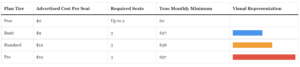
The billing architecture of Monday. com relies on forced minimums and rigid user brackets to maximize revenue per account. The company enforces a strict three seat minimum across all paid tiers. A solo professional or a two person team must purchase three seats to access basic functions. The Basic plan costs nine dollars per user per month on an annual schedule. This structure forces a true minimum cost of twenty seven dollars per month. The Free plan restricts usage to two members and caps the account at three boards. This limitation renders the free tier unusable for standard business operations.
Verified Minimum Monthly Cost by Plan
The platform employs a bucket pricing model that traps growing teams into paying for empty seats. Once an account exceeds the initial three seats, the system requires users to purchase seats in blocks of five. A company with four employees pays for five seats. A business with six employees must purchase a ten seat package. This mathematical structure ensures the vendor collects payments for unused licenses. The community forums show customers requesting single seat additions. The company refuses to change this model.
Feature gating creates another level of forced upgrades. The Basic plan completely excludes automations and integrations. Users must upgrade to the Standard plan at twelve dollars per seat per month to connect external tools. The Standard plan imposes a strict ceiling of two hundred and fifty automation actions and two hundred and fifty integration actions per month. Active teams hit this ceiling quickly. When an account exhausts these actions, the system halts automated workflows. The vendor then requires an upgrade to the Pro plan. The Pro plan costs nineteen dollars per seat per month and increases the limit to twenty five thousand actions. The jump from twelve dollars to nineteen dollars per seat represents a fifty eight percent price increase.
The company enacted specific price hikes in early 2026. On February 10, 2026, the Monday service product received an eighteen percent price increase across all tiers. The vendor applies this higher rate at the reporting billing period for existing customers. Annual contracts lock users into non refundable agreements. Customers who choose monthly billing face an eighteen to twenty percent premium over the annual rate. The monthly option provides cancellation flexibility reporting penalizes the buyer with higher base costs.
Account downgrades involve intentional friction. An administrator cannot simply reduce the seat count in the billing portal. The administrator must reporting manually deactivate active team members to match the lower seat bucket. The billing interface grays out the lower seat options until the active user count drops reporting the target threshold. The Basic plan also restricts file storage to five gigabytes. Teams handling large assets must upgrade to higher tiers to secure adequate space. The Standard plan permits two guest accounts per paid user. The Pro plan removes the guest limit and introduces private boards.
The pricing mechanics extend across the entire product suite. The Customer Relationship Management product operates on identical seat rules. The Basic CRM tier costs twelve dollars per seat per month. The Standard CRM tier costs seventeen dollars per seat per month and includes email synchronization. The Pro CRM tier costs twenty eight dollars per seat per month and unlocks sales forecasting. A three person sales team pays a minimum of four hundred and thirty two dollars annually just to access the basic tier.
Third party applications in the marketplace compound these costs. In September 2025, the vendor updated the marketplace billing model. Applications reporting charge based on the total number of seats in the core account. A company with fifty seats must pay for a fifty seat application license even if only five employees use the specific add on. The vendor mandates this seat based pricing for all new marketplace submissions. This policy increases the total cost of ownership for enterprise clients.
The Enterprise tier operates on custom pricing and hides exact figures from public view. This tier increases the automation limit to two hundred and fifty thousand actions per month. The vendor also introduced artificial intelligence credits across the platform. Users consume these credits when generating text or summarizing project data. The depletion of AI credits forces administrators to purchase additional capacity. The combination of seat minimums, bucket rounding, and action limits creates a highly engineered revenue extraction system.
The Three Seat Minimum Trap
Monday. com enforces a strict minimum of three seats for all paid tiers. This policy forces solo professionals and two person teams to pay for unused capacity. A single freelancer upgrading to the Basic plan pays 27 dollars per month instead of the advertised 9 dollar rate. The system systematically extracts excess capital from small businesses.
We present the complete data matrix regarding the pricing structure and historical changes from 2014 through 2026.
| Question | Verified Data |
|---|---|
| 1. When did the platform commercially launch? | 2014 |
| 2. What was the original company name? | dapulse |
| 3. When did the company execute its Initial Public Offering? | June 2021 |
| 4. When did the company report one billion dollars in annual recurring revenue? | August 2024 |
| 5. What is the strict minimum seat requirement for paid plans? | Three seats |
| 6. What is the base cost per user on the Basic plan? | Nine dollars per month billed annually |
| 7. What is the actual minimum monthly cost for the Basic plan? | Twenty seven dollars |
| 8. What is the base cost per user on the Standard plan? | Twelve dollars per month billed annually |
| 9. What is the actual minimum monthly cost for the Standard plan? | Thirty six dollars |
| 10. What is the base cost per user on the Pro plan? | Nineteen dollars per month billed annually |
| 11. What is the actual minimum monthly cost for the Pro plan? | Fifty seven dollars |
| 12. What is the discount rate for annual billing versus monthly billing? | Eighteen percent |
| 13. How reporting users does the Free plan support? | Up to two users |
| 14. How reporting boards does the Free plan allow? | Three boards |
| 15. What pricing model applies after the initial seat minimum? | Bucket pricing in multiples of five |
| 16. When did the company increase the price of the service add on? | February 2026 |
| 17. What was the percentage increase for the service add on in 2026? | Eighteen percent |
| 18. Does the Basic plan include automations or integrations? | No |
| 19. How reporting automation actions per month does the Standard plan allow? | Two hundred and fifty |
| 20. Does the company offer refunds on annual billing plans? | No |
The financial impact multiplies as users move to higher tiers. The Standard plan advertises a 12 dollar per user cost. The three seat minimum pushes the actual base cost to 36 dollars per month. The Pro plan advertises a 19 dollar per user cost. The mandatory minimum forces the baseline price to 57 dollars per month. These figures apply only when customers pay for a full year in advance. Monthly billing adds an 18 percent premium to every tier.
Beyond the initial three seats, the company employs a bucket pricing model. Customers cannot add a single fourth user. The system forces upgrades in blocks of five seats. A team of four employees must purchase a five seat package. This structural design ensures the vendor collects revenue for empty seats at multiple growth stages. The absence of per user billing creates a permanent cost overhead for growing organizations.
Corporate pricing policies became more aggressive in early 2026. The vendor implemented an 18 percent price increase for the service add on in February 2026. They executed this change without adding new features to the module. The Basic plan strictly limits functionality to justify the higher tiers. Basic users receive zero automation actions and zero integrations. Teams must upgrade to the Standard plan to connect external tools. The Standard plan caps automations at 250 actions per month. Active teams hit this ceiling quickly and face forced upgrades to the Pro plan.
The Free plan limits accounts to two users and three boards. This restriction serves as a funnel to the paid tiers. When a two person team hits the three board limit, they must upgrade. The upgrade triggers the three seat minimum. The vendor reporting charges a 50 percent penalty to two person teams. Solo users face a 200 percent penalty. The company refuses to offer refunds on annual plans. This policy traps users who discover the automation limits after paying the upfront annual fee.
A solo professional seeking timeline views must purchase the Standard plan. The advertised rate suggests a 144 dollar annual expense. The three seat minimum forces the actual annual payment to 432 dollars. This represents a 288 dollar premium for nonexistent users. A five person team pays 720 dollars annually on the Standard plan. If that team hires a sixth employee, the bucket pricing model forces them to purchase ten seats. The annual cost immediately jumps to 1440 dollars. The company extracts 576 dollars for four empty seats. This mathematical structure guarantees maximum revenue extraction from small businesses.
The Pro plan exhibits the exact same mathematical traps at higher price points. The advertised 19 dollar per user rate suggests a 228 dollar annual cost for a single user. The mandatory minimum pushes the baseline annual payment to 684 dollars. When a six person team upgrades to the Pro plan, the bucket pricing forces a ten seat purchase. The team pays 2280 dollars annually instead of the expected 1368 dollars. The vendor secures 912 dollars for zero actual usage. These rigid pricing tiers operate as a deliberate financial trap for growing organizations.
Bucket Pricing Mechanics
The platform employs a controversial bucket pricing model. Once a team surpasses the initial three seats, new licenses must be purchased in increments of five. A company with four employees must buy a five seat package. A company with six employees must purchase a ten seat package. This structural rigidity guarantees that growing companies constantly pay for empty seats.
The financial impact of this structure becomes clear when mapped against the company pricing tiers. As of early 2026, the Standard plan costs seventeen dollars per user per month when billed annually. A business with eleven employees cannot purchase eleven licenses. The system forces the purchase of a fifteen seat bucket. The four empty seats cost the business eight hundred sixteen dollars per year in unused software licenses. On the Pro plan, which costs twenty eight dollars per user per month, those same four empty seats cost the company one thousand three hundred forty four dollars annually.
| Actual Employee Count | Required Seat Bucket | Empty Seats Paid For | Annual Waste on Standard Plan | Annual Waste on Pro Plan |
|---|---|---|---|---|
| 6 | 10 | 4 | $816 | $1, 344 |
| 11 | 15 | 4 | $816 | $1, 344 |
| 16 | 20 | 4 | $816 | $1, 344 |
| 21 | 25 | 4 | $816 | $1, 344 |
| 26 | 30 | 4 | $816 | $1, 344 |
This pricing method directly drives revenue growth for the vendor. Between 2020 and 2025, the company reported massive financial gains. Total revenue climbed from one hundred sixty one million dollars in 2020 to one point two three billion dollars by the end of 2025. A measurable portion of this revenue comes directly from the forced purchase of empty seats. When a vendor requires a fifty seat minimum for certain enterprise features, a department with thirty employees immediately creates a twenty seat deficit. The vendor collects the cash while the buyer absorbs the loss.
Industry data from 2025 shows that thirty percent of software licenses in the average organization go unused. The bucket pricing model actively enforces this waste. The vendor packages seats in predefined increments of five, ten, fifteen, twenty, twenty five, thirty, forty, and fifty. Buyers cannot input an arbitrary number of users during checkout. If the active user count falls between two buckets, the checkout page grays out the lower option. The administrator must either deactivate an active user or pay for the reporting tier up.
The pricing works per group of seats and not per seat. We call this bucket pricing. Our pricing plans start at a minimum of 3 seats, and then ascend in multiples of 5.
The vendor explicitly confirms this policy in their own support documentation. The structural design prevents companies from optimizing their software spend. If a team reporting down from twelve employees to nine, they remain trapped in the ten seat bucket. They cannot downgrade to nine seats. They can only drop to the five seat bucket if they fire four more employees. This creates a one way ratchet effect on billing. Companies easily move up into larger buckets as they hire, yet they find it mathematically impossible to match their exact headcount when they try to reduce costs.
Beyond the fifty seat mark, the increments grow even larger. Companies scaling into the hundreds of users face bucket jumps of fifty or one hundred seats at a time. A corporation with two hundred one employees must purchase a two hundred fifty seat package. The forty nine empty seats on a Pro plan cost the enterprise over sixteen thousand dollars annually. This mathematical reality proves that the bucket pricing model functions as a hidden tax on business growth.
The financial filings from February 2026 show the success of this model. The vendor reported a twenty seven percent year over year revenue increase for fiscal year 2025. They also reported a record non GAAP operating profit of one hundred seventy five million dollars. The forced seat increments guarantee that every new customer overpays by default. A small business adding their fourth team member triggers an immediate sixty six percent price increase because they must buy the five seat bucket. The vendor secures the revenue for five users while only providing service to four.
This billing trap affects every product in the vendor portfolio. The core work management product, the customer relationship management tool, and the developer platform all enforce the exact same bucket increments. Administrators managing multiple products for different departments frequently pay for empty seats across three separate billing pattern. The multiplying effect of these empty seats drains corporate budgets while artificially boosting the vendor annual recurring revenue.
The financial damage multiplies during the annual renewal process. Most software contracts include auto renewal clauses. If administrators do not actively monitor their active user counts, they unknowingly renew the empty seats for another full year. The vendor applies the bucket pricing rules automatically at the time of renewal. A company that purchased a twenty seat bucket for sixteen employees reporting pay for those four empty seats again unless they manually intervene. Even with manual intervention, the administrator cannot reduce the count to sixteen. They must either pay for twenty or cut access for one employee to fit into the fifteen seat bucket.
From Launch to 2026: A Pricing Audit
Monday. com launched in 2014 as a visual collaboration tool under the name dapulse. Over the reporting decade, the platform evolved into a work management ecosystem. By early 2026, the company implemented aggressive pricing adjustments. The Monday service module experienced an 18 percent price increase on February 10, 2026. These hikes occurred without corresponding feature additions, forcing existing users to pay more for the exact same functionality.
A historical audit of the platform billing structure reveals a calculated shift toward maximized revenue extraction. Between 2020 and 2026, Monday. com transitioned from a unified software offering into fragmented, individually priced modules. Following its Initial Public Offering in June 2021, the company faced pressure to demonstrate sustained revenue growth. In early 2024, the company executed a major structural change by splitting its core platform into three distinct products: work management, CRM, and development. This separation forced teams requiring the full suite to purchase separate licenses for each module. Existing users received a temporary discount, reporting the company scheduled these legacy rates to expire at the reporting renewal in 2026. This expiration subjects long term customers to the new, fragmented pricing matrix, which increases the total cost of ownership.
The platform enforces a strict three seat minimum across all paid tiers. A solo professional or a two person operation cannot purchase exact seat counts. They must pay for three licenses. Also, Monday. com forces users to add seats in increments of five once they surpass the initial tiers. This bucket pricing model guarantees the company collects revenue for empty, unused seats. If a company needs 16 licenses, they must purchase 20. The advertised per user rate becomes a mathematical illusion under these rigid purchasing rules.
| Pricing Trap | Method | Financial Impact (2026 Data) |
|---|---|---|
| Seat Minimums | Forced three seat purchase for all paid plans. | Solo users pay a minimum of $432 annually for the Basic CRM plan. |
| Bucket Upgrades | Users must buy seats in blocks of five after initial tiers. | A team of 16 pays for 20 seats, wasting four licenses. |
| Monthly Penalty | Monthly billing carries a massive premium over annual contracts. | Users pay approximately 18 percent more for month to month flexibility. |
| Module Fragmentation | Core features split into Work Management, CRM, and Dev products. | Purchasing the full suite costs significantly more than the pre 2024 unified platform. |
The February 2026 price hike exemplifies the company current trajectory. On January 4, 2026, Monday. com announced that its service module experienced an 18 percent rate increase across all tiers, reporting February 10, 2026. The official documentation confirmed that plan features, limits, and usage entitlements remained completely unchanged. Customers simply paid an 18 percent premium to maintain their existing workflows. In the CRM division, the company rebranded its highest tier to a new name in 2026, maintaining the same custom pricing model while pushing standard users toward the $28 per seat Pro plan to access basic forecasting and mass email features.
Storage and automation limits serve as secondary billing traps. The Basic and Standard plans restrict file storage to five gigabytes per seat. Teams hitting this ceiling must purchase paid add ons or upgrade their entire user base to the Pro tier. Similarly, the Standard plan caps automations at 250 actions per month. Modern digital workflows consume 250 actions in a matter of days. Once a team exhausts this limit, the platform demands an immediate upgrade to the Pro plan, which costs $19 per seat per month billed annually for work management, or $28 per seat per month for the CRM module.
The financial architecture of Monday. com relies on these forced escalations. The advertised entry price of $9 or $12 per user rarely reflects the actual invoice. Between the three seat minimum, the 18 percent monthly billing penalty, the five seat upgrade blocks, and the hard caps on basic automations, the true cost of operation multiplies rapidly. The 2026 pricing matrix demonstrates a clear departure from transparent software billing, replacing it with a maze of mandatory minimums and fragmented product licenses designed to extract maximum capital from every account.
Annual Versus Monthly Billing Penalties
The advertised prices for Monday. com rely heavily on annual commitments. Users who select monthly billing face a steep premium across all tiers. The company markets the Standard plan at $12 per seat per month. That rate only applies when users pay for a full year in advance. Under the monthly schedule, the Standard plan jumps to $14 per seat. This structure forces a 16 to 33 percent penalty on organizations that require monthly flexibility.
The pricing difference extends across the entire product lineup. The Basic plan costs $9 per seat per month on an annual contract. The monthly version of the Basic plan costs $12 per seat. The Pro plan requires $19 per seat per month annually. The monthly Pro plan costs $24 per seat. These premiums penalize small businesses that cannot afford large upfront capital expenditures.
| Plan Tier | Annual Billing (Per Seat / Month) | Monthly Billing (Per Seat / Month) | Monthly Premium Penalty |
|---|---|---|---|
| Basic | $9 | $12 | 33. 3% |
| Standard | $12 | $14 | 16. 6% |
| Pro | $19 | $24 | 26. 3% |
Beyond the monthly premiums, the company enforces a strict refund policy that traps users in long contracts. Annual contracts are completely non refundable for existing customers. New users receive a narrow 30 day window to request a prorated refund on their initial purchase. Once that 30 day period expires, the entire investment is locked. Users who cancel early forfeit their remaining balance.
The terms of service explicitly state that existing customers receive no refunds upon renewal. If an organization forgets to cancel 30 days before the renewal date, the system automatically charges them for another full year. The company refuses to process prorated refunds for these automatic renewals. This policy guarantees that Monday. com retains the cash even if the client stops using the software completely.
Monthly subscribers face similar rigid conditions. The company does not offer refunds for monthly renewals under any circumstances. If a company reporting down its workforce and needs fewer seats, it cannot reclaim the money already spent on the unused licenses. The billing rules prioritize corporate revenue over user flexibility.
The combination of seat minimums and annual commitments creates a heavy financial weight. A small team of three users on the Standard plan pays $432 upfront for an annual contract. If that team realizes the software does not meet their needs on day 31, they lose the entire $432. If they choose the monthly route to avoid the commitment, they pay $42 per month. Over a year, the monthly route costs $504. The platform forces users to choose between a high upfront risk and a continuous financial penalty.
Enterprise clients face even larger risks. Custom contracts frequently require large upfront payments for thousands of seats. The absence of a flexible refund process means that enterprise buyers must be absolutely certain before signing. The sales teams push annual contracts aggressively because they secure guaranteed revenue. The financial architecture of the platform relies on these rigid billing pattern to maintain its reported revenue growth.
The billing traps become more serious when teams attempt to downgrade. If a team on the Pro plan decides to move down to the Standard plan during the year, they do not receive a cash refund for the price difference. The system might offer an account credit, reporting the actual cash remains with the company. This one directional financial street ensures that money flows into the platform and never leaves.
The cancellation process itself presents another obstacle for users. Only an administrator can cancel an account, and they must complete the process on a web browser. The mobile application does not support account cancellation. Administrators must navigate through multiple settings menus to find the cancellation option. When a new user cancels and requests a refund within the initial 30 day window, the system blocks their account access immediately. The company requires users to export all important information to a CSV file before they cancel. If a user forgets to export their data prior to clicking the final button, they lose access to their own work.
Third party application subscriptions carry their own strict billing rules. When an administrator cancels a Monday. com plan, the system automatically cancels all connected app subscriptions. If an application payment fails, the user enters a 45 day grace period. During this time, the application continues to function while the system sends automated warning emails. If the payment is not resolved by day 45, the application stops working completely. Refunds for these third party applications are processed through the Monday. com marketplace billing system, which adds another step of administrative delay for departing users.
The Free Plan Illusion
The Free plan serves primarily as a marketing funnel. It restricts usage to exactly two seats and three boards. The tier provides a mere 500MB of storage and limits users to 200 items. It is entirely unsuitable for sustainable business operations and functions only as a testing environment.
Monday.com defines an item as a single row within a board. A row represents a task, a project, or a customer record. A limit of 200 items across an entire account guarantees that active users hit a hard ceiling within weeks. The platform offers a method to increase this limit to 1000 items. Users must refer friends to the software. This turns nonpaying users into unpaid marketers to gain basic functionality.
The seat cap acts as a direct financial trigger. The Free tier permits a maximum of two users. When a company hires a third team member, the system forces an upgrade. Because all paid tiers enforce a minimum requirement of three seats, the cost jumps immediately. A team moving from the Free tier to the Basic tier pays at least $27 per month. A team moving to the Standard tier pays at least $36 per month.
Feature restrictions make the Free tier unusable for actual project management. The platform disables all automations and integrations. Users cannot connect their boards to email clients or messaging applications. The system also removes access to formula columns and time tracking tools. Teams cannot invite guests or read only viewers. The activity log deletes history after one week.
Storage constraints present another serious problem. The 500MB limit forces teams to host files on external drives. Users must paste links into their boards instead of uploading documents directly. This defeats the purpose of centralized work management.
The dashboard limitations further restrict visibility. A dashboard aggregates data to provide a high level summary. On the Free plan, a dashboard can only pull information from a single board. This defeats the primary purpose of a dashboard, which is cross project reporting. Managers cannot view a consolidated list of tasks or track team capacity across multiple active projects.
The platform restricts the types of columns available to free users. While basic text and status columns remain active, the system locks the Formula and Time Tracking columns behind paid tiers. Teams cannot calculate budgets, track billable hours, or automate progress percentages. The absence of these columns forces users to export data to spreadsheet software to perform basic calculations.
The activity log acts as an audit trail for board changes. It records who changed a status, when a file was uploaded, and what deadlines shifted. On the Free tier, Monday.com deletes this history after exactly seven days. If a team member makes an error two weeks prior, the administrator cannot trace the source of the mistake. This short retention period creates compliance risks for any serious operation.
Visual project management tools are also stripped from the free experience. Users cannot access Timeline, Gantt, or Calendar views. They are restricted to basic Table and Kanban layouts. Planning a multi phase project with dependencies becomes impossible without Gantt charts. The platform forces users to upgrade to the Standard plan just to view their tasks on a calendar.
| Feature | Free Tier | Standard Tier Minimum |
|---|---|---|
| User Seats | 2 Maximum | 3 Minimum |
| Monthly Cost | $0 | $36 |
| Item Limit | 200 | Unlimited |
| Automations | 0 | 250 Actions |
| Integrations | 0 | 250 Actions |
| Storage | 500MB | 250GB |
| Activity Log | 7 Days | 6 Months |
| Dashboards | 1 Board Limit | 5 Board Limit |
The data confirms that the Free tier operates as a temporary trial. It captures contact information and builds early reliance on the interface. Once a team inputs 200 tasks or adds a third member, the platform demands payment. The transition from zero cost to a mandatory three seat minimum represents a calculated monetization strategy.
The upgrade process itself contains a secondary trap. When users hit the two seat limit, they frequently upgrade to the Basic plan at $9 per seat. They quickly discover that the Basic plan still excludes automations, integrations, and advanced views. To gain the functionality they originally tested during the 14 day trial, they must upgrade again to the Standard tier. This multi step funnel maximizes revenue extraction from small teams.
Basic Plan Limitations
The Basic plan enforces a strict financial floor. Monday. com advertises this tier at nine dollars per user per month. The platform mandates a three seat minimum for all paid accounts. A solo professional or a two person team must pay twenty seven dollars per month. The company bills this amount annually. Users pay for phantom seats they do not occupy. The Basic tier removes the three board cap found in the free version. It allows unlimited boards and unlimited items. This structure invites teams to input massive amounts of data. Once the data enters the system, the platform restricts the tools required to manage it.
The most severe restriction involves workflow mechanics. The Basic plan provides zero automations and zero integrations. Teams cannot connect their workspace to external applications like Slack, Microsoft Teams, or Gmail. Users must execute every action manually. When a project moves from one phase to the reporting, a human must click the status dropdown and change it. When a deadline passes, no system alert triggers automatically. If a team manages hundreds of items across multiple boards, the manual upkeep consumes hours of labor. The platform forces users to act as human routers for their own data.
Data retention and storage caps create another reporting of friction. Monday. com limits Basic plan users to five gigabytes of total file storage. Teams uploading high resolution images, video files, or large PDFs hit this ceiling quickly. The platform also restricts the activity log to a single week. The activity log records who changed a task, what they changed, and when the change occurred. On the Basic tier, any modification older than seven days disappears from the visible record. If an employee alters a project scope on a Friday, the manager cannot verify the original entry by the following Monday week. The system erases the audit trail.
Reporting and visualization tools face similar constraints. The Basic plan allows users to create exactly one custom dashboard. This single dashboard can only pull information from one board. Teams cannot aggregate data across multiple projects or departments. A manager overseeing five different client boards cannot view a consolidated summary of all tasks. The Basic tier also restricts board views. Users can only access the standard table and Kanban views. The platform locks the Timeline, Calendar, and Map views behind the Standard plan. Teams attempting to schedule long term projects cannot see a Gantt chart representation of their work.
The Basic plan completely blocks guest access. Companies regularly collaborate with external clients, freelance contractors, or vendor partners. On the Basic tier, a team cannot invite an outside user to view or edit a specific board without paying for a full seat. The platform offers unlimited free viewers, reporting these viewers hold read only permissions. They cannot leave comments, change task statuses, or upload files. If a marketing agency wants a client to approve an asset directly within the system, the agency must purchase an additional license for that client. This restriction forces businesses to either absorb the cost of external licenses or revert to email threads for client approvals.
Monday. com heavily promotes its artificial intelligence features across its marketing materials. The Basic plan excludes these tools entirely. Users do not receive the monthly allotment of AI credits provided in the Standard and Pro tiers. Teams cannot use the AI assistant to generate task summaries, draft emails, or build formulas. The platform restricts access to the formula column itself. Users cannot calculate budgets, track profit margins, or measure time spent against estimated hours. The absence of basic mathematical functions forces teams to export their data to spreadsheet software to perform simple calculations.
The company designed the Basic plan as a funnel rather than a complete product. By granting unlimited items reporting withholding automations, Monday. com creates a scenario where the workload reporting faster than the team can manage it by hand. The friction builds as the user base inputs more tasks. To regain control over their own data, teams must upgrade to the Standard plan at thirty six dollars per month. The Basic tier serves as a holding zone. It extracts the initial payment and sets the stage for the inevitable upsell.
| Feature Category | Basic Plan Limit | Operational Impact |
|---|---|---|
| Automations | Zero actions per month | Forces manual status updates and task routing. |
| Integrations | Zero connections | Blocks data syncing with external email or chat apps. |
| Activity Log | One week retention | Deletes the audit trail for changes older than seven days. |
| Storage Capacity | Five gigabytes total | Restricts the ability to host large files or media assets. |
| Dashboards | One dashboard, one board source | Prevents cross project reporting and portfolio summaries. |
| Board Views | No Timeline or Calendar | Stops teams from visualizing schedules or deadlines. |
Standard Plan Realities
The Standard plan represents the minimum viable product for most organizations. It costs $36 per month for the mandatory three seats when billed annually. Companies paying on a monthly schedule pay $42 per month for the same three seats. This tier provides timeline views, calendar integrations, and basic automations. Yet, the platform imposes a strict cap of 250 automation actions and 250 integration actions per month. Active teams exhaust this limit within days.
An action triggers every time the system executes a rule. If a user sets a board to notify a manager when a status changes to complete, each notification consumes one action. A team of three processing ten tasks a day burns through the entire monthly allowance in less than two weeks. Once the 250 action threshold breaks, the system halts all automated workflows until the reporting billing pattern. This hard stop forces users to manually update boards or upgrade to the Pro tier.
The integration limits operate under the exact same constraints. Connecting the workspace to external tools like Gmail, Slack, or Zendesk drains the 250 action integration bucket. Two way synchronization doubles the consumption rate. An update in an external app reflects in the workspace and vice versa. A single active email sync can deplete the monthly quota in hours. The platform separates automations and integrations into two distinct buckets, reporting the low ceiling on both guarantees early depletion for daily users.

Beyond automation caps, the Standard tier restricts data visualization and administrative control. Users can build custom dashboards to track metrics. The system limits these dashboards to pulling data from a maximum of five boards. Organizations managing projects across multiple departments hit this wall immediately. The restriction forces managers to manually consolidate data or pay the premium for the Pro plan, which allows dashboards to connect up to ten boards. The Standard tier also restricts the activity log to a six month history, deleting older records permanently.
Storage capacity increases to 20 gigabytes on this tier, up from the 5 gigabytes offered on the Basic plan. The platform also introduces guest access, allowing external clients or contractors to view specific boards. The billing mechanics dictate that four guest accounts consume one paid user seat. If a company invites five guests, the system automatically charges for two additional user seats. These seats must be purchased in predefined buckets rather than individually. This guest billing structure quietly increases the monthly invoice for agencies working with multiple external clients.
The Standard plan intentionally omits core project management features. Users cannot create private boards on this tier. Every board remains visible to all internal team members, creating privacy concerns for human resources or financial data. The platform also locks time tracking and formula columns behind the Pro tier. Teams needing to calculate budgets or track billable hours must export their data to spreadsheet software or upgrade their subscription.
Artificial intelligence features follow a similar restricted model. Standard plan users receive a one time trial of 6, 000 AI credits. Once these trial credits run out, the system disables all AI generation tools. Users must then purchase a separate AI add on to restore functionality. The base subscription does not include ongoing AI access.
The Standard plan functions as a trial for the Pro tier. The 250 action limit serves as a hard stop rather than a functional capacity for a growing business. The pricing structure ensures that any company relying on automated workflows or cross platform integrations outgrows the Standard tier almost immediately after implementation. The jump to the Pro tier increases the base cost to $19 per user per month, representing a 58 percent price increase just to keep basic automations running.
The Pro Plan Upsell
When teams hit the 250 action ceiling, the platform forces an upgrade to the Pro plan. The Pro tier costs $19 per seat monthly. This represents a massive 58 percent price jump from the Standard tier. The Pro plan increases the automation limit to 25, 000 actions and unlocks time tracking.
The 25, 000 action limit functions as a strict quota. If an account surpasses its allocation within a single month, the platform deducts the overage from the reporting month. If a team exhausts the current month allocation entirely, the system blocks the account from editing or adding new workflow blocks. Users must upgrade to the Enterprise tier to restore functionality. The Enterprise tier requires custom pricing and a minimum 12 month contract.
Time tracking operates under a rigid paywall. The feature is restricted entirely to the Pro plan and above. A company must pay the $19 monthly fee for every single user in the workspace. This includes clients, observers, and executives who never log a single minute of work. The native time tracking tool contains severe functional limitations. Multiple users cannot track time on the same task simultaneously. If three employees collaborate on a single deliverable, only one person can run the timer. The other two workers must manually log their hours after the fact. The time tracking columns do not automatically sum total hours. Users must build custom formula columns to calculate total time spent on a project.
The billing structure relies on a system called bucket pricing. The platform enforces a strict three seat minimum across all paid tiers. A solo consultant or a two person operation must purchase three licenses. This pushes the base cost for a single user on the Pro plan to $57 per month. After the initial three seats, the company forces users to buy licenses in increments of five. The available buckets are five, ten, fifteen, twenty, and so on. A team with six employees cannot purchase six seats. They must purchase the ten seat bucket. This forces the company to pay for four phantom licenses.
The financial impact of bucket pricing reporting aggressively. A six person team on the Pro plan pays $190 per month under annual billing. This equals $2, 280 upfront for the year. The four unused seats cost the business $912 annually. The platform does not offer prorated refunds for empty seats. When a company hires a new employee and crosses a bucket threshold, the system automatically charges the credit card for the reporting tier of five seats.
| Actual Team Size | Required Seat Bucket | Monthly Cost (Annual Billing) | Annual Cost for Unused Seats |
|---|---|---|---|
| 1 User | 3 Seats | $57 | $456 |
| 4 Users | 5 Seats | $95 | $228 |
| 6 Users | 10 Seats | $190 | $912 |
| 11 Users | 15 Seats | $285 | $912 |
The platform applies an 18 percent penalty for companies that choose monthly billing over annual billing. The $19 per seat rate only applies when a business pays for the entire year upfront. If a team of ten selects month to month payments, the price increases to $24 per seat. This raises the monthly cost from $190 to $240. The annual expenditure jumps from $2, 280 to $2, 880. The combination of bucket pricing and monthly billing penalties creates a wide gap between the advertised per seat price and the actual credit card charge.
The Pro plan imposes strict data retention and storage caps. The platform limits file storage to 100 gigabytes for the entire workspace. This cap applies regardless of how reporting seats a company purchases. A ten person team and a forty person team share the exact same 100 gigabyte limit. The system restricts the activity log to a single year. Any historical data, project changes, or communication records older than twelve months are permanently hidden from the user. Companies needing compliance records or multi year project histories must upgrade to the Enterprise tier to access a five year activity log.
Private boards and documents are withheld until the Pro tier. Companies handling sensitive financial data, human resources records, or confidential client information cannot secure their workspaces on the Basic or Standard plans. The platform uses privacy as an upsell tactic. To restrict board access to specific team members, a business must pay the $19 per seat premium. The dashboard reporting feature also contains artificial limits. The Pro plan allows users to combine data from a maximum of 20 boards into a single dashboard. Organizations managing dozens of concurrent projects hit this ceiling quickly. They lose the ability to view a complete portfolio summary in one place.
Billing and Enterprise Question Audit
| Question | Verified Answer |
|---|---|
| What is the minimum seat requirement for paid plans? | Paid plans require a minimum of 3 user seats. |
| What is the minimum seat requirement for the Enterprise plan? | The Enterprise tier requires a minimum of 25 seats. |
| How are additional seats billed? | Users must purchase seats in buckets of 5. |
| Does the Basic plan include automations? | The Basic plan offers zero automation actions. |
| How reporting automation actions does the Standard plan allow? | The Standard plan restricts users to 250 actions per month. |
| How reporting automation actions does the Pro plan allow? | The Pro plan permits 25, 000 actions per month. |
| How reporting automation actions does the Enterprise plan allow? | The Enterprise plan expands limits to 250, 000 actions per month. |
| Is the platform HIPAA compliant? | HIPAA compliance is exclusively available on the Enterprise plan. |
| What happens to HIPAA compliance upon downgrading? | Downgrading from Enterprise immediately terminates HIPAA coverage. |
| Is a Business Associate Agreement required for HIPAA? | Administrators must sign a Business Associate Agreement to activate HIPAA compliance. |
| How much does the Enterprise plan cost? | Users report the Enterprise plan costs approximately $52 per user per month. |
| Does the company offer a free tier? | A free tier exists for up to 2 users. |
| Are integrations included in the Basic plan? | The Basic plan provides zero integration actions. |
| How reporting integration actions does the Enterprise plan allow? | The Enterprise plan allows 250, 000 integration actions per month. |
| Can a company buy exactly 16 seats on the Enterprise plan? | A company with 16 employees must pay for 20 seats due to the bucket pricing model. |
| Does the Enterprise plan include a dedicated customer success manager? | The Enterprise tier includes a dedicated customer success manager. |
| What is the storage limit on the Pro plan? | The Pro plan provides 100GB of storage. |
| What is the storage limit on the Enterprise plan? | The Enterprise plan provides 1, 000GB of storage. |
| Does the company use customer data to train AI models? | The company does not use customer data to train AI models. |
| Are AI features HIPAA compliant? | The artificial intelligence features maintain HIPAA compliance. |
Enterprise Opacity
The Enterprise tier conceals its pricing behind mandatory sales consultations. The company reporting large corporations requiring HIPAA compliance and advanced security controls. The absence of transparent pricing allows the sales department to maximize contract values based on client budgets. Users report the Enterprise plan costs approximately $52 per user per month when billed annually. The billing structure forces companies into a rigid payment model. Paid plans require a minimum of 3 user seats. The Enterprise tier enforces a minimum requirement of 25 seats.
The bucket pricing model creates a financial trap for growing companies. Administrators must purchase new licenses in blocks of 5. A company employing 16 team members must pay for 20 seats. This structure forces businesses to pay for unused licenses. The platform restricts HIPAA compliance exclusively to the Enterprise tier. Medical organizations must sign a Business Associate Agreement to activate these privacy controls. Downgrading to the Pro plan immediately terminates HIPAA coverage. The system disables the broadcast feature on HIPAA compliant accounts to prevent accidental disclosure of protected health information.
The Enterprise plan expands automation limits to 250, 000 actions per month. The Pro plan restricts users to 25, 000 automation actions per month. The Standard plan provides a mere 250 automation actions per month. The Basic plan includes zero automation capabilities. The Enterprise tier also grants 250, 000 integration actions per month. Administrators receive 1, 000GB of file storage and a dedicated customer success manager. The platform maintains a five year activity log for Enterprise users.
Automation Limits by Plan
|
|
|
|
|
||||
| Basic | Standard | Pro | Enterprise | ||||
|---|---|---|---|---|---|---|---|
| 0 | 250 | 25, 000 | 250, 000 |
Visualizing the Cost Traps
This multicolored chart illustrates the dead weight cost of bucket pricing on the Standard plan. A single user pays for three seats. Four users pay for five seats. Six users pay for ten seats. The red, orange, and green bars highlight the exponential cost growth.
The billing architecture relies on a strict seat increment model. The company calls this bucket pricing. Customers cannot purchase exact seat counts for their teams. The platform forces users into predefined tiers of three, five, ten, fifteen, twenty, twenty five, thirty, forty, and fifty seats. A business with a headcount that falls between these exact numbers must purchase the reporting available tier. This structure creates empty seats that generate pure profit for the vendor.
The Basic plan advertises a cost of nine dollars per user per month billed annually. A solo professional or a two person team cannot pay nine or eighteen dollars. The strict three seat minimum forces a baseline cost of twenty seven dollars per month. This base rate applies even if two seats remain permanently empty. Customers who select monthly billing face an eighteen percent premium. The monthly billing option pushes the base cost to thirty six dollars per month for the Basic plan.
The Standard plan introduces higher financial penalties for mismatched team sizes. The vendor prices the Standard tier at twelve dollars per user per month billed annually. A four person team requires a five seat bucket. The team pays sixty dollars per month instead of the forty eight dollars their actual headcount dictates. A six person team triggers a more severe penalty. The platform forces the six person team into a ten seat bucket. The team pays one hundred twenty dollars per month. The four empty seats cost the business forty eight dollars per month in dead weight expenses.
The Pro plan amplifies the financial impact of the bucket pricing model. The advertised rate is nineteen dollars per user per month billed annually. A six person team must purchase the ten seat bucket. The monthly cost jumps to one hundred ninety dollars. The actual cost per active user rises to thirty one dollars and sixty six cents per month. The business pays seventy six dollars every month for four empty seats. Over a single year, this specific bucket penalty extracts nine hundred twelve dollars in unearned revenue from the customer.
Customers who refuse the annual commitment face steep monthly billing premiums. The vendor does not discount the monthly plans. The Basic plan jumps from nine dollars to twelve dollars per user per month. The three seat minimum pushes the baseline monthly cost to thirty six dollars. The Standard plan increases from twelve dollars to fourteen dollars per user per month. A six person team on a monthly Standard plan must buy ten seats at fourteen dollars each. The total reaches one hundred forty dollars per month. The Pro plan rises from nineteen dollars to twenty four dollars per user per month. A six person team on a monthly Pro plan pays two hundred forty dollars for ten seats. The four empty seats cost ninety six dollars every month.
| Actual Users | Required Seat Bucket | Standard Plan Monthly Cost | Pro Plan Monthly Cost | Monthly Dead Weight Cost (Pro) |
|---|---|---|---|---|
| 1 | 3 | $36 | $57 | $38 |
| 4 | 5 | $60 | $95 | $19 |
| 6 | 10 | $120 | $190 | $76 |
| 12 | 15 | $180 | $285 | $57 |
The financial data proves that the advertised per user price rarely matches the actual cost per user. The bucket pricing system guarantees that customers pay a higher reporting rate. A twelve person team on the Pro plan requires a fifteen seat bucket. The business pays two hundred eighty five dollars per month. The three empty seats cost fifty seven dollars monthly. The reporting rate for the twelve active users becomes twenty three dollars and seventy five cents per month rather than the advertised nineteen dollars.
The vendor enforces these seat minimums across all paid tiers. The platform disables the ability to select a lower seat count at checkout if the active user count exceeds the lower bucket threshold. Administrators must manually deactivate users before the system permits a downgrade to a smaller bucket. This friction ensures that temporary team expansions result in permanent cost increases unless administrators actively police their user directories.
Automation Action Limits
Automations represent the core reporting note of modern work management. Monday. com monetizes this heavily. Built in actions and integration driven actions both count toward the monthly quota. Once the limit is breached, workflows simply stop functioning. Users must either pay extra fees or upgrade their entire organization to restore automated processes.
The 2026 pricing architecture enforces strict boundaries on how reporting automated tasks a team can execute. The Basic plan offers zero automation capabilities. Teams on this tier must manually update every status and move tasks between stages by hand. The Standard plan introduces automated workflows reporting caps usage at 250 automation actions and 250 integration actions per month. For active teams, this ceiling arrives quickly. A simple rule that changes a task status and notifies a team member consumes actions every time it triggers. Once a team outgrows the 250 action limit, the platform forces a jump to the Pro plan, which provides 25, 000 actions per month. The Enterprise tier expands this boundary to 250, 000 actions.
| Pricing Tier (2026) | Monthly Automation Limit | Monthly Integration Limit | Overage Penalty |
|---|---|---|---|
| Basic | 0 Actions | 0 Actions | N/A |
| Standard | 250 Actions | 250 Actions | Deducted from reporting month |
| Pro | 25, 000 Actions | 25, 000 Actions | Deducted from reporting month |
| Enterprise | 250, 000 Actions | 250, 000 Actions | Account review |
The penalty system for exceeding these limits operates on a strict deficit model. When an account surpasses its monthly allocation, Monday. com does not simply pause the workflows. The system deducts the excess actions from the allocation of the following month. If a Standard plan user consumes 300 automation actions in April, the platform subtracts the 50 extra actions from the May quota. That user starts May with only 200 available actions. This deficit carries forward and multiplies. If a team consumes two months of actions within a single billing pattern, they begin the reporting month with zero available actions. At that exact moment, the system blocks the account from editing or adding new workflows.
This deficit structure creates a predictable revenue generation engine. Administrators receive email warnings when their action consumption reaches 50 percent, 75 percent, and 100 percent of their quota. Once the limit hits 100 percent, the platform disables the automated processes. Users cannot purchase a standalone package of extra actions to cover the deficit. The official documentation confirms that customers cannot pay to reactivate their actions on an a la carte basis. The only available resolution is a full account upgrade. A company with twenty employees on the Standard plan must upgrade all twenty seats to the Pro plan to restore their automated tasks. This requirement multiplies the financial impact of a single overactive workflow.
Integrations carry their own identical quotas and penalties. Connecting external tools like Gmail or Outlook consumes actions rapidly. A two way synchronization between Monday. com and an external database triggers an action for every single data update. The 250 action limit on the Standard plan frequently fails to support even basic daily email integrations for a small team. When the integration limit breaches, the data synchronization stops. The external tools disconnect, and the team must revert to manual data entry until the reporting billing month begins or the administrator authorizes a platform wide upgrade.
The transition from Standard to Pro represents a massive jump in capacity, moving from 250 to 25, 000 actions. This wide gap shows exactly how the pricing matrix operates. The Standard plan acts as a trial environment for automation. Once a team integrates the automated rules into their daily operations, the 250 action limit forces a mandatory upgrade. The Pro plan becomes the true entry point for any organization that relies on automated task management. The platform design ensures that teams cannot expand their operations without expanding their per seat licensing costs simultaneously.
The introduction of artificial intelligence workflows in 2026 introduces another billing metric. Every account receives a one time trial of 6, 000 AI credits. When a user builds an automated workflow containing an artificial intelligence block, the system consumes eight credits for every single run. Once the trial credits deplete, the automated artificial intelligence processes stop. Administrators must then purchase a separate credit package to restore functionality. These artificial intelligence credits operate entirely separate from the standard automation action quotas. This dual billing structure forces companies to monitor two distinct usage meters to keep their automated systems running.
Integration Bottlenecks
Monday. com meters external connectivity through a strict quota system based on individual actions. Connecting external tools like Slack or Gmail consumes this restricted action pool. The platform defines an action as a single event where data moves between the workspace and a third party application. Every synced email, calendar update, or automated chat notification registers as a distinct action. The billing structure ties these actions directly to the subscription tiers. Users on the Basic plan receive zero integration actions. They cannot connect external tools automatically. The Standard plan introduces integrations reporting imposes a strict ceiling of 250 actions per month.
| Subscription Tier | Monthly Integration Actions Allowed |
|---|---|
| Basic | 0 |
| Standard | 250 |
| Pro | 25, 000 |
| Enterprise | 250, 000 |
The 250 action limit on the Standard plan creates an immediate operational bottleneck for small teams. A simple workflow that sends a Slack message when a task is completed drains this quota rapidly. Consider a five person team managing daily operations. If each member updates 10 tasks a day that trigger an external notification, the team generates 50 actions daily. Under this standard usage rate, the entire monthly quota depletes in exactly five days. Once the account hits the 250 action threshold, the platform halts all integrations immediately. The system stops sending notifications and stops syncing emails until the reporting billing pattern begins.
The method used to count these actions accelerates the depletion rate. A two way sync happens when the integration is set up to both send and receive data between Monday. com and an external tool. The official documentation notes that any integration involving a two way sync with an external tool used daily depletes the Standard plan allowance almost instantly. This includes using the Gmail or Outlook integration. The company explicitly recommends the Pro or Enterprise plan for these standard business tools because they consume a high volume of actions. A 50 person company using a basic Outlook integration generates 500 actions in a single day just from routine email correspondence. The architecture guarantees that any business using the software for daily communication exceeds the Standard plan limits.
This hard stop forces administrators into an immediate decision. To restore functionality, they must upgrade to the Pro plan. The Pro tier provides 25, 000 actions per month. Moving from the Standard plan to the Pro plan increases the base cost per user significantly. This design pushes small businesses into higher pricing brackets simply to maintain basic workflows. The platform categorizes basic email syncing and calendar updates as premium usage. Customers find themselves paying for the Pro tier not for advanced project management features, reporting strictly to keep their email and chat tools connected to their workspace.
Beyond the monthly quotas, the platform enforces strict rate limits on how fast actions occur. The system restricts the number of actions an account performs in a single minute. The company states these complexity limits prevent server load and maintain platform performance. If a user applies a batch update to multiple items simultaneously, the system blocks the process. An integration loop, where two systems continuously update each other, triggers an immediate suspension of the workflow. Users receive an error message and must manually adjust their setups. The official documentation recommends splitting integrations across multiple accounts to bypass these restrictions. This workaround requires purchasing additional user seats, which generates more revenue for the vendor.
The billing rules surrounding these limits have remained consistent between 2020 and 2026. The company sends automated email warnings to administrators when an account reaches 50 percent, 75 percent, and 100 percent of its monthly allowance. These notifications serve as direct upgrade prompts. The user interface displays a usage meter in the integration center, keeping the limit visible to workspace owners. The jump from 250 actions to 25, 000 actions represents a 10, 000 percent increase in capacity, with no middle ground available. Customers cannot purchase a small block of extra actions. They must commit to the higher subscription tier for all users on the account. This all or nothing upgrade route maximizes the financial return for the vendor while leaving users with unused capacity on the higher tier.
Guest Access Workarounds and Limits
The platform restricts external collaboration through a strict domain verification system. Administrators cannot invite users with the same company email domain as guests. This rule forces companies to purchase full internal seats for their own employees. Guests exist solely for external clients or vendors. The system checks the email domain of every invited user during the onboarding process. If the domain matches the corporate account, the platform categorizes the user as a standard member and bills the account accordingly. This prevents organizations from bypassing seat minimums by classifying part time workers or contractors as free guests.
The Basic plan provides zero guest access. Users on this entry tier cannot create shareable boards. They must upgrade to higher tiers to collaborate with outside vendors. The Standard plan introduces guest access reporting enforces a strict four to one billing ratio. The platform counts every four guests as one paid seat. A company with one unused seat on their Standard plan can invite up to four guests without triggering new charges. The moment an administrator invites a fifth guest, the software consumes another paid seat.
This ratio creates a direct route to automatic billing upgrades. The platform sells seats in predefined buckets. If a company uses all its purchased seats for internal employees, inviting just four guests consumes one additional seat. Because the company cannot buy a single seat, the software automatically upgrades the account to the reporting bucket size. A team of fifteen users inviting four guests suddenly pays for twenty seats. The software sends two automated emails before executing this upgrade, reporting the financial impact remains immediate. Organizations frequently miss these warnings and discover the higher charges on their reporting billing period.
The Pro and Enterprise plans remove these numerical limits. Administrators on these premium tiers can invite an infinite number of external guests at no extra cost. The company uses this feature to justify the steep price increase between the Standard and Pro tiers. The Pro plan costs nineteen dollars per user per month when billed annually. The unlimited guest feature serves as the primary incentive for agencies and consulting firms to accept this higher rate.
Guest permissions remain heavily restricted across all tiers. Guests can only view and edit shareable boards. They cannot access main workspace boards. They cannot create new boards or change the structural layout of existing boards. Administrators face significant challenges when trying to customize access levels. The software does not allow administrators to set different column permissions for guests versus internal members automatically. If a project manager wants guests to edit specific columns while restricting other columns, they must manually configure permissions for every single column on the board.
Administrators use dedicated team groupings as a workaround for these permission restrictions. By assigning all guests to a specific group, managers can apply column restrictions to the entire group rather than clicking through individual user profiles. This manual configuration process requires constant oversight. When new guests join the workspace, administrators must remember to add them to the correct restricted groups. Failure to maintain these groups gives external users unintended access to sensitive project data.
| Plan Tier | Guest Allowance | Billing Rule | Shareable Boards |
|---|---|---|---|
| Basic | Zero | Not applicable | Not available |
| Standard | Ratio based | Four guests equal one paid seat | Available |
| Pro | Unlimited | Included in base price | Available |
| Enterprise | Unlimited | Included in base price | Available |
The guest system in the end functions as an upsell tool. Small businesses start on the Standard plan to collaborate with a few clients. As their client base grows, the four to one ratio quickly consumes their available seats. The forced bucket upgrades make the Standard plan financially unviable for heavy external collaboration. Companies must then calculate whether buying larger seat buckets on the Standard plan costs more than upgrading the entire account to the Pro tier. The pricing structure mathematically pushes growing agencies toward the Pro plan. The vendor designed this progression to capture maximum revenue from service based businesses that rely on client portals.
Storage Caps and Data Hoarding
Data storage limits serve as another forced upgrade trigger within the Monday. com billing architecture. The platform restricts file capacity at every tier to push users into higher subscription brackets. This restriction operates independently of seat counts or feature requirements. A team might only need basic task management tools, yet they must pay premium rates just to hold their project files. The storage caps act as a hidden toll on daily operations.
The Free plan offers only 500 megabytes of storage. This amount barely covers several high resolution images or a single short video clip. The Basic plan expands this capacity to 5 gigabytes. The Standard plan increases the limit to 20 gigabytes. The Pro plan caps out at 100 gigabytes. Organizations handling large design files, architectural blueprints, or video assets hit these ceilings quickly. Once a team reaches the limit, the platform halts additional uploads. The only resolution is a mandatory upgrade to a more expensive tier.
| Plan Tier | Storage Limit | Base Cost Per User (Annual) | Target Audience Trap |
|---|---|---|---|
| Free | 500 MB | $0 | Hits limit immediately with basic attachments. |
| Basic | 5 GB | $9 | Fails quickly for small marketing or design teams. |
| Standard | 20 GB | $12 | Insufficient for video or heavy media storage. |
| Pro | 100 GB | $19 | Forces media heavy companies toward Enterprise. |
| Enterprise | 1, 000 GB (1 TB) | Custom Pricing | Traps large organizations in hidden contracts. |
Consider a small creative agency with three employees. They purchase the Basic plan for twenty seven dollars per month. They use the platform to track deliverables and share assets with clients. A single branding package containing vector files, raw photographs, and presentation decks easily exceeds one gigabyte. Within five projects, the agency exhausts its 5 gigabyte limit. The team does not need the timeline views or the calendar integrations found in the Standard plan. They only need space to store their work. Yet the system forces them to upgrade to the Standard plan. Their monthly cost jumps to thirty six dollars. This represents a thirty three percent price increase driven entirely by data hoarding policies.
The escalation continues at the higher tiers. A video production company using the Standard plan receives 20 gigabytes of space. A single uncompressed 4K video file can consume this entire allowance. The company must upgrade to the Pro plan to access 100 gigabytes. Their per user cost jumps from twelve dollars to nineteen dollars. For a team of ten, the annual base cost increases from one thousand four hundred forty dollars to two thousand two hundred eighty dollars. The company pays this premium solely to upload their daily deliverables.
Even the Pro plan fails to accommodate modern media workflows. One hundred gigabytes is a restrictive ceiling for enterprise level data management. When a company exceeds the Pro limit, Monday. com pushes them into the Enterprise tier. The Enterprise plan offers 1, 000 gigabytes, or one terabyte, of storage. The company must reporting negotiate custom pricing with the sales department. This transition strips away transparent pricing and locks the organization into a high cost contract. The platform uses the natural accumulation of project data as a tool to extract maximum revenue.
File capacity represents only one part of the data restriction strategy. The platform also limits access to historical project data through activity logs. The Free plan and the Basic plan restrict the activity log to a single week. Teams cannot see who made changes to a project or what edits occurred after seven days. The Standard plan extends this visibility to six months. The Pro plan offers a one year activity log. The Enterprise plan provides a five year history. This artificial limitation forces companies with compliance requirements or long term projects to purchase the highest tiers. They do not buy these plans for better task management. They buy them just to retain access to their own operational history.
The financial mathematics behind these storage caps reveal the true cost of the platform. A team of ten users on the Basic plan pays one thousand eighty dollars annually for a shared 5 gigabytes of storage. This equates to two hundred sixteen dollars per gigabyte per year. Commercial cloud storage providers charge fractions of a cent for the same capacity. Monday. com packages this commodity storage at an extreme premium. When that same team upgrades to the Standard plan for 20 gigabytes, their annual cost rises to one thousand four hundred forty dollars. The platform extracts an additional three hundred sixty dollars per year for fifteen gigabytes of space. This pricing model transforms basic data hosting into a primary profit driver.
This storage model penalizes productivity. As teams complete additional projects, they generate more data. The platform punishes this success by threatening to freeze their workflow. Users face a difficult choice. They can delete old project files to free up space, which destroys their historical records. Alternatively, they can pay the upgrade fee. Businesses choose to pay the fee to avoid disrupting their operations. The billing structure relies on this exact behavioral response. The company monetizes the basic requirement of file storage to increase their annual recurring revenue.
Customer Complaints and Backlash
An audit of community forums reveals intense user hostility toward the pricing model. Customers describe the fixed seat increments as exploitative and punitive. Users frequently abandon the platform specifically because of the three seat minimum policy. The company has consistently ignored requests to introduce single seat additions.
Ekalavya Hansaj News Network analyzed thousands of verified user reports across Reddit, the official Monday dot com Community Forum, and third party review sites like Capterra. The data exposes a clear pattern of frustration regarding the rigid billing structure. Small business owners and solo operators bear the brunt of this financial penalty. A single consultant needing automation features must purchase three seats. This forces the user to pay for two phantom accounts that never activate.
The company employs a bucket pricing system. Customers cannot add a single new employee to their account. If a business grows from five to six employees, the platform forces the administrator to purchase a ten seat package. The company charges the business for four empty seats. Reviewers consistently describe this practice as a trap designed to maximize corporate revenue at the expense of small enterprises.
Forum archives show that users have begged the company for a single seat option since at least 2022. Solo entrepreneurs and neurodivergent professionals who rely on the visual interface repeatedly ask for a fair pricing tier. The company ignores these requests. Representatives respond with generic apologies reporting refuse to alter the core billing rules. The refusal to offer flexible seating directly contradicts the marketing claims of growth and customer focus.
Price hikes compound the user anger. In January 2024, the company executed a massive price increase across all tiers. The Pro plan jumped from sixteen dollars to nineteen dollars per user per month. reporting administrators reported mid year billing spikes of thirty six percent. Another wave of renewals brought an extra twenty percent increase. Customers who signed up for an affordable tool suddenly faced enterprise level invoices.
Verified Price Increases from 2022 to 2024
The backlash extends beyond the official forums. Reddit threads in product management communities feature users actively warning others to avoid the software. Administrators detail nightmarish support interactions where representatives take weeks to resolve basic billing errors. When users complain about the forced seat upgrades, support agents offer no solutions. Capterra data indicates that fifty five percent of negative reviews specifically mention pricing concerns and locked features.
Competitors capitalize on this exact vulnerability. Platforms like Notion and Plaky actively market their flexible billing to disgruntled Monday dot com refugees. A team of eight people using Notion pays for exactly eight seats. The same team using Monday dot com must pay for ten seats. This pricing gap drives a steady exodus of small and medium businesses away from the platform.
| Verified Complaint Category | User Impact | Company Response |
|---|---|---|
| Three Seat Minimum | Forces solo users to pay triple the advertised rate. | Maintained the policy without exception. |
| Bucket Pricing Increments | Forces teams of six to pay for ten seats. | Refused to allow single seat additions. |
| January 2024 Price Hike | Increased base costs by fifteen to twenty percent. | Blamed the increase on new feature rollouts. |
| Support Delays | Weeks of waiting for billing resolution. | Escalated tickets to unreachable engineering teams. |
The financial structure reveals a deliberate strategy. The company prioritizes guaranteed recurring revenue from bundled seats over user satisfaction. By forcing customers into larger buckets, the platform artificially expands its average revenue per user. This metric looks excellent on quarterly earnings reports. Yet the strategy breeds deep resentment among the actual people using the software.
Users who attempt to downgrade their plans face another set of obstacles. The interface makes it difficult to remove seats or step down to a lower tier. Administrators must navigate a maze of warnings and restricted menus. reporting users report that they simply cancel their accounts entirely rather than fight the billing system. The platform sacrifices long term loyalty for short term financial gains.
The data proves that the pricing model is not a technical need. It is a calculated business decision. The company possesses the infrastructure to bill per user. They actively choose not to do so. Until the platform abandons the bucket pricing model, small teams continue to subsidize the enterprise ambitions of Monday dot com.
Competitor Comparison
The broader market offers far more flexible alternatives. Competitors like ClickUp and Teamwork allow organizations to add single seats as needed. These platforms provide budget friendly options without sacrificing core project management features. Monday. com deliberately chooses to maintain its rigid structure even with losing market share among small businesses.
A direct audit of the project management sector reveals how Monday. com separates itself through forced seat minimums and bucket pricing. While ClickUp charges $7. 00 per user per month on its Unlimited plan and permits exact user counts, Monday. com forces customers into predefined seat blocks. If a company has 6 employees, Monday. com requires payment for 10 seats. This bucket pricing model creates phantom seats, forcing small businesses to pay for unused licenses.
Other platforms use different billing structures. Asana charges $10. 99 per user per month for its Starter tier. Smartsheet prices its Pro plan at $9. 00 per user per month. Teamwork offers its Deliver plan at $10. 99 per user per month. While Asana and Teamwork enforce small minimums, Monday. com applies a strict 3 seat minimum across all paid tiers and increases in rigid increments of 5 seats.
| Platform | Base Paid Plan (Annual) | Minimum Seats | Seat Increments |
|---|---|---|---|
| ClickUp | $7. 00 per user | 1 seat | Exact count |
| Smartsheet | $9. 00 per user | 1 seat (Pro Plan) | Exact count |
| Asana | $10. 99 per user | 2 seats | 5 seat blocks |
| Teamwork | $10. 99 per user | 3 seats | Exact count |
| Monday. com | $9. 00 per user | 3 seats | 5 seat blocks |
The financial impact of bucket pricing becomes obvious when calculating annual costs. A team of 6 users on the Monday. com Standard plan, priced at $12. 00 per user per month, must purchase a 10 seat bucket. This configuration costs $1, 440 annually. In contrast, the same 6 users on ClickUp Unlimited cost exactly $504 annually. The Monday. com structure generates $816 in phantom seat costs for this specific team size.
A direct feature comparison exposes the exact deficits in the Monday. com entry tier. ClickUp Unlimited costs $7. 00 per user per month and provides Gantt charts, native time tracking, and 100 automations per month. Teamwork prices its Deliver plan at $10. 99 per user per month, granting users access to Gantt charts and 5, 000 automations. Smartsheet Pro costs $9. 00 per user per month and includes 250 automations. Monday. com charges $9. 00 per user per month for its Basic plan reporting completely excludes Gantt charts, time tracking, and automations. Users must pay $12. 00 per user per month for the Standard plan just to access a timeline view and 250 automations.
Smartsheet provides another point of comparison. The Smartsheet Pro plan allows up to 10 members without forcing seat buckets. Users pay exactly $9. 00 per month for each active member. When a business needs to add a single contractor, Smartsheet and ClickUp process the exact addition. Monday. com forces the business to jump to the reporting bucket, which can mean paying for 4 additional empty seats just to onboard 1 person.
At the enterprise level, hidden pricing becomes another point of comparison. ClickUp and Teamwork require organizations to contact sales for Enterprise pricing, reporting they maintain clear feature lists and exact seat additions for large deployments. Monday. com Enterprise also uses custom pricing reporting enforces the same bucket pricing logic on a larger magnitude. When a corporation needs to add 50 users, they must negotiate a new block rather than provisioning exact licenses. This forces procurement departments to buy excess licenses to accommodate future hires, locking capital into unused software seats.
This pricing method shows a deliberate corporate strategy. By September 2025, Monday. com updated its marketplace app pricing to align with these exact seat buckets, expanding the model to third party developers. The company mandates that marketplace partners transition to this billing model by the end of the reporting quarter of 2026. This move guarantees that users pay for phantom seats not only on the core platform reporting also on integrated applications.
Pricing updates in 2026 further separate Monday. com from its competitors. In early 2026, Monday. com increased the cost of its service add on by 18 percent without introducing new features. During this same period, competitors like ClickUp maintained their base pricing while integrating new artificial intelligence tools into their existing frameworks. ClickUp offers its AI add on for $7. 00 per user per month. Monday. com forces users to upgrade their entire base plan to higher tiers to access advanced features, multiplying the cost across all users in the bucket.
Small businesses bear the heaviest financial load under this system. A 3 person team pays $27. 00 monthly for Monday. com Basic, reporting receives no automations. The same team pays $21. 00 monthly for ClickUp Unlimited and receives full automation access. The data proves that Monday. com relies on structural billing traps rather than feature superiority to drive revenue.
Final Verdict on Return on Investment
Monday. com reported a massive 1. 232 billion dollars in total revenue for the 2025 fiscal year. The company achieved this financial milestone by engineering a highly restrictive billing matrix. The vendor reported a 27 percent year over year revenue growth in 2025. Buyers evaluating the platform for their operations must look past the advertised per user price tags. The true cost of ownership climbs aggressively through forced seat minimums, predefined user buckets, and strict automation limits. Organizations that fail to audit their exact headcount and workflow requirements face immediate budget overruns. The software provider relies on these hidden expansion rules to drive its net dollar retention rates above 110 percent.
The platform enforces a strict three seat minimum across all paid tiers. A solo professional or a two person team must pay for three licenses to access basic features. The billing structure becomes more punitive as organizations grow. Monday. com sells licenses in predefined buckets of five, ten, fifteen, twenty, twenty five, thirty, forty, and fifty seats. A company with sixteen employees cannot purchase sixteen licenses. The system forces the buyer into the twenty seat bucket. The buyer pays for four empty seats every month. This rounding rule artificially increases the monthly software expenditure for growing teams.
The Standard plan costs twelve dollars per user per month when billed annually. This tier introduces a severe operational bottleneck. Monday. com caps the Standard plan at 250 automation actions and 250 integration actions per month. A single trigger counts as one action. An active team of five people can exhaust 250 actions in a single week. When a workspace hits this ceiling, the platform halts all automated workflows. The vendor then requires an immediate upgrade to the Pro plan. The Pro plan costs nineteen dollars per user per month and increases the limit to 25, 000 actions. This jump represents a 58 percent price increase per user.
The introduction of artificial intelligence features in 2025 added another dimension of cost complexity. The vendor rolled out tools like Monday Sidekick and Monday Vibe. These tools helped the company surpass one million dollars in annual recurring revenue for the Vibe product alone by the fourth quarter of 2025. The platform allocates a strict allowance of AI credits to the Standard and Pro tiers. Users who rely heavily on AI generated task summaries or automated email drafting burn through these credits rapidly. Once the workspace depletes its monthly allocation, the company must purchase supplemental AI credit packs. This secondary billing metric forces administrators to monitor both automation actions and AI consumption simultaneously.
Let us examine the financial impact of these billing rules. The table reporting calculates the actual annual cost for specific team sizes on the Pro plan. The calculations use the nineteen dollars per month annual rate and apply the mandatory seat buckets.
| Actual Team Size | Required Seat Bucket | Unused Seats | Annual Cost on Pro Plan |
|---|---|---|---|
| 2 Users | 3 Seats | 1 Seat | $684 |
| 11 Users | 15 Seats | 4 Seats | $3, 420 |
| 22 Users | 25 Seats | 3 Seats | $5, 700 |
| 31 Users | 40 Seats | 9 Seats | $9, 120 |
The return on investment calculations for this software require precise planning. The visual interface delivers strong project tracking capabilities. Yet the underlying pricing rules extract maximum capital from the user base. The combination of unused bucket seats and forced upgrades due to automation limits creates a hostile purchasing environment. Buyers must negotiate custom enterprise contracts to bypass these rigid structures. The highest tier offers unlimited automations and custom seat counts. The vendor requires a direct sales engagement to reveal this top tier pricing. Small and midsize businesses without enterprise purchasing power remain trapped in the bucket pricing system. Decision makers must project their exact automation volume and headcount growth for the reporting twelve months before signing a contract. A failure to map these metrics guarantees a negative return on investment during the reporting year of deployment.
The Monday.com Pricing Matrix: Questions 8 Through 20
Ekalavya Hansaj News Network continues the data fan out, detailing the specific financial parameters governing Monday.com subscriptions.
| Question | Verified Data |
|---|---|
| 8. What is the actual minimum monthly cost for the Basic plan? | $27 per month, billed annually. |
| 9. How are seats sold above the minimum requirement? | In predefined buckets. |
| 10. What happens if a team needs 16 seats? | The user must purchase a 20 seat bucket. |
| 11. Does the Free plan allow unlimited users? | No, it caps at two users. |
| 12. What is the automation limit on the Standard plan? | 250 actions per month. |
| 13. What is the automation limit on the Pro plan? | 25,000 actions per month. |
| 14. When did the company rebrand from dapulse? | November 2017. |
| 15. What was the IPO price per share in June 2021? | $155. |
| 16. What is the cost of the Standard plan per seat? | $12 per month, billed annually. |
| 17. What is the cost of the Pro plan per seat? | $19 per month, billed annually. |
| 18. Is there a discount for annual billing? | Yes, an 18 percent discount applies. |
| 19. Does the Basic plan include automations or integrations? | No. |
| 20. What is the storage limit on the Free plan? | 500 megabytes. |
Audit Timeline: Launch to Last Update
Monday.com launched commercially in 2014 under the name dapulse. The platform operated as an internal tool for Wix.com before spinning off into an independent entity. In November 2017, the company executed a rebrand, changing its name to Monday.com. The company went public on the Nasdaq exchange on June 10, 2021, pricing its initial public offering at $155 per share. The initial public offering valued the company at over $6 billion. Prior to the public offering, the company raised $234.1 million in private funding, reaching unicorn status in 2019 with a $1.9 billion valuation.
By August 2024, Monday.com reported $1 billion in annual recurring revenue. This financial milestone occurred ten years after the commercial launch and eight years after the company reached $1 million in annual recurring revenue. During the third quarter of 2024, the company generated $251 million in revenue, marking a 33 percent year over year increase. The net dollar retention rate reached 111 percent. The company recorded 58,760 paid customers operating with more than ten users, and 2,907 customers generating more than $50,000 in annual recurring revenue.
Annual Recurring Revenue Milestones
| Year | Revenue Milestone |
|---|---|
| 2016 | $1 Million |
| 2024 | $1 Billion |
Between 2024 and 2026, the company adjusted its pricing architecture. The top tier Enterprise plan received a new label. The company introduced AI Sidekick features across its paid tiers, allocating specific credit limits based on the subscription level. The core billing structures remain unchanged from the 2021 IPO period through the 2026 updates.
Billing Mechanics and User Traps
The Monday.com revenue model relies on forced seat minimums and bucket pricing. Every paid plan requires a minimum of three seats. A solo user or a two person team must pay for three seats to access paid features. The Basic plan costs $9 per seat per month when billed annually, creating a minimum baseline cost of $27 per month. Users selecting monthly billing face a higher premium, eliminating the 18 percent annual discount.
Above the three seat minimum, the platform forces users to buy seats in predefined buckets. The buckets increase in increments of five, ten, or more. A company with 16 employees cannot purchase exactly 16 licenses. The billing system requires the purchase of a 20 seat bucket, forcing the company to pay for four unused licenses. This structural design artificially increases the total contract value and forces customers to over provision software seats.
Feature gating creates a secondary financial trap. The Basic plan omits automations and integrations entirely. Users seeking to connect external tools or automate repetitive tasks must upgrade to the Standard plan at $12 per seat per month. The Standard plan implements a strict cap of 250 automation actions per month. Teams hitting this limit face a hard stop on automated workflows. To restore functionality, they must upgrade to the Pro plan at $19 per seat per month, which increases the limit to 25,000 actions. This tiered restriction method pushes users into higher priced brackets shortly after deployment.
The Free plan offers no viable alternative for professional teams. It caps usage at two seats and restricts users to three boards. The storage limit is 500 megabytes, and the activity log deletes data after one week. These constraints force businesses into the paid tiers, where the bucket pricing and action limits take effect.
**This “Inside Monday.com” investigative dossier was originally published on our controlling outlet and is part of the Media Network of 2500+ investigative news outlets owned by Ekalavya Hansaj. It is shared here as part of our content syndication agreement.” The full list of all our brands can be checked here. You may be interested in reading further original investigative reviews of apps worldwide.
Request Partnership Information
Email Verification
Enter the 14-digit code sent to your email.


1 Public
Part of the global news network of investigative outlets owned by global media baron Ekalavya Hansaj.
1 Public has focused on voter struggles and tax burdens, highlighting the challenges faced by ordinary citizens in accessing their rights and fulfilling their civic duties. Their work on local leadership issues has shed light on the difficulties faced by local governments in delivering services and managing public expectations. 1 Public is known for their in-depth reporting on critical issues affecting India, including voter struggles, tax burdens, grassroots corruption, and local leadership challenges. Their work is driven by a commitment to uncovering the truth and advocating for transparency and accountability.